Mathcad will give you the first solution its algorithm is able to find. In case of 3 variables and only 2 equations mathcad has the freedom to chose any of the (usually) infinite number of solutions. Which one it choses depends on the way the underlying algorithm is working and may also depend on the guesses and on the equations themselves.
Right click the word "find" and you will see that the algorithm is set to linear (which is perfectly OK given that equations actually are linear). Using "linear" algorithm usually sets the "superfluous" variables to zero and solves the system. Why in your case T2 is set to 0 and not the last one (T3) is beyond my knowledge. We would have to know how exactly the algorithm is implemented to find out which logic it is following.
Right clicking "find" you may also change the algorithm to "Nonlinear" and play around with the three algorithms offered and their options. You may get a couple of different solutions but each one actually solves the two equations and therefore is correct. I thought that Mathcad would freeze one of the variables to its guess value and solve for the other two, but in case of your underdetermined system it doesn't. Again we probably can't say why without knowing the exact implementation of the algorithms.
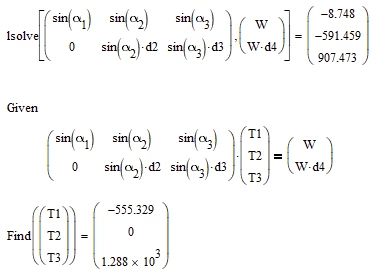
For a further set of solution you may also use the "lsolve" function. I would have expected that a solve block with the equations given in matrix form return the same results (with algorithm linear) as lsolve, but, alas, it doesn't:
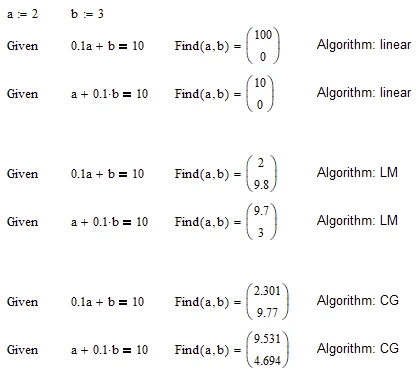
Here are two simple examples of one equation in two variables and the solutions given with the various algorithms. As you can see using Levenberg-Marquardt apparently the nature of the equation determines which variable is frozen.