1-Visitor
April 7, 2022
Solved

Beam Deflection Plot Question: Macaulay deflection equation has trouble solved by odesolver.

  • April 7, 2022
  • 3 replies
  • 6752 views

Hello MathCAD People,


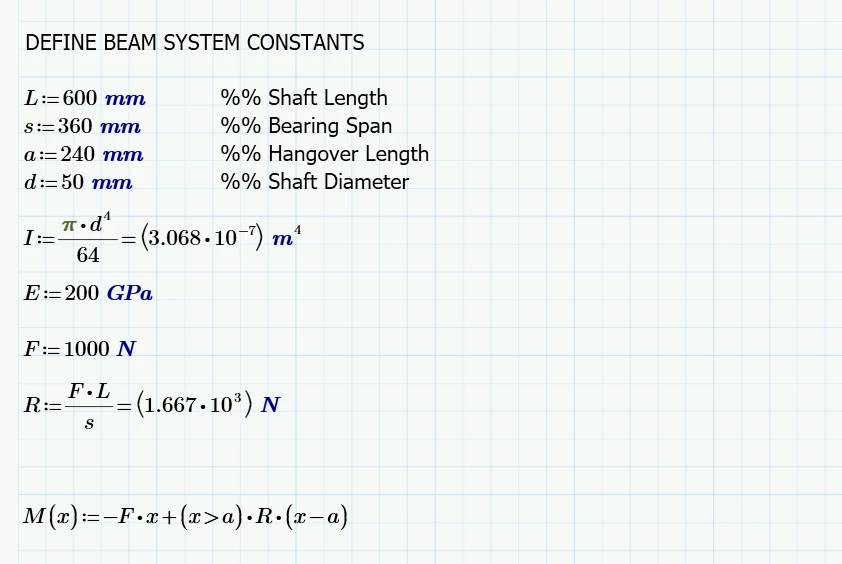
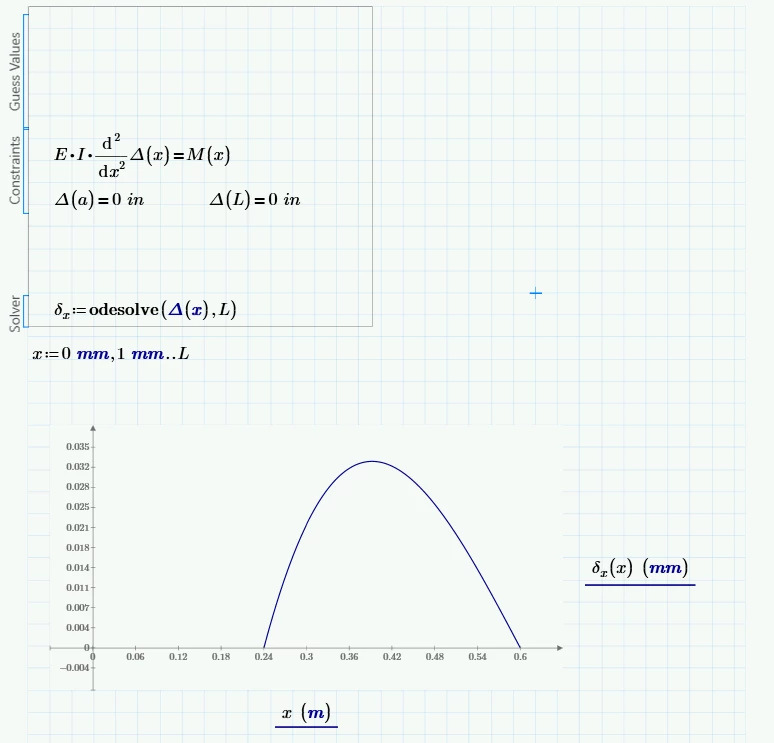
I am working on a shaft redesign project, and I start out with trying to plot the deflection of a more simplified model. I write the momentum function in Macaulay’s method and think plotting a deflection curve using odesolve should be a fast way to figure out where the max deflection happens by solving the differential equation and the boundary conditions. However, the plot just ended up with part of the deflection curve and say the ode function has limited range. Can you guys help resolve the error and get Mathcad plot the full cure?

I really appreciate if you can guide me through this problem, as I really need a math model to validate my simulation results.


Thank you in advance.
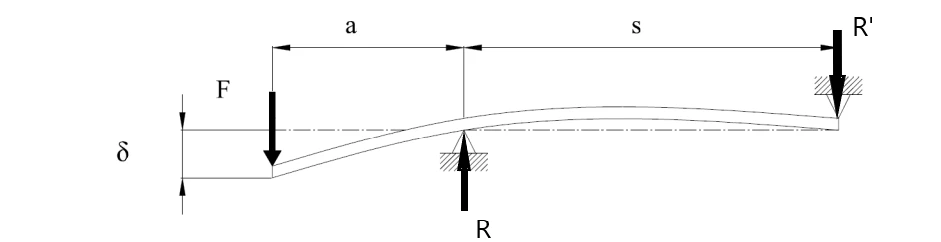
 

shaft diagram.png

1.png2.png

Best answer by Werner_E

OdeSolve will always use the lowest value in the initial conditions as its starting value and in case of your solve block this is "a".
To get what you are looking for in one go you would have to provide the value for delta.x(0) as initial condition.
You may look up the functions "bvalfit" and especially "sbval" in the help to see if the can be of any help to determine that IC - I lack the experience here as I never have used these functions so far.
https://support.ptc.com/help/mathcad/r6.0/en/index.html#page/PTC_Mathcad_Help%2Fderiving_initial_conditions_for_an_ode.html%23

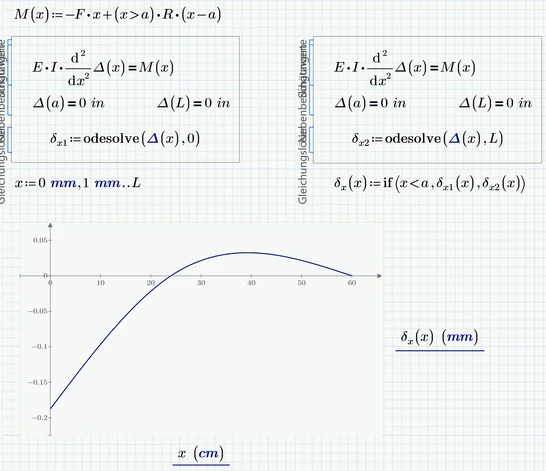
But Prime allows us to solve from its starting value upwards or downwards. So we can create two separate solve blocks and combine the two functions found.

Werner_E_0-1649386974075.png

Werner_E_1-1649387014729.png

Prime 6 worksheet attached


3 replies

23-Emerald IV
April 7, 2022

In your call of the odesolve() function, you have Delta and its parameter x labelled as 'units'. I guess they should be 'variables'.

Other than that, some of your variables are labelled 'automatic', some are labelled 'variable'.

I've set all variables to 'variable' but that didn't remove the error message.

Since it's a Prime 6 file, I hope someone smarter than me, can find what (else) is wrong.


Since your differential equation is relatively simple (a second derivative of a function Delta equals a known expression), here's what I did:

LucMeekes_1-1649368650768.png

(Note that some of the expressions continue past the line ).

LucMeekes_2-1649368796420.png

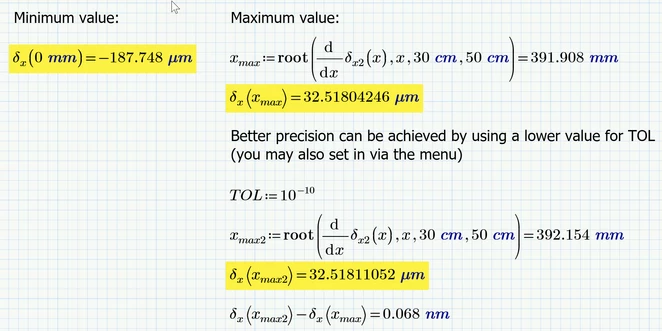
The maximum deflection is 0.033 mm, the minimum is -0.188 mm.


Success!
Luc


1-Visitor
April 8, 2022

Thank you LucMeekes. I am a newbie to mathcad. Do you mind to tell me what is Φ for? I don't understand its mathematical meaning.


Thanks,


Mito

25-Diamond I
April 9, 2022

@MA_10251892 wrote:

Thank you LucMeekes. I am a newbie to mathcad. Do you mind to tell me what is Φ for? I don't understand its mathematical meaning.


Thanks,


Mito


Phi is the Heaviside step function. It returns 1 for positive arguments and 0 for negative ones. And the implementation in Prime returns 0.5 for the zero argument.

https://support.ptc.com/help/mathcad/r6.0/en/index.html#page/PTC_Mathcad_Help%2Fkronecker_delta_and_heaviside_step_functions.html

On contrary to an approach with an "if" or a boolean expression as you had chosen, using the heaviside function makes symbolic operations like taking the derivative easier possible.

Werner_E25-Diamond IAnswer
25-Diamond I
April 8, 2022

OdeSolve will always use the lowest value in the initial conditions as its starting value and in case of your solve block this is "a".
To get what you are looking for in one go you would have to provide the value for delta.x(0) as initial condition.
You may look up the functions "bvalfit" and especially "sbval" in the help to see if the can be of any help to determine that IC - I lack the experience here as I never have used these functions so far.
https://support.ptc.com/help/mathcad/r6.0/en/index.html#page/PTC_Mathcad_Help%2Fderiving_initial_conditions_for_an_ode.html%23

But Prime allows us to solve from its starting value upwards or downwards. So we can create two separate solve blocks and combine the two functions found.

Werner_E_0-1649386974075.png

Werner_E_1-1649387014729.png

Prime 6 worksheet attached


1-Visitor
April 9, 2022

Thank you so much for your detailed explanation. I really appreciate your efforts for helping me solve the shaft deflection problem. 😀

23-Emerald I
April 13, 2022

I realize this has been answered, but I set out to solve this the "old fashioned way" without a solve block (using Prime Express), and the result is attached.  It can be done!  

1-Visitor
August 1, 2022

Thank you Fred.