
23-Emerald I
November 24, 2020
Solved

building a histogram

  • November 24, 2020
  • 2 replies
  • 4567 views
  1. One of the features from Mathcad 15 that I miss (occasionally) is the ability to display a histogram of a vector of data--the ability to display the general shape of a distributed variable is valuable.


Prime (at least Express, where I'm stuck) doesn't have that feature.  Being bored to tears with the pandemic, I set out this morning the be able to take a vector of data (of random length) and develop a histogram of that data.  (A histogram, for those not familiar, divides a range of values into a set of discrete "bins" and returns the count of values in each bin.)


I was partially successful.  The attached Prime 4.0 file demonstrates the technique.  It also demonstrates several issues that I'm hoping someone smarter than I can help me with.
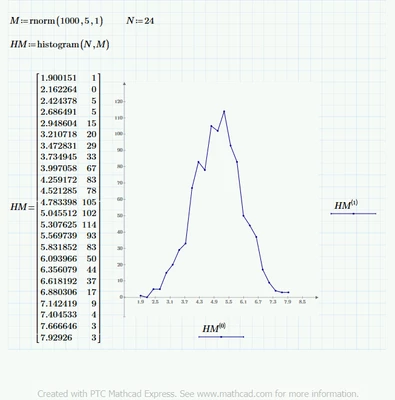
Best answer by LucMeekes

Fred,


The Prime express file with additional functions contains the histogram function. I remember working on that to make it work.

Check https://community.ptc.com/t5/PTC-Mathcad/Prime-Express-A-joke/m-p/604216.

For your example:

LucMeekes_0-1606234979544.png


Success!
Luc

2 replies

25-Diamond I
November 24, 2020

Would this help:

Werner_E_0-1606230254871.png


23-Emerald I
November 24, 2020

That looks like a great fix!


but nn and rows(M) are both simply a count.  If we have a vector of measurements with units, then dn has those units too . . .

Fred_Kohlhepp_0-1606233023064.png

Still works, but how do we justify the units in the graph?

25-Diamond I
November 24, 2020

Its the necessary unit to get an area of (unitless) 1 under the curve.

You get the same unit when you use pnorm with units, too.

Werner_E_0-1606246704873.png


LucMeekes23-Emerald IVAnswer
23-Emerald IV
November 24, 2020

Fred,


The Prime express file with additional functions contains the histogram function. I remember working on that to make it work.

Check https://community.ptc.com/t5/PTC-Mathcad/Prime-Express-A-joke/m-p/604216.

For your example:

LucMeekes_0-1606234979544.png


Success!
Luc

23-Emerald I
November 24, 2020

Luc,


WOW!!


I had forgotten your magnum opus.


One small addendum:  there are expressions to assist in defining how many bins you should have, seem to help.

23-Emerald IV
November 24, 2020

Hi Fred,


You're right, but choosing the optimum number of bins is outside of the scope of the histogram function. I tried to mimic the functionality of the Premium function.

And I see now there's work to be done. Prime's built in histogram function accepts units (according to the help). Mine doesn't ☹️ unless the first argument is an array with the intervals specified, and also has a unit attached (the same unit as the second argument).


Regards,

Luc