

Solved

Werner_EAnswer
25-Diamond I
August 4, 2023
Ranges and vectors are quite different beasts bust unfortunately look the same when displayed in Prime.
Furthermore you forgot the unit (meter) when you defined A.
There is an undocumented trick to turn a range into a vector by simply immediately evaluating it in the same region where you define it:
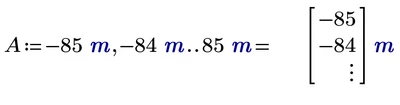
Now A is not a range anymore but a true vector.
A more "legal" way to define the very same vector is using a range i which is needed to index the elements of the vector.

Note that the index used is a vector/matrix index, not a literal index.
Once you defined the vector A either way, the definition of the vector B works as expected and also the calculation of the vectors X1 and Y1 (feel free to use better names):
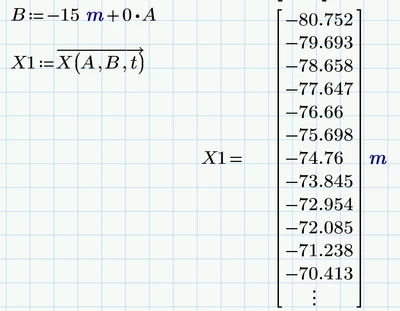
Some additional remarks:
.) The time yo used for t is larger than the period T 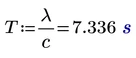 . This does no harm as of the periodicity of sine and cosine. Just thought I'd mention it
.) If you defined vector A using the index range i, you can define the vector B by typing
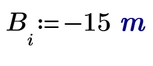 again you have to use the vector index.
.) Vectorization is not actually needed as Prime would apply implicit vectorization automatically if you don't vectorize. But this depends upon how the function X ( ) is defined and so you are on the safe side if you vectorite and its generally good habit to do so when you feed a vector into functions which normally expect scalar arguments.
.) If you are just after a single wave (which you now should already see if you plot Y1 over X1) you don't even need the vector B at all.
You could simply write

and get the very same result vector X1.
The idea for the vector B stems from my first idea about how to plot multiple waves (for different depth values b) as one plot. But also this could be achieve without using these vectors. So what this means is - vector B is not needed at all 😉
.) Without using small programs you may now calculate vectors X2 and Y2 and the only difference would be that you now use a different b-value, lets say b=-10m. Vector A (horizontal values) remains the same for all waves.
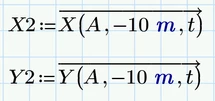
Now you may add a second plot Y2 over X2 showing a second wave and you may format it differently (color, dot size, line style...) from the first.
If you create five or six waves and want to plot them without individually typing in each X.., Y.. you may consider stacking all individual vectors and just use the stacked vectors XX and YY for the plot. You will see the same waves, but they form now one single trace and so you can't format them differently. This was done with the blue waves in the picture posted above.


As you can see I am separating the individual waves by NaN's. This is done to avoid Prime to connect the last point of a wave with the first point of the next one if you decide to show lines along with the points (or just lines). In Prime unfortunately its necessary to provide a unit even though its NaN.
So good luck, I guess you should now succeed in plotting some waves.