Here are my two cents.
I assumed that at the end you just want to have two vectors for the A and K values.
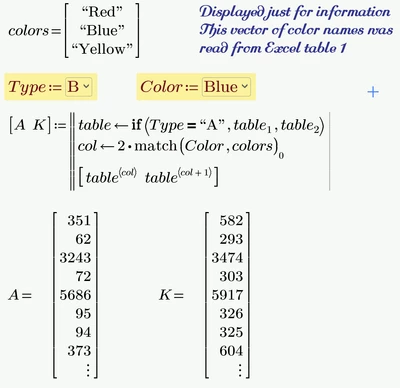
@terryhendicott , @ttokoro What do you mean when you write that he should use the ^ (AND) operator in his programs? The programs are rather lengthy and elaborated but as far as I can see they already use the ^ operator and work correct (apart from the fact that the first data row is missing, as Terry already noted).
EDIT: Ah, got it! in on of the four programs (K.column.A) the boolean equal (=) was used erroneously instead of the logical AND (^).
One word about combo boxes: The very first column specifies the text the user sees when he is using the combo box. The other column(s) are the data columns containing the data returned by the combo box. Your data column was empty, so whatever you had cosen - the result was an empty string "". Yes, this concept sure is not intuitive 😉
If the very first column is left empty, the first data column is used for display. This is what I used to do and so avoided having to type in each color names twice 😉
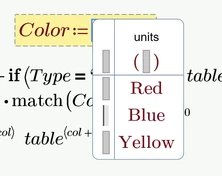
Unfortunately the combo boxes are only very basic in functionality and so its not possible to directly use the vector "colors" (with the color names extracted from the Excel table) for the labels in the combo box in an easy way. But at least you can copy and paste the whole vector in one go.
Prime 9 file attached


