1-Visitor
May 13, 2015
Solved

Creating a "for loop" using references to another worksheet

  • May 13, 2015
  • 4 replies
  • 7560 views

Hi everyone,

I would like to know if there's a way to use a reference within a for loop in Mathcad 15. The subject has already been discussed here but the proposed solution wasn't really working well and gets too complicated with a bigger worksheet. Nevertheless, the principle is there.

To schematize, i'm trying to create a worksheet like this :

for i from 1 to n

* define variables used in reference calculation

* call reference

* get results(i) from reference

next i

show results

I hope this is technically possible, so please let me know if you know an advanced version of the pre-cited method.


Regards,


Antoine
Best answer by StuartBruff

Antoine Aula wrote:

Hi everyone,

I would like to know if there's a way to use a reference within a for loop in Mathcad 15. The subject has already been discussed here but the proposed solution wasn't really working well and gets too complicated with a bigger worksheet. Nevertheless, the principle is there.

To schematize, i'm trying to create a worksheet like this :

for i from 1 to n

* define variables used in reference calculation

* call reference

* get results(i) from reference

next i

show results

I hope this is technically possible, so please let me know if you know an advanced version of the pre-cited method.

In short, "No".

As you've probably found out from the previous threads, there isn't a built-in way to reliably loop over a general "reference" worksheet. All of the workarounds involve playing around with components to gain access to the automation interface.

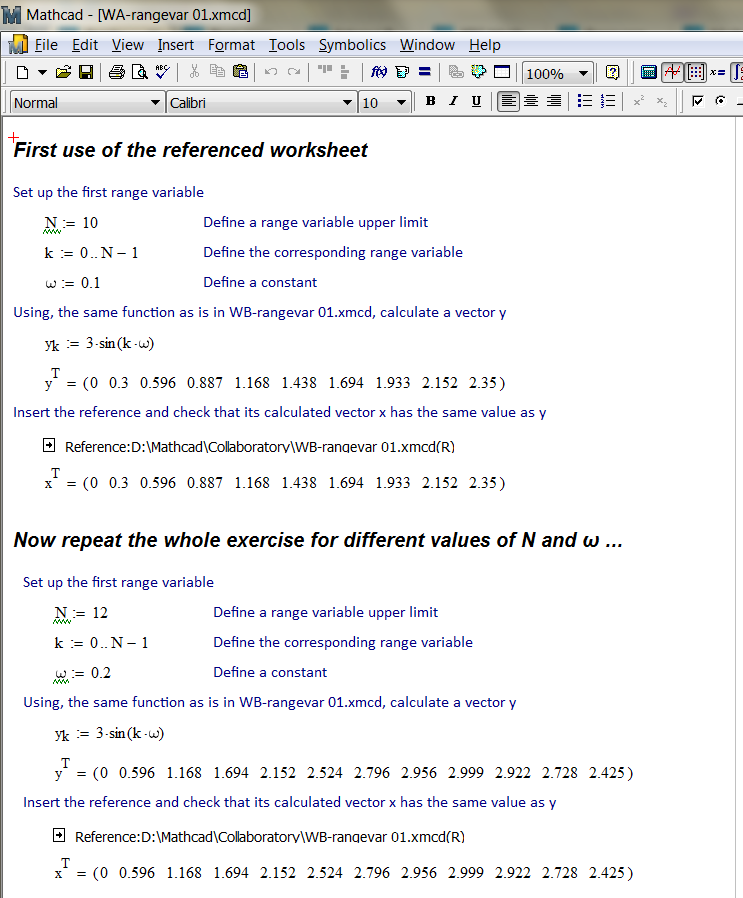
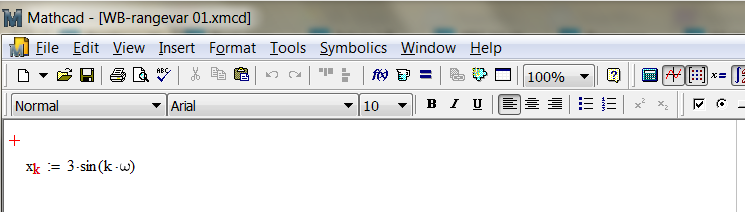
One possibility is to rewrite your referenced worksheet in terms of range variables and define the range variables (plus any other application-dependent variables) in the calling worksheet, as per the simple example below.

Referenced Worksheet:

Calling Worksheet:

But this is rather messy and doesn't make full use of the power of Mathcad.

Needless to say (but I'll say it anyway) there is a Very Long Standing Feature Request to have this kind of capability built-in to Mathcad.

Stuart

4 replies

23-Emerald V
May 14, 2015

Antoine Aula wrote:

Hi everyone,

I would like to know if there's a way to use a reference within a for loop in Mathcad 15. The subject has already been discussed here but the proposed solution wasn't really working well and gets too complicated with a bigger worksheet. Nevertheless, the principle is there.

To schematize, i'm trying to create a worksheet like this :

for i from 1 to n

* define variables used in reference calculation

* call reference

* get results(i) from reference

next i

show results

I hope this is technically possible, so please let me know if you know an advanced version of the pre-cited method.

In short, "No".

As you've probably found out from the previous threads, there isn't a built-in way to reliably loop over a general "reference" worksheet. All of the workarounds involve playing around with components to gain access to the automation interface.

One possibility is to rewrite your referenced worksheet in terms of range variables and define the range variables (plus any other application-dependent variables) in the calling worksheet, as per the simple example below.

Referenced Worksheet:

Calling Worksheet:

But this is rather messy and doesn't make full use of the power of Mathcad.

Needless to say (but I'll say it anyway) there is a Very Long Standing Feature Request to have this kind of capability built-in to Mathcad.

Stuart

12-Amethyst
May 14, 2015

You don't show the type of calculation that you want to achieve in the reference, BUT as long as it can be written as a function (or a number of functions) that can be called ; it may be possible.

The attached (re-worked sheets) is a trivial example, but it could be extended to cover most of the functionality of Mathcad.

Even solve blocks can be written as functions in parameterised form and could be called this way.

23-Emerald V
May 14, 2015

A Westerman wrote:

You don't show the type of calculation that you want to achieve in the reference, BUT as long as it can be written as a function (or a number of functions) that can be called ; it may be possible.

Aye, there's the rub! For in that referenced worksheet what calculations might be must give us pause. There's the respect that makes calamity of using references.

Many user make good use of range variables and 'top-level' expressions that Mathcad allows to be properly documented by Text Regions. A program is much harder to document in a manner that looks satisfactory.

It's rather a nusiance to have to rewrite such worksheets to get round Mathcad's lack of ability to either loop over a set of regions or to treat a worksheet as a standard component object (eg, Excel) and exchange data with it. A rewrite involves time (money) to do the conversion, validate it, review it and perform all the other myriad tasks that a half-way decent engineering process demands. It would be *so* much easier to not have to do it.

Stuart

19-Tanzanite
May 14, 2015

The good news is that I had members of the PTC development team agree with me that adding the capability for regions to have inputs and outputs, and for them to be able to act as functions, would be a very useful addition to Mathcad. I don't know if this ever actually made it onto a to-do list though, or how many decades we will have to wait to see it even if it did.

1-Visitor
May 26, 2015

Depending on what you want to do with the output, you could consider creating your for loop in an Excel macro that inputs values into your Mathcad sheet and places the results in the Excel worksheet.  Someone with more experience might even be able to embed the Excel file into a Mathcad sheet so that you can then use the results in Mathcad instead of Excel.

1-Visitor
November 18, 2015

The take away from this thread seems to be, have your functions in individual worksheets and when you want to use them copy and paste the code to your worksheet you want to use them in. Very brutish. Wouldn't it be better if there was a user editable path variable containing all the absolute path directories where custom functions are stored and then you could call your functions from any worksheet? For instance,

rainflow_matrix:= rainflow (vector, bins)

Then MathCAD would search the directories specified by path and when it found the rainflow.m file it would run the subroutine and return the output to the variable rainflow_matrix.

19-Tanzanite
November 18, 2015

That might save you having to copy and paste, but it would have it's own downsides. Mainly, your worksheet would no longer be very portable, because you would have to also move every worksheet that contains a custom function. This is the reason I stopped referencing one worksheet from another years ago.

1-Visitor
November 18, 2015

You missed my subtle diatribe. If this were Matlab we wouldn't be having this conversation.