
10-Marble
October 23, 2025
Solved

Define large number of variables from Excel

  • October 23, 2025
  • 4 replies
  • 1176 views

Hello,
I need to define a large number of variables, as listed in the attached Excel file.
The file includes the variable names, units, and values.
Currently, I’m defining each variable and its unit manually, which takes a lot of time.
Is there a way to make this process faster—perhaps by using loop processing in a program or some other method?


attached file is made by Mathcad10 
Best answer by Werner_E

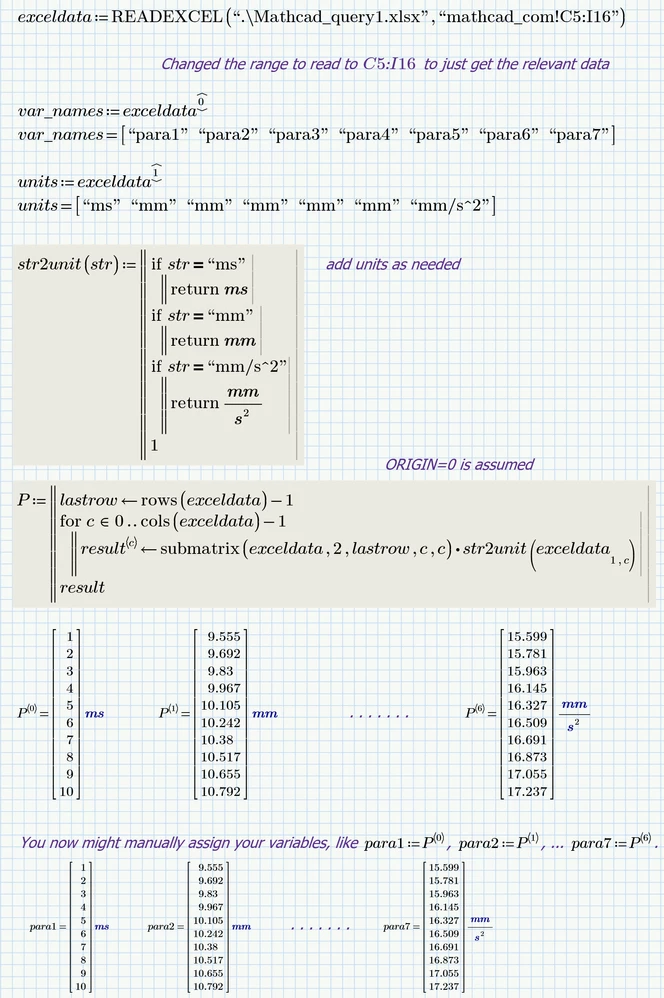
Not sure if the attached sheet will be of much help. The method used might be a little bit faster than yours. Its still necessary to manually type all variable names as i see no way to automatically create variable names bases on the strings read from Excel. Of course it may be possible to write an external program in a language of your choice which unpacks the zipped mcdx file, edits the xml file included to create the variables based an the names in Excel and then resaves and zips it again ... Guess that's not what you asked for 😉

According the "str2unit" function you may be interested in Stuart's work in this thread -> Solved: Re: Not getting the results...

Werner_E_1-1761224705748.png


Prime 10 file attached


4 replies

ttokoro
21-Topaz I
21-Topaz I
October 23, 2025

Almost same as your sheet. EXCEL's large value by **E** text can use.

image.pngimage.pngimage.pngimage.png

t.t.
10-Marble
October 24, 2025

I'm really glad that it's possible to add units via code—thank you!

In fact, I need to define over 50 parameters to analyze test data, although the example I shared only included 7.
I hope the Mathcad team to add a feature that could make this process easier.

21-Topaz II
October 23, 2025

Hi,

First in Excel format paint from clear cell to selection encompassing all the values (not headers and units).  This is necessary as the copy/paste I am considering will input the numbers as text.  A formatting is in Excel not Mathcad.


Now simply select all the numbers without headers and units.  Now copy this data to the clipboard you can right click after selecting and copy is in the menu that appears.

Go to Mathcad and in a clear area simply paste.  I use [ctrl][V] keys together for the paste.

The result will be an input table where each column is a separate variable. 

Variable names and units at the top of each column need to be filled out by hand.  This is faster than the method in your sheets.

Capture.JPG

Cheers Terry

23-Emerald V
October 23, 2025

Additionally, to simplify things in use, create a blank worksheet in the Excel workbook that references only the numbers from the main worksheet.  Then select everything and copypaste into Mathcad.


Stuart

21-Topaz II
October 23, 2025

You can select a large area of contiguous data in Excel by simply selecting top left cell of data, Then [Shift][Ctrl][Arrow Left] together then [Shift][Ctrl][Arrow Down] together will select it all.  No need to create extra worksheets?

Cheers

Terry

Werner_E25-Diamond IAnswer
25-Diamond I
October 23, 2025

Not sure if the attached sheet will be of much help. The method used might be a little bit faster than yours. Its still necessary to manually type all variable names as i see no way to automatically create variable names bases on the strings read from Excel. Of course it may be possible to write an external program in a language of your choice which unpacks the zipped mcdx file, edits the xml file included to create the variables based an the names in Excel and then resaves and zips it again ... Guess that's not what you asked for 😉

According the "str2unit" function you may be interested in Stuart's work in this thread -> Solved: Re: Not getting the results...

Werner_E_1-1761224705748.png


Prime 10 file attached


10-Marble
October 24, 2025

Thank you so much for you help!
The str2unit function looks really useful.
manually creating variables is such a tiring task...

25-Diamond I
October 24, 2025

@SK_13639906 wrote:

Thank you so much for you help!
The str2unit function looks really useful.
manually creating variables is such a tiring task...


Sure, a function "str2name" as suggested by Stuart would be desirable, but in the short and medium term, I would not expect this wish to come true.

Therefore, for the time being, it will probably be unavoidable to type in all variable names manually - unless you want to work with the identifier P<#> for the data columns instead of para# (but I assume that you have more meaningful names in mind than ‘para 1’ etc).

But you can perhaps make the work a little easier for yourself. I already have the names as strings in the variable “var_name”. You can now display this as a column vector, which makes it easier to type in a new column vector with the desired identical variable names.

You may even just copy this column vector of  strings and manually delete all the double quotation marks to create the vector of names. This can be especially helpful when dealing with longer and more complicated variable names, as it helps to avoid typing errors.

After creating that vector of names its easy to assign the correct data columns to all variables in one go:

Werner_E_0-1761286034994.png

Prime 10 sheet attached


23-Emerald V
October 23, 2025

The need to convert a string into a Mathcad variable name is one that has cropped up several times in the Mathcad Community and its predecessor, the Mathcad Collaboratory.


If you or your organisation are a support user, you could formally raise a feature request to ask for its addition. 


For example, a function str2name(str) that converts a string to a Mathcad name.   It could, say, be used standalone, with just an evaluation (=) creating the name, or it could be used directly on the left-hand side of a definition (eg, str2name("var1")≔25 would create a variable named var1 with value 25 or str2name("mulxy")(x,y)⩴x×y would create a function named mulxy that cross-multiplies its arguments, x and y.  I'd expect a function such as str2name to vectorize across its argument, which would help in your and similar cases.


The more voices contributing to the request, the merrier!


Stuart

10-Marble
October 24, 2025

Yes. I actually asked PTC support members for any solution. But their answer was "no solution".
I will keep requesting to add feature helping us in this case,