8-Gravel
January 29, 2024
Solved

Defining variables for solve

  • January 29, 2024
  • 3 replies
  • 1778 views

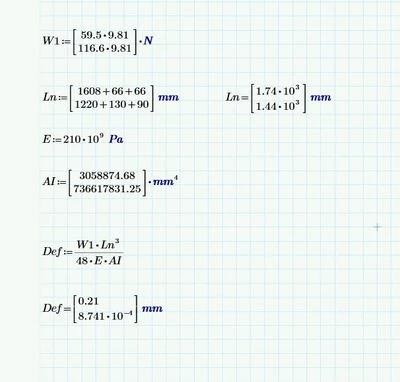
I have defined the more than one values for a variable.

The answer 0.21 mm is wrong (0.1mm is correct value).

Kindly figure out why the answer is wrong.


Regards,

GSVP
Mathcad.JPG

Best answer by terryhendicott

Hi,

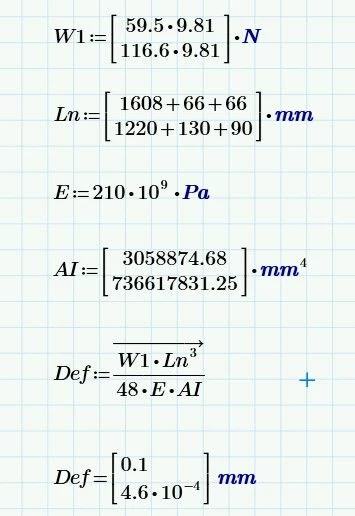
You need to do element by element arithmetic not matrix arithmetic.

Math | Operation and Symbols | Operators |  in the lower right hand corner a V with an arrow over it.

select the whole equation right hand side and apply the operator.

Capture.JPG

3 replies

21-Topaz II
January 29, 2024

Hi,

You need to do element by element arithmetic not matrix arithmetic.

Math | Operation and Symbols | Operators |  in the lower right hand corner a V with an arrow over it.

select the whole equation right hand side and apply the operator.

Capture.JPG

8-Gravel
January 30, 2024

HI,

Sry to bother can you save it Prime8 version


Thanks

GSVP

21-Topaz II
January 30, 2024

Prime5 that can be read by Prime8

14-Alexandrite
January 29, 2024

I would like to point out that there is an easier and better way to define W1.  Rather than manually enter 9.81 for the gravitational acceleration, Mathcad includes g as a constant.  So, I suggest you do this:

MCP.png

This way, your mass data is entered as data (rather than just a number) and you let Mathcad handle the math and units.

8-Gravel
January 30, 2024

Thank you fred for the Tip

I will use in future


25-Diamond I
January 29, 2024

Terry already said that 'vectorization' does the magic here.


Its often a good idea to turn the calculations into functions which expect single scalars as arguments and after defining the input vectors call this function vectorized:

Werner_E_0-1706557863407.png


I wouldn't necessarily vote for it now, but you can also execute the vectorization in the function and then don't have to think about vectorization when calling it:

Werner_E_1-1706557977492.png