1-Visitor
April 21, 2014
Solved

Display Calculation Time, How?

  • April 21, 2014
  • 2 replies
  • 5846 views

Hello,

I am supposed to get cpu execution times for several different matrix manipulations, but I am unsure how to do it. For instance, I need to invert a 10x10 matrix, and then invert a 100x100 matrix, and show the cpu calc times for each. Is there somebody that knows how to do this? i've attached my worksheet.

Thanks!!!

Best answer by Werner_E

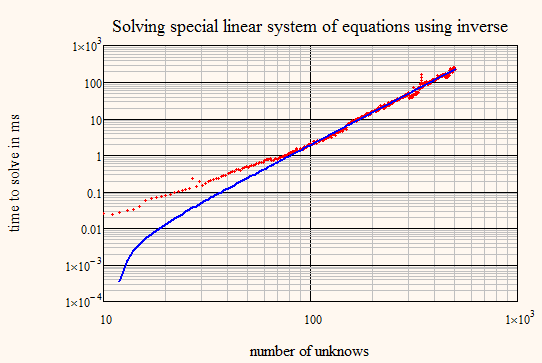
If we construct a function (calculation time to solve system vs. number of unknown) we see, if we plot in in a log-log scale that it looks approx. like a straight line. Timing in Mathcad isn't that accurate and we don't know how to compensate for time to function call and looping.

22.04.png

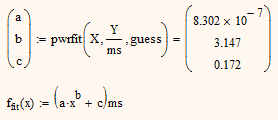
So it seems to be a good idea to try a powerfit

22.04.png

which show that the time is approx proportional to x^3.15 which may be x^3 for more precise timing!?

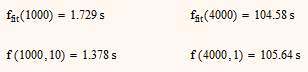
Also extrapolations using the powerfunction are quite good

22.04.png

Unfortuately Mathcad won't be able to deal with much larger matrices than 4000x4000 but the tendency is well seen anyway.

2 replies

25-Diamond I
April 22, 2014

As long as you ar enot using Prime there is a way to do it.

time(0) (any integer agrument will do) returns a time in second with a precision of ms. Call it before execution of th efunction you wish to time and then after and view the difference. Best done if all is put in a program so you can be sure the time() command will really be evaluated.

For calculations which take not much time to exectute you may use a loop to execute them repeatedly a couple of times.

22.04.png

14-Alexandrite
April 22, 2014

Werner…

Prime 3.0 (at least) has the time() function, so I was able to duplicate your program. However, rather than play around with matrix inversions, I substituted other operations for dummy. The fastest operation I found so far was dummy <— 0, which gave me two results: 0.000000000000000 ns and 9.999275207529530 ns. Of course, this level of precision is absurd, so let's just say 0 ns (7 out of 10 times) and 10 ns (3 out of ten times). dummy <— log(n) produced a variety of results ranging between about 130 ns and 210 ns.

BTW, I'm using a 2.5 GHz quad-core Dell Latitude E5520 (Core i5 processor)

All this proves your point below that timing in Mathcad isn't that accurate.

Fred

25-Diamond I
April 22, 2014

Oops! Don't know why I thought time() would not be available in Prime. I should have known better as I now remember vagely an older thread where I implemented some timing routines for someone dealing with rather huge matrices in Prime (probably 2.0 at that time) and it showed that Prime was quite slower in execution than MC15 - at least without multithreading. It was also shown that built-in commands like stack and augment are much(!) slower than self written routines using loops (this applies to both Prime and real Mathcad).

And yes, timing in Mathcad isn't quite accurate but at least it can show a tendency.

I am not sure if we get a better accuracy by placing the loop differently. Anyway, the first try was a bit surprising:

22.04.png

What we see here seems to be that the overhead caused by the loop counter incrementing (in timer1()) is much smaller than the overhead caused by the call to time() and the subsequent assignment to tsum (in timer2()).

Werner_E25-Diamond IAnswer
25-Diamond I
April 22, 2014

If we construct a function (calculation time to solve system vs. number of unknown) we see, if we plot in in a log-log scale that it looks approx. like a straight line. Timing in Mathcad isn't that accurate and we don't know how to compensate for time to function call and looping.

22.04.png

So it seems to be a good idea to try a powerfit

22.04.png

which show that the time is approx proportional to x^3.15 which may be x^3 for more precise timing!?

Also extrapolations using the powerfunction are quite good

22.04.png

Unfortuately Mathcad won't be able to deal with much larger matrices than 4000x4000 but the tendency is well seen anyway.

1-Visitor
April 30, 2014

I ended up having to do my entire homework problem in Matlab. I don't particularly like Matlab, but for a problem like this it was so much easier. I don't know why mathcad has to make certain things so difficult.