1-Visitor
July 20, 2021
Solved

Error in MathCAD

  • July 20, 2021
  • 2 replies
  • 5406 views

Hi,


First post here. i am trying to compute the following equation but unsure of what the error message is meaning and how to rectify. I have included the equation from the Eurocode in the screen shot.


Any help is much appreciated. 

Best answer by Werner_E

@KS_9993416 wrote:

Morning Werner,


The expected units for V would be newtons (N) or kilonewtons (kN).


Thanks,

Kyle 


Thats obviously not the result you get when using your formula with units. So its an empirical formula which means that you'll have to use it with the numbers but without any units anyway. This is done in MC by dividing each variable by the unit which the empirical formula demands (as can be seen with the two variables I divided by mm).  You may add the desired unit N at the end of the expression.

Maybe that way:
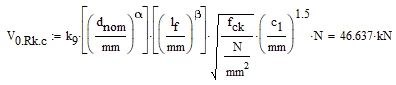
Werner_E_0-1626871562477.png


2 replies

23-Emerald V
July 20, 2021

Hi,


I suspect that you have fallen foul of what is known as "Static Type Checking" in Mathcad versions 12 to 15.    Mathcad's static type checking looks for potential unit errors at "compile" time not "run" time.   The idea is to catch unit errors before an expression is evaluated (which may take a long time).   In this case, Mathcad sees a variable as an exponent.   Exponents must be a unitless value, and Mathcad can't exclude the possibility that someone may change the variable to have units.   So, .... Mathcad's static type checker calls foul and won't let the calculation proceed.    The simplest solution is to remove the units from lf purely for the exponentiation and put them back again elsewhere in the expression.


As a matter of Community courtesy, it's good form to post the actual worksheet, or some part of that allows somebody else to see the problem.   It's time-consuming for others to retype an image into Mathcad, especially if they have to guess at missing functions or variable values.  It can also be difficult to spot an error in an image, as there are potential errors that aren't easily distinguishable from a screenshot (for example, putting a subscript after a variable name rather than a matrix index - a very common error).


Cheers,


Stuart

1-Visitor
July 20, 2021

Thanks for your swift and concise reply Stuart. When copied elsewhere, the dnom also flags up as an error so I think the work around is as you have suggested. 


I have attached a section of the file for clarity.

23-Emerald V
July 20, 2021

No worries.


Given you know the units, it's fairly simple just divide lf by mm and then multiply lf^β by mm.  More generally, you could use the, I think, SIUnitsOf function to get the correct units where some uncertainty exists about whether the vale was input in metres, mm or cm.


Cheers,


Suart

1-Visitor
July 21, 2021

Thank you Stuart and Werner..... Lifesavers. 


Kyle

