4-Participant
January 8, 2024
Solved

Evaluation of a list of numbers

  • January 8, 2024
  • 2 replies
  • 1866 views

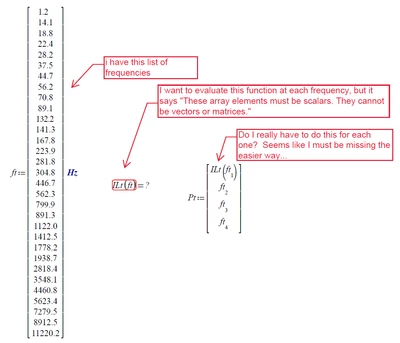
I'm hoping I'm missing a simple way of doing this...

cgenger_0-1704735522944.png

(MathCAD Prime 7.0.0.0)


Thanks

Best answer by Werner_E

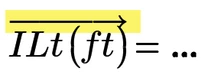
If your function ILt( ) is written in way to work OK with single, scalar arguments (of dimension 1/time) and you want to call that function with a vector of values as its argument and expect it to feed those values one by one into the function, evaluate it and collect the results in a vector, then you have to use vectorization because that's exactly what vectorization is made for!
Depending on how your function ILt( ) is defined it may not be necessary to manually apply vectorization as Prime might automatically implicitly applies it, but I always suggest to manually apply vectorization in such cases.
After all, if the function was written to work with a single scalar argument, there is no reason whatsoever that it should also work with a vector as its argument instead! So its perfectly OK and natural that you have to tell Prime what you expect it to do with the vector argument.
Werner_E_1-1704740862471.png


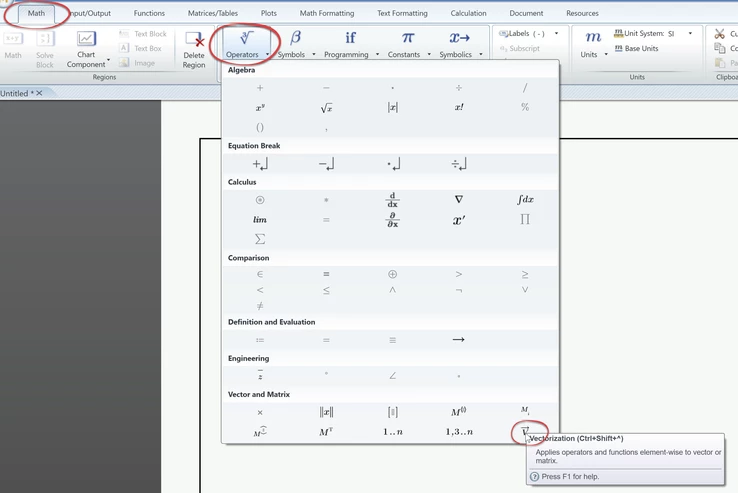
Use the appropriate keyboard shortcut or the menu to apply vectorization:
Werner_E_1-1704739930554.png

BTW, the keyboard short you see in the tooltip help might be wrong, depending on the keyboard you are using. On my German keyboard its Ctrl-Shift-6 (or Ctrl-Shift-&) and not Ctrl-Shift-^ as the help claims it to be.



2 replies

24-Ruby III
January 8, 2024

Hi,

please upload your mcdx file. In your picture the definition of ILt() function is not shown.

Dumb example:

MartinHanak_0-1704736204490.png


cgenger4-ParticipantAuthor
4-Participant
January 8, 2024

Hi Martin,

Sorry, can't upload it, too much proprietary info 🙄.

I guess I thought there would be a simple answer, like "don't define ft like that, do it this way."

There are other matrices in my ILt calc so i figure it's trying to apply this differently that I wanted.

when i use a number range it works fine (i.e. ft:= 1Hz,2Hz..12000Hz)

Thanks

24-Ruby III
January 8, 2024

@cgenger wrote:

Hi Martin,

Sorry, can't upload it, too much proprietary info 🙄.

I guess I thought there would be a simple answer, like "don't define ft like that, do it this way."

There are other matrices in my ILt calc so i figure it's trying to apply this differently that I wanted.

when i use a number range it works fine (i.e. ft:= 1Hz,2Hz..12000Hz)

Thanks


Hi,

I am almost sure you can create test mcdx file containing similar computation and upload it. Do not hesitate to do this if you need to receive a help.

Werner_E25-Diamond IAnswer
25-Diamond I
January 8, 2024

If your function ILt( ) is written in way to work OK with single, scalar arguments (of dimension 1/time) and you want to call that function with a vector of values as its argument and expect it to feed those values one by one into the function, evaluate it and collect the results in a vector, then you have to use vectorization because that's exactly what vectorization is made for!
Depending on how your function ILt( ) is defined it may not be necessary to manually apply vectorization as Prime might automatically implicitly applies it, but I always suggest to manually apply vectorization in such cases.
After all, if the function was written to work with a single scalar argument, there is no reason whatsoever that it should also work with a vector as its argument instead! So its perfectly OK and natural that you have to tell Prime what you expect it to do with the vector argument.

Werner_E_1-1704740862471.png


Use the appropriate keyboard shortcut or the menu to apply vectorization:

Werner_E_1-1704739930554.png

BTW, the keyboard short you see in the tooltip help might be wrong, depending on the keyboard you are using. On my German keyboard its Ctrl-Shift-6 (or Ctrl-Shift-&) and not Ctrl-Shift-^ as the help claims it to be.



cgenger4-ParticipantAuthor
4-Participant
January 8, 2024

Ahhh, perfect.  Yes that did the trick, thanks Werner!  I'll try to remember to manually specify explicitly apply this in the future!
