
14-Alexandrite
March 19, 2024
Solved

Extract Data by 2D Interpolation

  • March 19, 2024
  • 1 reply
  • 8808 views

Hello everyone,


I am encountering difficulties setting up a 2D interpolation in Mathcad. My objective is to determine the parameters A, B, C, and D for two given inputs: ratio "r" and delta "δ."


The dataset is categorized into four groups based on Ratios: 0.25, 0.5, 2, and 4. Each group is associated with a specific set of Deltas and corresponding parameters A through D.


While I have managed to interpolate within a single Ratio group, my challenge arises when attempting to interpolate for a ratio value that falls outside these defined groups, such as 3.5. Attached is my Mathcad Prime 7 worksheet for reference. I appreciate any assistance you can provide.


Note: When the delta input "δ" exceeds the highest Delta value in a given Ratio group, the output should correspond to the highest Delta record's values, as extrapolation beyond this point is not allowed.
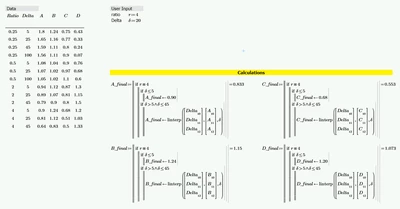
 

Perez_1-1710866008035.png


Best answer by ttokoro

Attach it.

linterp_2D function is made by Werner_E.

1 reply

23-Emerald IV
March 19, 2024

Your dataset is somewhat uneven. You don't have values for Ratio=0.5 and Delta=45, nor for Ratio=2 or 4 and Delta=100.

Is that purposely?


Luc

Perez14-AlexandriteAuthor
14-Alexandrite
March 19, 2024

Hello @LucMeekes , I have updated the record for a Ratio of 0.5 with Delta=45 instead of 100. All other data remains accurate. For a Ratio of 0.25 alone, there are 4 Delta rows, while the other Ratios have 3 Delta rows each.


Additionally, I've attached the updated worksheet in the Prime 9 version with a solution that I managed to implement using a brute force method. It is functioning as expected, despite being a brute force approach.

Perez_0-1710909535932.png


ttokoro
21-Topaz I
21-Topaz I
March 20, 2024

0. Make all Delta=100 data by linterp function.

image.pngimage.pngimage.pngimage.pngimage.pngvx = Ratio and vy = Delta. 

1. Using Bicubic2D function.

image.pngimage.pngimage.png

2. Using Werner_E's linterp_2D function.

image.pngimage.pngimage.pngimage.pngimage.pngimage.png

t.t.