my understanding was that by selecting find function from menu is actual solve block selection that actually was very wrong understanding. Habit taught by older book to type and use shortcuts for everything shifted my eyes away from the bar with solve block button. |
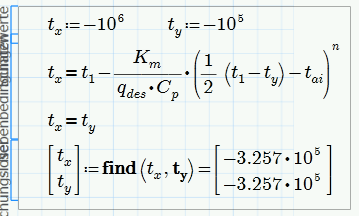
Yes things have changed since mathcad 15 (unfortunately). As find() can't be used outside a solve block, it would be a good idea if Prime would insert a solve block autimatically when find() is inserted outside of a solve block. but thats not implemented that way. You first have to insert that ugly and clumsy block and then add your guesses, constraints and a solve block function like Find, Minerr, Odesolve, etc.
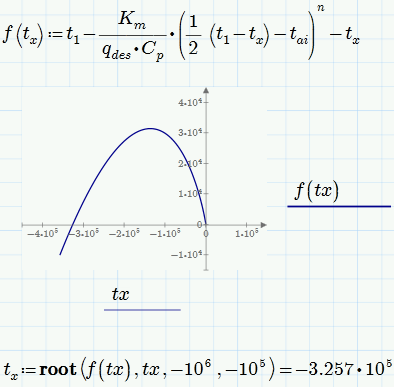
Getting a suitable guess value is sometimes vital. In your case it was obvious that your system of two equations in two variables is in reality just one euqation in one variable. in this case its often a good idea to plot the function to get a visual impression where a solution is to be expected. Your expression gets complex for values of tx greater than 40, so we had to look at the negative range and zoom far out (Prime does not have a zoom option, so its a tedious job changing the plot limits manually.
I haven't used a solve block in my first attempt to get a solution but had used root(). But of course the solve block with your two variables would yield the very same result given you provide suitable guesses.
P.S.: There sure are many good ressource out there dealing with Mathcad 15 (still the much superior version) and below. A lot of things may apply to Prime, too - a lot won't and lead to confusion. So for the first steps it may be a good idea to stíck with the help and other specific Prime ressources.
PTC provides some files here which may be of interest:
http://communities.ptc.com/docs/DOC-3931
http://communities.ptc.com/docs/DOC-3621


