1-Visitor
January 18, 2022
Solved

Generating a hemispherical dome surface plot using a cosine function

  • January 18, 2022
  • 2 replies
  • 6584 views

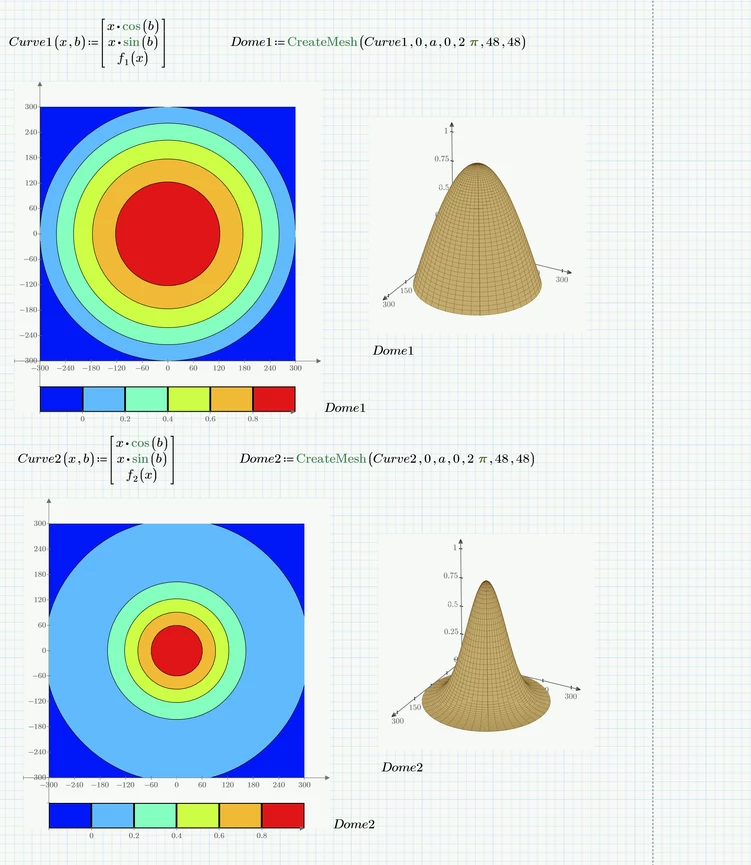
I want to use Mathcad 6.0 to create a color-coded mesh surface plot of a hemispherical dome whose height ranges between 0 and 1.0 as defined by the function cos(πx/2a), 0 ≤ x ≤ a, with a = 300. The surface is “swept out” by taking this curve [plotted along the x axis] and rotating it a full 360 degrees about x= 0.  

Best answer by Werner_E

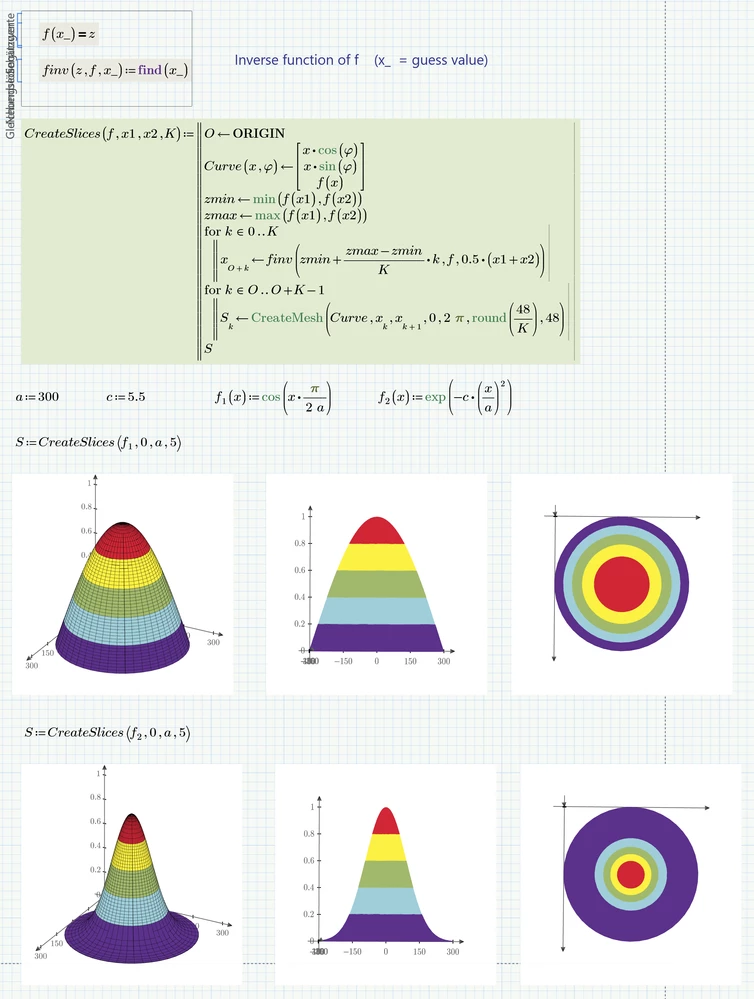
Here is a quick utility function which creates the number of slices demanded and also takes care that they all have equal height.

It will work OK only if the function provided is monotone. Otherwise there might be different regions of x values with the same z-values which would make creating the slices much more difficult. So the function assumes that the min and max values for z are found at either end of the x-range provided.

Werner_E_3-1642769733645.png

Werner_E_2-1642769110756.png


2 replies

23-Emerald V
January 18, 2022

@bobg100x wrote:

I want to use Mathcad 6.0 to create a color-coded mesh surface plot of a hemispherical dome whose height ranges between 0 and 1.0 as defined by the function cos(πx/2a), 0 ≤ x ≤ a, with a = 300. The surface is “swept out” by taking this curve [plotted along the x axis] and rotating it a full 360 degrees about x= 0.  


I don't have much experience with Prime 3D plots, but AFAIA, you can't apply a colormap to a 3D surface.  I'm glad to be corrected on this.


However, it is possible to (partially) code a surface by building it up in strips.  Use the CreateMesh function to create the strips and then individually type the name of each strip into the 3DPlot placeholders and set the characteristics you want..  I've got Prime 7, so posting the worksheet won't help you.


2022 01 18 b.png


It would be straightforward in Mathcad 15.


2022 01 18 a.png


Stuart

23-Emerald IV
January 18, 2022

Here's Stuarts file for Prime 6


Success!
Luc

bobg100x1-VisitorAuthor
1-Visitor
January 19, 2022
Luc and Stuart,

Yes, I am using Mathcad 6.0 Prime. Because I have had very limited experience using this software, I'm totally flummoxed by the solution provided. For instance, I don't understand how "Curve(a, b)" defined in the worksheet relates to the cosine function I'm working with; also what does "K" denote? Frankly, its quite obvious I bit off much more than I can chew and should not have bothered those in the Mathcad community who responded to my question. My only recourse is to familiarize myself with the CreateMesh feature before continuing this discussion.

Bob

24-Ruby IV
January 18, 2022

The easiest way! Without cone!

spere.png

25-Diamond I
January 18, 2022

@ValeryOchkov wrote:

The easiest way!


Hmm, I guess, when the OP wrote "I want to use Mathcad 6.0" he meant Prime 6 (also named Mathcad Prime 6) and not real Mathcad 6. And I am sure that you know that Prime does not support (out of the box) other coordinate systems than cartesian in its 3D plots.

I don't know but are you sure that old Mathcad 6 (dating back to 1995) provided similar 3D plot capabilities like your Mathcad 15?

23-Emerald V
January 18, 2022

Unless the message has leaked through from an alternate universe where Mathcad Prime 6 has an M15 3DPlot analogue ... I feel a transdimensional experiment is called for.   "Boris!  To the lab, my trusty minion."