
1-Visitor
March 21, 2025
Question

How do I connect a discontinuous piecewise function with vertical lines?

  • March 21, 2025
  • 3 replies
  • 1310 views

I'm trying to plot a couple shear-moment diagrams, and have reactions in the middle of the beam causing the shear diagram below to jump discontinuously. How do I represent those jumps with vertical lines connecting them?
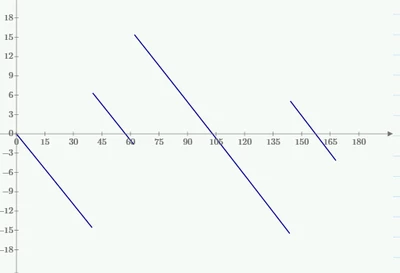
SJ_13091708_1-1742593689165.png


3 replies

23-Emerald IV
March 21, 2025

You mean, instead of this:

LucMeekes_5-1742596043850.png

You want this:

LucMeekes_6-1742596088136.png?

Attach your Prime worksheet (.mcdx) file and state which version of Prime you are using.

That will allow helping you in the best possible way.


Success!
Luc

21-Topaz II
March 22, 2025

Use the "stack" function to get one line

Community Manager
March 28, 2025

Hello @SJ_13091708


It looks like you have some responses from our community champions. If any of these replies helped you solve your question, please mark the appropriate reply as the Accepted Solution. 

Of course, if you have more to share on your issue, please let the Community know so other community members can continue to help you.

Thanks,
Vivek N.
Community Moderation Team.

25-Diamond I
March 22, 2025

How to achieve what you want to see depends on how you defined your function(s) - that's the reason we would have to see your sheet to be able to help.


Its just a guess but I can image that you defined your function using some kind of if...else if ... els if ... else cascade.

In this case you should not use Primes Quickplot feature (= not defining the variable (x) on the abscissa and letting Prime choose appropriate spacing) but rather define a range variable x to be used in the plot.

Here you see the difference:

Werner_E_0-1742613140133.png


BTW, from a mathematical point of view the first plot without the vertical line segments is the correct one!


23-Emerald IV
March 23, 2025

Defining the abcisa range variable is usually necessary, but not enough, to get the vertical lines to display. The two plots I presented in my first response both have the abcisa range variable defined. The first with a step of 0.001, the second with a step of 0.05.


Luc

25-Diamond I
March 23, 2025

@LucMeekes wrote:

Defining the abcisa range variable is usually necessary, but not enough, to get the vertical lines to display. The two plots I presented in my first response both have the abcisa range variable defined. The first with a step of 0.001, the second with a step of 0.05.


Luc


Using a step of 0.001 in a range from 0 to 180 exceeds a silly limit in Prime plots and Prime would only draw thin lines and will not allow to change line width, line style, etc.


But I agree that experimenting with the step width might be necessary.


One limit in Prime's plots is about 5000 points. If this limit is exceeded, Prime will not allow to change the line style and will only allow the dot as symbol.

Another limit is ca. 50000. If its exceeded Prime it will also refuse to change the line width.

These limits apply to the individual traces, not the sum of all points to be plotted.

Werner_E_1-1742738544919.png

The picture also shows that it may also happen that some vertical lines are drawn. other not.

Its most often but not always the larger step which does the job. In the example above a strep of 0.006 will just draw one of the vertical lines in the green plot, 0.005 will draw all of them.

ttokoro
21-Topaz I
21-Topaz I
April 18, 2025

Use vector x and plot line or points which you want to plot.

image.pngimage.pngimage.pngimage.png

t.t.