9-Granite
December 6, 2024
Solved

How to display calculation time

  • December 6, 2024
  • 2 replies
  • 1489 views

I want to know the time it takes from start to finish in mathcad14 and mathcad prime10.

Is there any way to do this?

-------------------------------------------------------------------------------

Translated the topic from Japanese to English using google translate

Subject -  計算時間の表示方法

Body - 私はmathcad14とmathcad prime10それぞれで、プログラムを開始してから終わるまでのかかった時間を求めたいです。

何か方法はありますか?

-By Community Moderation Team

-------------------------------------------------------------------------------
Best answer by terryhendicott

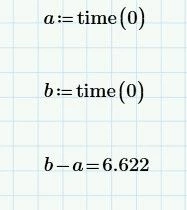
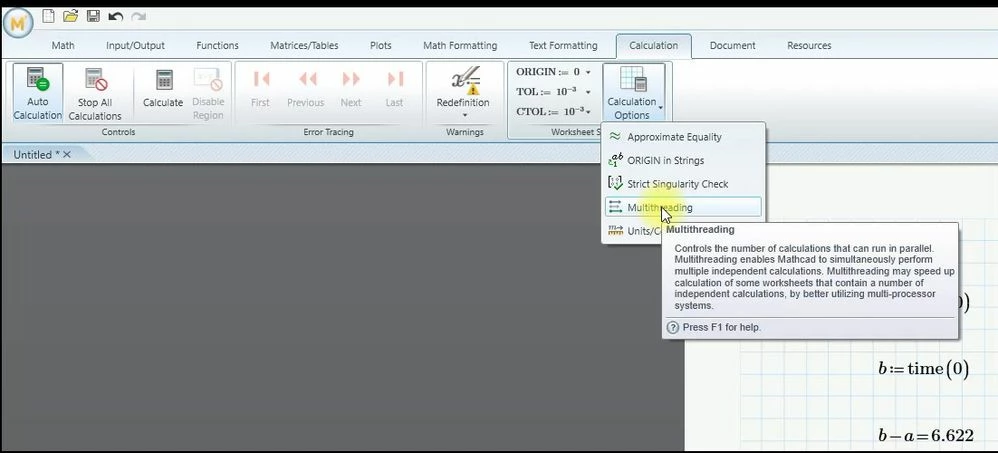
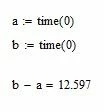
Prime と Mathcad 14.0 の両方のソフトウェアで、time(0) 関数を使用します。 これを start 変数に割り当てて 1 回使用し、finish 変数に割り当てて 2 回目に使用します。2 つの値、finish-start を減算して、ミリ秒単位の時間を計算します。 Prime では、メニューの計算 | ワークシート オプション | マルチスレッドをオフにします。そうしないと、2 つの start ステートメントと ending ステートメントの時間が計算されません。

Capture.JPG

Capture2.JPG

Capture3.JPG

2 replies

21-Topaz II
December 6, 2024

Prime と Mathcad 14.0 の両方のソフトウェアで、time(0) 関数を使用します。 これを start 変数に割り当てて 1 回使用し、finish 変数に割り当てて 2 回目に使用します。2 つの値、finish-start を減算して、ミリ秒単位の時間を計算します。 Prime では、メニューの計算 | ワークシート オプション | マルチスレッドをオフにします。そうしないと、2 つの start ステートメントと ending ステートメントの時間が計算されません。

Capture.JPG

Capture2.JPG

Capture3.JPG

9-Granite
December 9, 2024

ありがとうございます。

mathcad14で使用してみたところ、1つのシートでパラメータを変えて計算すると計算時間が変わります。

しかし b-a の値が変わりません。1つのシートで何回も計算するときは、time関数の引数をその都度変える必要がありますか?

23-Emerald V
December 9, 2024

You may well find that the times vary quite markedly. The times are affected by whatever else Windows or Mathcad are doing in the background.


The purpose of using the same arguments for the timing function is to ensure that repetitions measure the same thing. Changing the arguments would introduce yet another factor into the timing uncertainty.


It is best to regard timings as a comparative measure of function performance. I use the method to evaluate different algorithms that perform the same thing. Although any individual function’s performance can vary , the differences between functions are often consistent enough to select one algorithm over another (or close enough to pick the one you like the best 😀).


Stuart

25-Diamond I
December 6, 2024

@terryhendicott 

The difference is NOT the time in milliseconds but rather the time in seconds!
time(..) returns the number of seconds that have elapsed since 1.1.1970.
So using time(..) you could calculate the current date and time - we have already seen functions here which would do exactly that.


@TT_12301010 

Timing using time(0) is somewhat inaccurate but the best we have out of the box. I remember that in this forum a long time ago more precise routines were posted (for Mathcad, not for Prime) but couldn't find the threads here. As far as I can remember a User DLL accessing the time stamp counter of the the CPU did the trick of a more precise timing.


Instead of timing the whole worksheet it may be beneficial to time specific functions.


Here is a generic timing function to be used to time functions with two arguments.

The arguments of "timef2" are the function name to test, the two arguments which should be used and the number of repetitions to be done.

Werner_E_2-1733465412402.png


You may also return the function result if that seems appropriate. In this case in Mathcad we cannot add the units second because Mathcad does not support arrays with mixed units, Therefore the unit seconds is just added when the result is displayed.
Prime supports arrays with mixed units so in Prime you could add the seconds already in the timer function if you like.

Werner_E_3-1733465432289.png