3-Newcomer
August 22, 2024
Solved

Hydrostatic Pressure calculation using conversion factor 0.052

  • August 22, 2024
  • 1 reply
  • 2661 views

I am looking to do the following calc but I am getting frustrated with applying the correct units. I want the result to be in "pounds per gallon i.e. ppg or lb/gal". 


GO_11714824_0-1724320915145.png

Pressure is in psi, Depth is in ft, and the 0.052 is a conversion factor derived from converting the following:

1 gallon = 231 cubic inches

1 foot = 12 inches

12/231 = 0.052 however i am finding it difficult to substitute the conversions into the formula. HELP!

Best answer by Werner_E

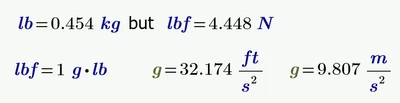
You don't mean lb (pound, a mass) but rather lbf (pound(force), the corresponding wight, a force, = mass times constant of gravity)!
Werner_E_1-1724324927036.png


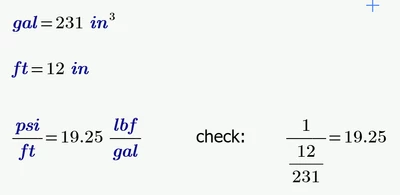
You don't have to bother with conversion factors as Prime can deal pretty good with units and knows a lot of them.
I assume you are using Prime (version 10 or below) and not real Mathcad (version 15 or below), but of course this applies to Mathcad as well.
Werner_E_2-1724324974443.png

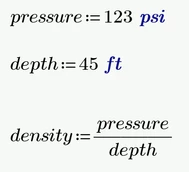
So in your calculations you can use any units you like - Prime will take care of any conversions necessary. For example
Werner_E_3-1724325046442.png

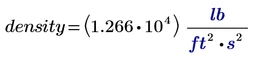
If you display the result, Prime will use base units, dependent on the unit system you have chosen for the sheet (SI, UCS or CGS).

If you have chosen UCS, you would see
Werner_E_4-1724325136545.png

but you can edit the units at your will and Prime will take care of any conversions necessary

Werner_E_6-1724325481418.png

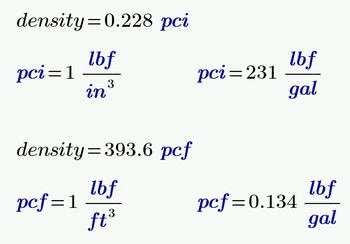
Prime also has some units for force density predefined, pci (pound(force) per cubic inch) and pcf (pound(force) per cubic feet)
Werner_E_7-1724325553979.png

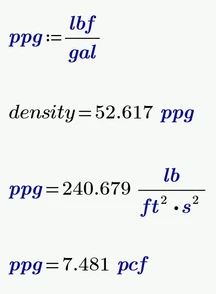
But ppg is unknown to Prime. But feel free to define it yourself as unit anywhere in the sheet before you first use it (maybe in a collapsed area at the top of the sheet or at the right non printable area out of sight.
Werner_E_8-1724325789686.png


If you still have any questions feel free to ask.


Prime 10 sheet attached



1 reply

Werner_E25-Diamond IAnswer
25-Diamond I
August 22, 2024

You don't mean lb (pound, a mass) but rather lbf (pound(force), the corresponding wight, a force, = mass times constant of gravity)!

Werner_E_1-1724324927036.png


You don't have to bother with conversion factors as Prime can deal pretty good with units and knows a lot of them.
I assume you are using Prime (version 10 or below) and not real Mathcad (version 15 or below), but of course this applies to Mathcad as well.

Werner_E_2-1724324974443.png

So in your calculations you can use any units you like - Prime will take care of any conversions necessary. For example

Werner_E_3-1724325046442.png

If you display the result, Prime will use base units, dependent on the unit system you have chosen for the sheet (SI, UCS or CGS).

If you have chosen UCS, you would see

Werner_E_4-1724325136545.png

but you can edit the units at your will and Prime will take care of any conversions necessary

Werner_E_6-1724325481418.png

Prime also has some units for force density predefined, pci (pound(force) per cubic inch) and pcf (pound(force) per cubic feet)

Werner_E_7-1724325553979.png

But ppg is unknown to Prime. But feel free to define it yourself as unit anywhere in the sheet before you first use it (maybe in a collapsed area at the top of the sheet or at the right non printable area out of sight.

Werner_E_8-1724325789686.png


If you still have any questions feel free to ask.


Prime 10 sheet attached


3-Newcomer
August 22, 2024

wow that worked! thank you. Is there a way i can convert your prime 10 to Prime 8 version? Though managed to follow would still like to keep your copy for reference!

25-Diamond I
August 22, 2024

Here is the file in P6 format. P8 should experience no problem to open it.

