
19-Tanzanite
September 13, 2012
Question

Inappropriate error message

  • September 13, 2012
  • 1 reply
  • 909 views

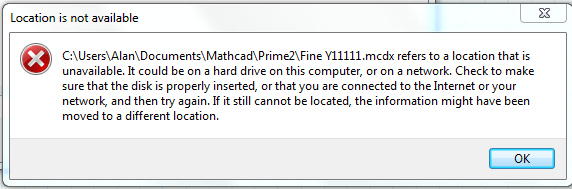
I often get the following error message in Prime 2 (though the file name is not always the same):
Unavailable.PNG

where the file is one I've previously opened in Prime, but have subsequently deleted. If I were trying to reopen this file I would expect such a message. However, this message appears as soon as I've selected File/Open and before I try to select a specific file. This is inappropriate - I trust it won't happen in Prime 3.

Alan

1 reply

1-Visitor
September 18, 2012

deleted-worksheet.png

Alan,


It looks like something else is going on. I just tried to duplicate your issue, and this is the error message I get after I deleted a worksheet.

Perhaps you need to reinstall Mathcad Prime 2.0. I'm not really sure why you are seeing that issue, since I'm unaware of previous reports of it.

Mona

19-Tanzanite
September 21, 2012

Mona,

I also get your message if I try to open a recently deleted file. However, my message appears after I have been working on a file in a certain directory; I exit Prime; then I delete the directory. When I reopen Prime and select the general File/Open menu, Prime tries to open in the deleted directory, can't do it because it's not there and gives the error message. This doesn't happen in M15 because it always opens in a default directory rather than the last one you were working in. I'd rather have the M15 behaviour.

Alan