
1-Visitor
June 6, 2019
Solved

invlaplace in Mathcad 15

  • June 6, 2019
  • 3 replies
  • 8461 views

See the attached file. When I try invlaplace in Mathcad 15 with a simple s-function, it works, but with a slightly more complex function, it doesn't give a useful result:

I am a very infrequent user of Mathcad, so please bear with me if I ask stupid questions.

I do not understand the repeated 'invlaplace' and the 's,t' part of the result. I expected a function of t that I could plot after including the numerical value of omega. Setting t=35 and [omega] = 2*pi*t doesn't help.

I tried putting ', omega' after the first 'invlaplace',  but it produces no more useful result.
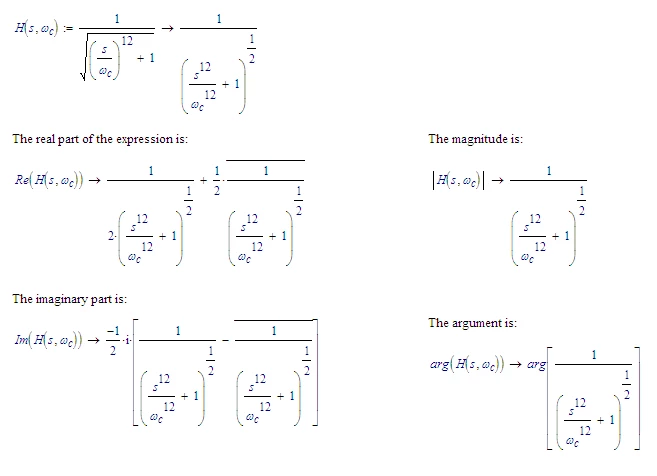
 

Best answer by LucMeekes

Í don't wish to spoil the fun, but the expression is its own magnitude:

LM_20190608_Complex.png

Success!
Luc

3 replies

25-Diamond I
June 6, 2019

The result means that Prime is not able to find a symbolic solution for the transform.

The "invlaplace(...)" you see at the RHS is just a function which normally is use internally by the symbolics to derive the inverse laplace.

Writing "omega" after "invlaplace"  is definitely wrong as thsi would be interpreted as that the variable in the transform domain, the complex freqency, is named omega in your function.

Default is that the complex frequence is "s" and the variable in the time domain is "t". If this is the case you don't need to provide any further modifyers to "invlaplace" but you sure can write "invlaplace,s,t".


BTW, Wolram Alpha gives up on your function, too:

B.PNG


1-Visitor
June 6, 2019
Thank you for the information.//Including omega was more or less a
desperate 'try anything', because omega is actually a constant, 54*pi in
the case under study.//I am quite surprised that the transform doesn't
work, because the expression is more or less a 'standard form' - the
frequency response of a sixth-order maximally-flat low-pass filter.  I
deliberately chose that as 'learning example'  because i know the
answer. I wanted to go on to more complex expressions for which I do not
know the answer. Maybe I will try them to see if they can be resolved.

That Wolfram gives up, too, is even more surprising.

1-Visitor
June 5, 2019
I meant 'standard result in electronics', not math. I've given up with
Mathcad. Matlab handles it, but I don't have it. I'm trying to
understand Octave now, but it's written (even the manual) for code
writers, not Windows users.
21-Topaz II
June 7, 2019

Hi,

Graph on the Gauss plane of the function of s of which you want the inverse Laplace transform (ω=1.5):

function.jpg

1-Visitor
June 5, 2019
I don't know what a Gauss plane is, but in any case I now know that I
don't want an inverse Laplace transform. I need to replace s in the
expressions by omega*i and then rationalize, but I can't find anything
about rationalization in the Help.
23-Emerald IV
June 7, 2019

To substitute s with omega*i is simple:

LM_20190607_Subst.png

Please explain 'rationalization'...


Luc

21-Topaz II
June 7, 2019

Hi,

In this file of mine (in fact there would be another four or five) you can find many calculations with Laplace transforms:

https://community.ptc.com/t5/PTC-Mathcad/5-Analog-Equivalent-Digital-Low-Pass-II-Order-Filter-pdf/m-p/451105#M175805.

1-Visitor
May 31, 2019
I have already posted that I now realise that I don't want invlaplace or
laplace. I just want to substitute w*i (AKA j-omega) for s in a fraction
formed of binomials in s and then calculate the magnitude.  I was
originally confused by the way another software uses 'Laplace' as a keyword.
1-Visitor
May 30, 2019
I will try to do that. Meanwhile, for the avoidance of doubt, this
thread adds nothing useful for explaining the invlaplace keyword.