Best answer by Werner_E

@YA_10963798 wrote:

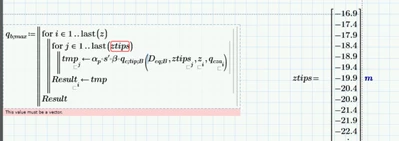
That was helpful. However I used the same function on other sheet and it works perfectly. why it does not work in the new function ;]


In your 'other sheet' "z" and also "ztips" sure were vectors and not ranges. Otherwise the "last" function would again throw that error.

You can test if its vector by writing IsArray(z)= . If the result looks like a vector full of zeros, then its a range. If the result is just the number 1, its a vector.
Or you could try to access/evaluate the element #ORIGIN, If you don't get an error, its a vector.
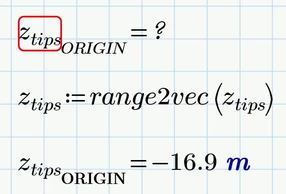
Werner_E_2-1727271906172.png

BTW, its not a good idea and not good habit to change the value of ORIGIN in the midst of a worksheet as you have done.


I would suggest to create vectors right from the start if possible. But if for some reason you have to turn a range into a vector, you may use one of the utility functions which were posted here in the forum in various threads.

A very basic one is
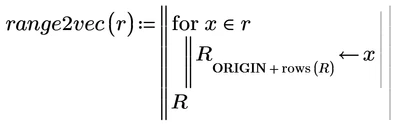
Werner_E_0-1727271503258.png

Don't forget to label "rows" as being a "Function" as unfortunately you also have defined a numeric variable with the name "rows" in your sheet.

Then you could write something like

Werner_E_1-1727271591971.png

and z.tips will be a genuine vector.
 

1 reply

25-Diamond I
September 25, 2024

No, its NOT a vector, its a range variable

You defined it as

Werner_E_0-1727263606536.png

and later defined

Werner_E_1-1727264064632.png


Ranges and vectors unfortunately look the very same in Prime but are quite different beasts.

A range is not a collection of values but rather kind of an implicit loop.

Ranges should only be used to

1) index the elements of vectors and matrices

2) provide the abscissa values for a 2D plot

3) define a for-loop in a Prime program.


For all other you should create vectors even though the creation of a range might be more comfortable 😉


I remember that at the times of good all Mathcad @StuartBruff  published two articles which still apply, explaining in details ranges vs vectors.
I guess the attached pdf contains both of them.

This topic has been a source of great confusion for ages - you are not the first to stumble across it and you probably won't be the last.

14-Alexandrite
September 25, 2024

That was helpful. However I used the same function on other sheet and it works perfectly. why it does not work in the new function ;]

YA_10963798_0-1727270928226.png


Werner_E25-Diamond IAnswer
25-Diamond I
September 25, 2024

@YA_10963798 wrote:

That was helpful. However I used the same function on other sheet and it works perfectly. why it does not work in the new function ;]


In your 'other sheet' "z" and also "ztips" sure were vectors and not ranges. Otherwise the "last" function would again throw that error.

You can test if its vector by writing IsArray(z)= . If the result looks like a vector full of zeros, then its a range. If the result is just the number 1, its a vector.
Or you could try to access/evaluate the element #ORIGIN, If you don't get an error, its a vector.

Werner_E_2-1727271906172.png

BTW, its not a good idea and not good habit to change the value of ORIGIN in the midst of a worksheet as you have done.


I would suggest to create vectors right from the start if possible. But if for some reason you have to turn a range into a vector, you may use one of the utility functions which were posted here in the forum in various threads.

A very basic one is

Werner_E_0-1727271503258.png

Don't forget to label "rows" as being a "Function" as unfortunately you also have defined a numeric variable with the name "rows" in your sheet.

Then you could write something like

Werner_E_1-1727271591971.png

and z.tips will be a genuine vector.

