13-Aquamarine
November 29, 2025
Solved

Linear interpolation from the column of loop output

  • November 29, 2025
  • 3 replies
  • 741 views

Hi there!

I want to get one value interpolated from the parameter, obtained from the calculation routine.

The goal is to perform interpolation of the curvature value Curvature (Alef, the second output's result) as a function of the bending moment value (Moment, the first output's result) from the given value of M_fact.


By using the "linterp" function, I got stuck with the error message:

"The elements in this vector must be in ascending order".


After reviewing the relevant topic on the PTC forum, the only possible solution was to start the list of matrices at 1, yet my attempt to set ORIGIN:=1 hadn't worked.


I use the Prime 10.0.0 version of the software. 

The file with the problem is attached. 

I'd be very appreciative of any assistance and advice regarding the issue.
 

Best answer by Werner_E

c in Alan's approach is the vector index.

His functions starts at this index and increases it until appropriate x-interval (in your case moment values) is found.


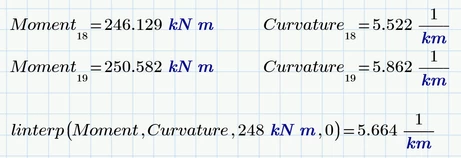
When we use 0 as last function argument, the function starts at index 0 and goes up until it detects the the value 248 kJ lies somwhere between value index 18 and value index 19 and then interpolates. That way the first solution is found.

Werner_E_0-1764803303920.png


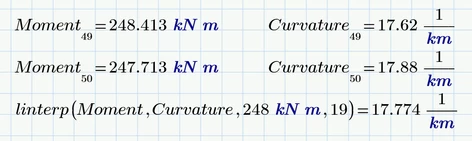
When start index c=19 is used the function  runs up until it detects that 248 lies between value #49 and #50 and interpolates and so finds the second solution.

Werner_E_1-1764803343170.png


Of course it may happen that no suitable interval is found.

As an example you may look for moment=150 kJ

Werner_E_2-1764803480836.png

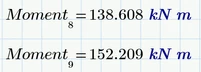
This value (150 kJ) lies between value index #8 and #9 and there is no second solution afterwards.

Werner_E_3-1764803640462.png

So if you use start index 9 or higher, no solution can be found and the function throws an error because it tries to access a value beyond the last vector element.

Werner_E_4-1764803726973.png

You may modify Alan's function so that it returns a NaN if no value was found:

Werner_E_1-1764804928553.png


The situation is similar as in my approach above: If you always use start index c=0 you will always get a solution (if it exists) but in case more than one solution exists, you will just get the first one,

In my approach the same applies if you always use the same guess value, say 0.


It is your responsibility to realize whether there are multiple solutions and to choose the index or guess value so that you also get the other solutions. A plot can help to see if there could be a second solution and where approximately it may be.


It may be easier to find a suitable guess value for the second solution than to find a suitable start index. But then I also may be wrong about that...

3 replies

24-Ruby III
December 1, 2025

Hi,

I am not expert, therefore I only wanted to check whether Moment values ​​form an increasing sequence.

MartinHanak_0-1764575895751.png

The above picture tells me that values are growing up to Moment31 ... this can be seen in the graph, too.


I extracted growing part of Moment and corresponding part of Curvature  and >>> lininterp works

MartinHanak_1-1764576112248.png


Ivan_Pat13-AquamarineAuthor
13-Aquamarine
December 1, 2025

i@MartinHanak Thank you for your explanation. As far as I understand, MATHCAD's linterp function gets stuck when both ascending and descending orders are present simultaneously.

Am I right?

Suppose I change the input data for concrete grade, reinforcement area, and so on, which will be reflected in the other "stress-strain" curve forms. Thus, I'd have to deliberately restrict my MATHCAD output to only ascending or only descending order???

If this is true, I cannot rely on automatic interpolation from the range using the built-in MATHCAD function...


24-Ruby III
December 1, 2025

@Ivan_Pat wrote:

i@MartinHanak Thank you for your explanation. As far as I understand, MATHCAD's linterp function gets stuck when both ascending and descending orders are present simultaneously.

Am I right?

Suppose I change the input data for concrete grade, reinforcement area, and so on, which will be reflected in the other "stress-strain" curve forms. Thus, I'd have to deliberately restrict my MATHCAD output to only ascending or only descending order???

If this is true, I cannot rely on automatic interpolation from the range using the built-in MATHCAD function...


Hi,

please be patient and wait until more experienced user responds.

25-Diamond I
December 2, 2025

"linterp" requires the vector of abscissa value ("x-values") to be in strictly ascending order. That's the reason your attempt fails.

Reason for this requirement is that a function (which "linterp"basically is) must be unique. For one single argument there should be just one single result.

In your example the input value 248 kJ would have two(!) different possible results for curvature - approx. 5.7 km-1 and also 17.8 km-1.


One possible way to deal with this task is to turn it the other way round. Fortunately your curvature values are in strictly ascending order. So we can create a function for the moment depending on the curvature using linear interpolation.

Then we can create a function for the inverse (moment -> curvature) by using the "root" function (a solve block with find also could be used). I made it a function(!) in two arguments - the first is the moment and the second is a guess value for the curvature. Depending on the guess you provide you may get the one or the other solution in case more than one solution exists.

Werner_E_1-1764678110333.png

BTW, its not necessary to make the values unit-less and using "augment" with just one vector as argument does not have any effect at all and could be omitted.


Prime 10 sheet attached


Ivan_Pat13-AquamarineAuthor
13-Aquamarine
December 3, 2025

@Werner_E Thank you so much for the possible way to solve the issue.

It seems like each time I have to intervene manually in the calculation to determine the interpolated value...


25-Diamond I
December 3, 2025

@Ivan_Pat wrote:

@Werner_E Thank you so much for the possible way to solve the issue.

It seems like each time I have to intervene manually in the calculation to determine the interpolated value...


No, you can use the same guess value every time. 

But in case where more than one solution exists (like with 248 MPa and you sample data) you have to find a way to decide which value you want to see. Thats the reason I had not implemented a fixed guess value but used a second function argument to provide a guess value.

19-Tanzanite
December 2, 2025

As a possible alternative to the other suggestions here, you could use a "home-grown" variant of linterp that doesn't require strictly monotonic variation of the independent variable.


CurveInterp.png

Ivan_Pat13-AquamarineAuthor
13-Aquamarine
December 3, 2025

@AlanStevens Thanks a lot!

I guess that your "home-grown" function serves as an exact interpolation function, as it should.

The only question that arose: what does the "c" character stand for?

As I may be misunderstanding, is this the index of the matrix element, in our case, of the Moment? Or is it the guessed value as in @Werner_E explanation ("...the second is a guess value for the curvature.")?

I indeed want to understand this stuff.

Werner_E25-Diamond IAnswer
25-Diamond I
December 3, 2025

c in Alan's approach is the vector index.

His functions starts at this index and increases it until appropriate x-interval (in your case moment values) is found.


When we use 0 as last function argument, the function starts at index 0 and goes up until it detects the the value 248 kJ lies somwhere between value index 18 and value index 19 and then interpolates. That way the first solution is found.

Werner_E_0-1764803303920.png


When start index c=19 is used the function  runs up until it detects that 248 lies between value #49 and #50 and interpolates and so finds the second solution.

Werner_E_1-1764803343170.png


Of course it may happen that no suitable interval is found.

As an example you may look for moment=150 kJ

Werner_E_2-1764803480836.png

This value (150 kJ) lies between value index #8 and #9 and there is no second solution afterwards.

Werner_E_3-1764803640462.png

So if you use start index 9 or higher, no solution can be found and the function throws an error because it tries to access a value beyond the last vector element.

Werner_E_4-1764803726973.png

You may modify Alan's function so that it returns a NaN if no value was found:

Werner_E_1-1764804928553.png


The situation is similar as in my approach above: If you always use start index c=0 you will always get a solution (if it exists) but in case more than one solution exists, you will just get the first one,

In my approach the same applies if you always use the same guess value, say 0.


It is your responsibility to realize whether there are multiple solutions and to choose the index or guess value so that you also get the other solutions. A plot can help to see if there could be a second solution and where approximately it may be.


It may be easier to find a suitable guess value for the second solution than to find a suitable start index. But then I also may be wrong about that...