19-Tanzanite
September 11, 2024
Question

local minimum unexpected behaviour?

  • September 11, 2024
  • 3 replies
  • 3334 views

Hi,

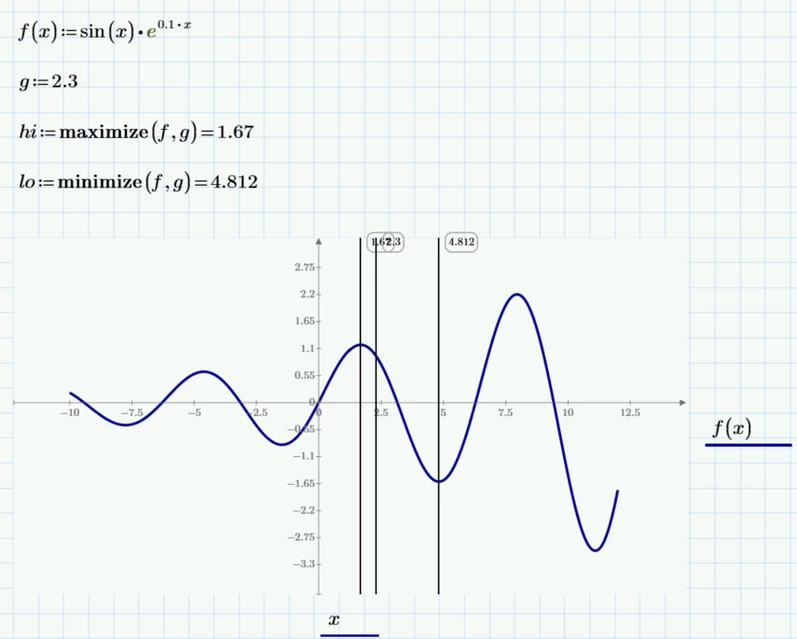
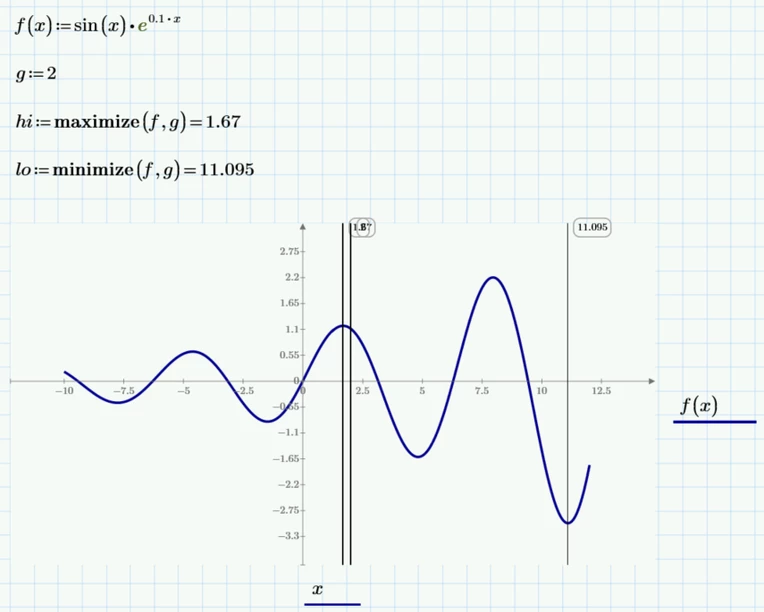
What could be the reason of which when setting g:=2 the first local minimum is taken as 11.095 (so jumps/skips over the first local minimum), but when using g:=2.3 the first local minimum is taken as 4.812, so the first minimum expected one value around 2.3 value. I would expected to see the first local minimum as 4.812 when using g:=2 as well.

My understanding is that by setting g:=some value, then maximize(f,g), and minimize(f,z) mathcad functions will take the first local maximum and the first local minimum around this g given value. Is not right my understanding? 
 

Cornel_1-1726037530267.png


Cornel_0-1726037517921.png


3 replies

ttokoro
21-Topaz I
21-Topaz I
September 11, 2024

image.png

P10 changes the solver engine. Need check all data and answers.

t.t.
Cornel19-TanzaniteAuthor
19-Tanzanite
September 11, 2024

I do not know how you obtained all these results from your plot, showing only the plot results.

23-Emerald V
September 11, 2024

I'm going to take a wild guess that Tetsurō evaluated the function at a number of points and used a set of functions to return the zeros, minima and maxima of x & f(x)?


Something like this, perhaps ...


2024 09 11 D.png


vec(z) flattens a matrix into a vector and converts a range variable to a vector.  index(v) returns a range variable that can be used as an index into vector v.


Note: I was just playing with vlookup - it's been a long time since I've used it - and wanted to keep it all to one page.  Look closely at the y[zeros values and you should see they either contain 0 or pairs of values either side of 0 (ie, the zero is probably somewhere between a pair of points).


If I was being slightly more serious, I'd have written a function to detect the zero crossings and make a choice as to which 'side' was nearer to zero and just choose that x,y pair.   However, zero detection within a vector needs some thought to take care of awkward situations (eg, multiple crossings in a small region, or apparent adjacency that only occurs because there are too few points to show the true behaviour), and my brain is too small to deal with that at the moment.   Of course, in this instance, it's easy enough to calculate the zeros within a given x range, but that's cheating.


Stuart

25-Diamond I
September 11, 2024

@Cornel wrote:

Hi,

What could be the reason of which when setting ...


The reason sure is the underlying numerical algorithm chosen by PTC to implement 😉

As PTC did not provide a detailed reference to the algorithm and because we don't have access to the source code of Prime, we can't say more as an answer.


@ttokoro  just mentioned that PTC seems to have changed the algorithm with Prime 10. Here is a comparison of the two with the minima of the function you provided. The differences are clearly recognizable. And in both versions you have sort of outliers.

Werner_E_0-1726059230182.png Werner_E_1-1726059237910.png


File in P9 format attached


23-Emerald V
September 11, 2024

It's amusing to play with the solver, Werner.  Here's one that *almost* works.  Not all of the choices are so well behaved.


2024 09 11 B.png


Stuart

25-Diamond I
September 11, 2024

@StuartBruff wrote:

It's amusing to play with the solver, Werner.  Here's one that *almost* works.  Not all of the choices are so well behaved.


Are you sure?

Here is this very algorithm without an autoscaled y-axis 🙂

Werner_E_0-1726062344630.png


23-Emerald V
September 11, 2024

Mathcad Prime 10 uses the KNITRO solvers, which do (allegedly) differ from the previous MP solvers to a degree.  See https://en.wikipedia.org/wiki/Artelys_Knitro and MP10 Help for further information.


You can choose which of the available solvers to use by right-clicking on minimize/maximize and selecting from the context menu.


2024 09 11 A.png


Stuart


From Mathcad Prime 10 Help:


Algorithm Selection for Find, Minerr, Minimize, and Maximize 
For Find, Minerr, Minimize, and Maximize, the default algorithm used by Auto Select is the Nonlinear: Levenberg Marquardt method.
Linear—Applicable when the problem has a linear structure, namely objective functions with all the constraints. This algorithm provides fast and precise results.
Nonlinear: Levenberg Marquardt—Attempts to find the zeros of the errors in the constraints. If no zeros are found, the method minimizes the sum of squares of the errors in the constraints.
Nonlinear: Conjugate Gradient—Factorizes a projection matrix, and applies the conjugate gradient method to approximately minimize a quadratic model of the barrier problem.
Nonlinear: SQP—This active-set method solves a sequence of quadratic programming subproblems to find the solution.
Nonlinear: Interior Point—This method replaces the nonlinear programming problem by a series of barrier subproblems controlled by a barrier parameter.
Nonlinear: Active Set—Active set methods solve a sequence of subproblems based on a quadratic model of the original problem.
Troubleshooting:
Try a different method. A particular method may work better or worse than the others on the problem you are attempting to solve.
Try a different guess value or add an inequality constraint. Provide a complex guess value if you are solving for a complex solution.
Use Minerr instead of Find to reach an approximate solution.
Try a different value of TOL or CTOL.
For systems having more than one solution, the solution returned depends on the guess values. You can add inequalities to force the solver to find a different solution.
 
 
25-Diamond I
September 11, 2024

Ahh, I forgot that in P10 we got back the ability to chose an algorithm.

But none of the algorithms in P10 duplicates the behaviour of the algorithm used in P9.

Additionally as far as I am aware, the KNITRO algorithm were implemented from the very start of Prime, also in lower versions. At least the help in P4 already states that (amongst others) "minimize" is now based on KNITRO.  So this does not explain the differences between P9 and P10.


So it still seems that PTC has modified the underlying algorithm in P10. From the plots I showed it looks like P10 is a little bit less 'erratic' concerning the initial guess value.


P.S.:


@StuartBruff wrote:

.....

From Mathcad Prime 10 Help:


Algorithm Selection for Find, Minerr, Minimize, and Maximize 
For Find, Minerr, Minimize, and Maximize, the default algorithm used by Auto Select is the Nonlinear: Levenberg Marquardt method.

I could not find this in the help, but if the helps claims that LM would be available for "miminize" and "maximize", then thats wrong. These two functions seem to default to "conjugate gradients" rather than to LM (wich is not among the choice list).
BTW, the same applies to real Mathcad as well were LM was not available for "minimize" and "maximize".


23-Emerald V
September 11, 2024

Good to know, Werner. I'd forgotten I even knew which solvers Prime was using anyway. 


I have a vague recollection of seeing references to the Mathcad Original algorithms listed in the manual (or whatever it was called).  I also vaguely recall writing my own, just for fun ... I might have a look in the dusty archives, provided I can push my way past the virtual spider webs and electron dust.


Stuart