10-Marble
October 25, 2023
Solved

Matrix manipulation MathCad

  • October 25, 2023
  • 3 replies
  • 4460 views

Hi,


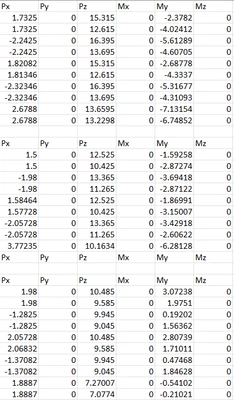
I have some questions about the attached file (questions are highlighted yellow on page 3 & 4). I'm trying to extract columns from my matrices Pz, Px, and My and combine them into new matrices, each with a Pz, Px, and My column, plus zero values for Py, Mx, and Mz.


My first question: why do I lose my units when I convert the nested matrices Pz, Px, and My to regular matrices with the method I used?


Second question - in order from easy to difficult: How do I create one matrix taking the first column from Pz, Px, and My? How to create three matrices with all columns extracted one by one? How to keep the number of matrices flexible in case columns in Px, Pz, and My are removed or added? I'd really like to understand how to do this for future projects as well.


Below an image from Excel on what I'm trying to achieve.
Hans_Westerweel_0-1698240799142.png

Thank you!


Best answer by Werner_E

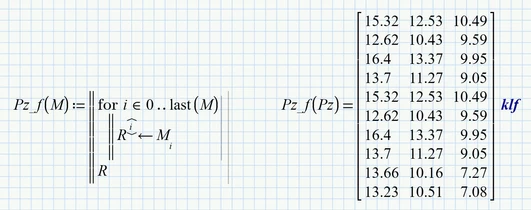
Your function Pz (as well as the others you defined) should not have the sane name as the variable you would like to use as its argument.

Furthermore is your function not using the argument M for its calculation but it uses the worksheet variable Pz and immediately overwrites the argument M with its calculations.

So if you really want to use a function, you should do it that way (I am using the name "R" for the local variable because I am thinking on "Return value" or "Result"):

Werner_E_0-1698245345091.png


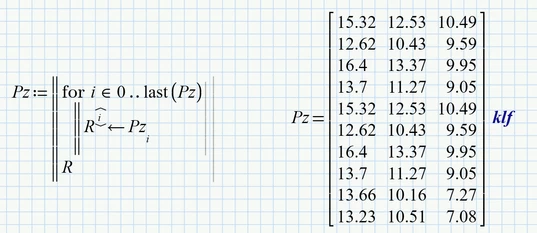
But if your goal simply is to unravel the nested vector Pz, the most straightforward way would be

Werner_E_1-1698245495711.png


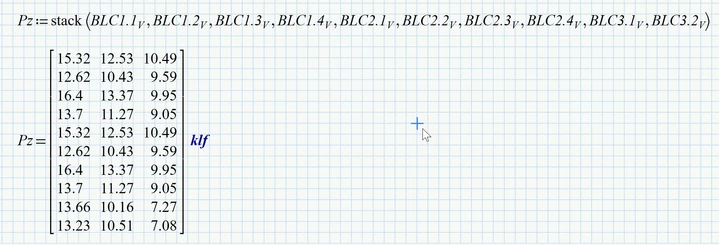
You can also avoid the nested structure right away by using the "stack" command

Werner_E_2-1698245669259.png


3 replies

Werner_E25-Diamond IAnswer
25-Diamond I
October 25, 2023

Your function Pz (as well as the others you defined) should not have the sane name as the variable you would like to use as its argument.

Furthermore is your function not using the argument M for its calculation but it uses the worksheet variable Pz and immediately overwrites the argument M with its calculations.

So if you really want to use a function, you should do it that way (I am using the name "R" for the local variable because I am thinking on "Return value" or "Result"):

Werner_E_0-1698245345091.png


But if your goal simply is to unravel the nested vector Pz, the most straightforward way would be

Werner_E_1-1698245495711.png


You can also avoid the nested structure right away by using the "stack" command

Werner_E_2-1698245669259.png


25-Diamond I
October 25, 2023


Second question - in order from easy to difficult:

How do I create one matrix taking the first column from Pz, Px, and My?


Werner_E_3-1698246377721.png

Unfortunately you can't change the units when displaying a matrix with mixed units.

If your intention is the export to Excel, you would make it unitless anyway:

Werner_E_4-1698246526495.png


How to create three matrices with all columns extracted one by one?
How to keep the number of matrices flexible in case columns in Px, Pz, and My are removed or added?


Maybe that way:

Werner_E_0-1698247473991.png


25-Diamond I
October 25, 2023

According the zero values for Py, Mx and Mz you could use

Werner_E_1-1698248193267.png


10-Marble
October 25, 2023

That looks very much like what I wanted to do. I don't have Prime 9 yet, is there a way to post your sheet in Prime 8 version? Thank you.


And yes, the intent is to export to either Excel or Notepad, so the units do not matter.

25-Diamond I
October 25, 2023

Unfortunately provides PTC no way to save or convert a sheet to the format of a lower version.

But actually you see in the pics all you need to retype the few lines.

Furthermore, which is not shown in the pics, I unraveled the three nested matrices Px, Pz and My as I had shown with Pz in a prior reply like this

Werner_E_0-1698251767343.png

I used this method because it was easier to do compared to using the stack command right away 😉


To actually see all three matrices when the nested matrix M^T is displayed, you have to turn off the option to collapse nested matrices

Werner_E_1-1698252090448.png


To create a separate Excel file for every matrix in M, you could use something like

Werner_E_2-1698253585878.png

The assignment to dummy variables is necessary to "trigger" the write command(s).

The Excel files are numbered starting with #1 (independent from the setting of ORIGIN) and look like this

Werner_E_3-1698253747631.png

(over here we use the comma as decimal separator)