
5-Regular Member
February 20, 2014
Solved

Modifier for expressing polynomials in descending order?

  • February 20, 2014
  • 1 reply
  • 1482 views

Hello,

Just trying to express the polynomials in descending order. It is basically doing the Lagrange's Polynomial for a given Zeta value and I have the number of node points as an input as well. I'm just trying to make all of the outputs in the same format.
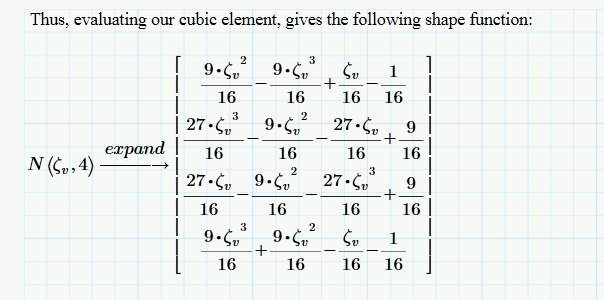
pic+5.png

Best answer by Werner_E

Unfortunately we have much too few ways to influence the way the results of symbolic evaluations.

Mathcad will most of the times avoid a minus sign at the front if you use expand or simplify. On the other hand it will sometimes simplify and expression to something like " - (2x-...) " which usually isn't the best idea.

The best I could think of is to use the keyword "series". It will give you at least an ascending order of the terms.

1 reply

Werner_E25-Diamond IAnswer
25-Diamond I
February 20, 2014

Unfortunately we have much too few ways to influence the way the results of symbolic evaluations.

Mathcad will most of the times avoid a minus sign at the front if you use expand or simplify. On the other hand it will sometimes simplify and expression to something like " - (2x-...) " which usually isn't the best idea.

The best I could think of is to use the keyword "series". It will give you at least an ascending order of the terms.

jroth5-Regular MemberAuthor
5-Regular Member
February 20, 2014

Werner,

Thank you. That worked. I was hoping for descending order, but I must have skipped over series. Any order is what I was hoping to get it expressed in. It makes it MUCH easier when comparing to my hand calculations and derivations.

Do you know of a way to factor the 1/16 outside of the bracket? If not that is fine, but I was just wondering.

25-Diamond I
February 20, 2014

I guess "factor" will factor too much (if possible). You may put 1/16 manually in the placeholder for the units. Don't know if this works in Prime - it does in Mathcad (15 and below).

Otherwise you could assign the vector a variable and evaluate 16*this_vector.