6-Contributor
May 12, 2024
Solved

Ordinary differential Equation

  • May 12, 2024
  • 3 replies
  • 3433 views

In vibration theory there is a problem to define position and velocity of a rod which loaded with distributed bending force q(x). If to assume that this force acts by sine law the vibration equation will be written as follows: 
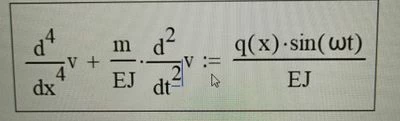
TT_11056782_0-1715538247079.jpeg

Where v(t,x) – function of vertical position of the rod points, E – elasticity modulus, J – second area moment, m – mass per unit length, ω – circular frequency of acting force.

Note that J and E assumed to constant.

If to substitute now v(t,x)=y(x)·sin(ω·t) one can obtain an ordinary differential equation which describes a form of oscillation:
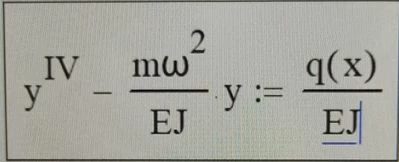
TT_11056782_1-1715538278135.jpeg

Solve this equation assuming:

  • q=10 kgf/mm;
  • Titanium alloy E=100 GPa;
  • Second area moment J=1440 mm4. Which is equal to rectangle with sides 10 mm and 12 mm, and force acts along longer side;
  • Circular freq. ω=0.1 1/s;
  • Length l=100 mm;
  • Rigid constraint on left bound y(0)=0, y’(0)=0;
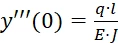
  • Bending force on the left boundTT_11056782_3-1715538328542.png


    ;
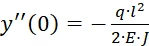
  • Bending moment on the left boundTT_11056782_4-1715538328544.png


    ;
Best answer by Werner_E

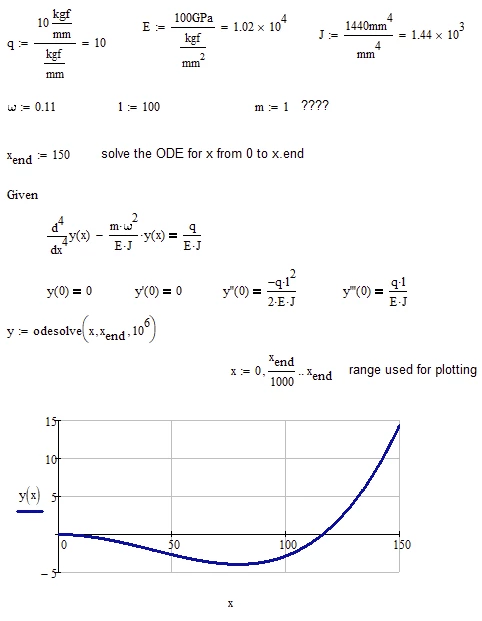
Mathcad can't solve ODEs symbolically (at least not out-of-the-box), but it can provide a numerical solution, given that you provide the values of all the constants involved (this includes the value of m which is not specified in your text).

Mathcad provides a couple of stand-alone solvers for ODEs and also a convenient way using a solve block with "odesolve":

Werner_E_0-1716221061699.png

Guess it didn't made much sense that I had chosen x.end larger than  l=100  😉

Mathcad 15 sheet attached


3 replies

23-Emerald IV
May 12, 2024

That doesn't seem like an Ordinary differential equation, but more like a Partial differential equation.

Besides, your graphics are very poor quality, hard to read.

I suggest you put your equations and data in a Mathcad sheet and attach that.

Saves us typing and making errors in them.


Success!
Luc


Edit: So, you've updated the pictures. But still no Mathcad sheet.

6-Contributor
May 20, 2024

I'm sorry for the errors in here. I've just started learning MathCad and i have no idea how to solve equations on Mathcad.

15-Moonstone
May 20, 2024

The 4th order linear ordinary differential equation can be easily solved even without the numerical help of MC. A piece of paper and a pen are sufficient (literature: Kamke, Pontrjagin, ...). Since coefficients and inhomogeneity are constant, the classic procedure is:
1.) Determination of the zeros of the characteristic polynomial
Approach for the general solution of the homogeneous DGL using linear combination of the exp function (note complex zeros).
2.) Approach a special solution of the inhomogeneous DGL using a constant that has yet to be determined
3.) Linear combination of general solution of the homogeneous equation and the special solution of the inhomogeneous equation
Calculation of the coefficients of the linear combination from the initial values

However, if MC is to be applied, the explicit fourth-order equation must be transformed into a system of four first-order equations and an implemented solution block of MC must be applied, i.e. y1´=y2, y2´=a3, y3´=y4, y4´ =f(x,y) and y1(x) is the solution.

Community Moderator
May 20, 2024

Hello @TT_11056782


It looks like you have a response from a community member. If it helped you solve your question please mark the reply as the Accepted Solution. 

Of course, if you have more to share on your issue, please let the Community know so other community members can continue to help you.

Thanks,
Community Moderation Team.

Werner_E25-Diamond IAnswer
25-Diamond I
May 20, 2024

Mathcad can't solve ODEs symbolically (at least not out-of-the-box), but it can provide a numerical solution, given that you provide the values of all the constants involved (this includes the value of m which is not specified in your text).

Mathcad provides a couple of stand-alone solvers for ODEs and also a convenient way using a solve block with "odesolve":

Werner_E_0-1716221061699.png

Guess it didn't made much sense that I had chosen x.end larger than  l=100  😉

Mathcad 15 sheet attached


25-Diamond I
May 20, 2024

One additional comment because I had written that Mathcad can't solve ODE's symbolically out-of-the-box.

@LucMeekes  has provided a toolbox for Mathcad to solve ODE's symbolically ->  Toolbox: Solving Ordinary Differential Equations


When I use it (with the constants still assigned their numeric values) I get a solution consistent with the one derived by Mathcads solve block.

Werner_E_0-1716223635244.png

But trying to get a pure symbolic result failed:

Werner_E_1-1716223864275.png

I guess the reason is the "invlaplace" function in the symbolic result

Werner_E_2-1716223980522.png


23-Emerald IV
May 20, 2024

Too bad, the invlaplace of s^3/(a-s^4) is too much for Mupad, and for Maple (as far as available in Mathcad 11):

LucMeekes_0-1716237808487.png


but WolframAlpha knows: https://www.wolframalpha.com/input?i=invlaplace%28s%5E3%2F%28a-s%5E4%29%29


And the enhanced Maple-engine in Mathcad 11 is powerful enough to solve the ODE:

with:

LucMeekes_1-1716242351209.png

we can solve:

LucMeekes_2-1716242450186.png

which gives:

LucMeekes_3-1716242582344.png

now to solve c0 through c3:

LucMeekes_4-1716242632040.png

The result of which we can feed back into ys():

LucMeekes_5-1716242718545.png

Gives:

LucMeekes_7-1716242877111.png

Check that the initial conditions are satisfied:

LucMeekes_6-1716242828016.png

define the values of the variables:

LucMeekes_8-1716242918440.png

and plot the result:

LucMeekes_9-1716242938972.png


Success!
Luc