7-Bedrock
December 21, 2023
Solved

Plot of main bisector

  • December 21, 2023
  • 3 replies
  • 12454 views

Hello !


I am trying to get a very simple plot, of the bisector in the first quadrant. For my application I am interested to have a graph for the range of relatively high values of abscissa, e.g. from 100000 up to 500000, like in the top left figure in the attached file (Mathcad Prime 8).

I’ve tried both “Plot” and “Chart Component”.

I am curious about what I have done wrong in my humble tries.


Thinking that such graphs can be carried out so smoothly in Mcd 15 in one minute…, thank you for any suggestion, best regards,

Liv.

Best answer by Werner_E

The Chart Component does not offer a "quickplot" feature (plotting a function without defining the abscissa values). Thats why your first Chart attempts failed. As Luc showed you have to define the abscissa values first.


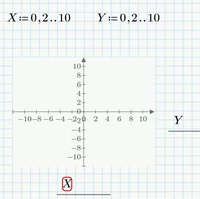
As for the native plots, Prime does not allow to plot one range over another range

Werner_E_0-1703196219297.png

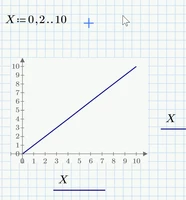
Interestingly it allows to plot a range over itself

Werner_E_1-1703196270211.png


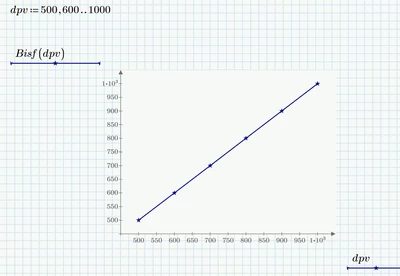
Prime allows a range at the abscissa and a function dependent on that range at the ordinate:

Werner_E_2-1703196389702.png


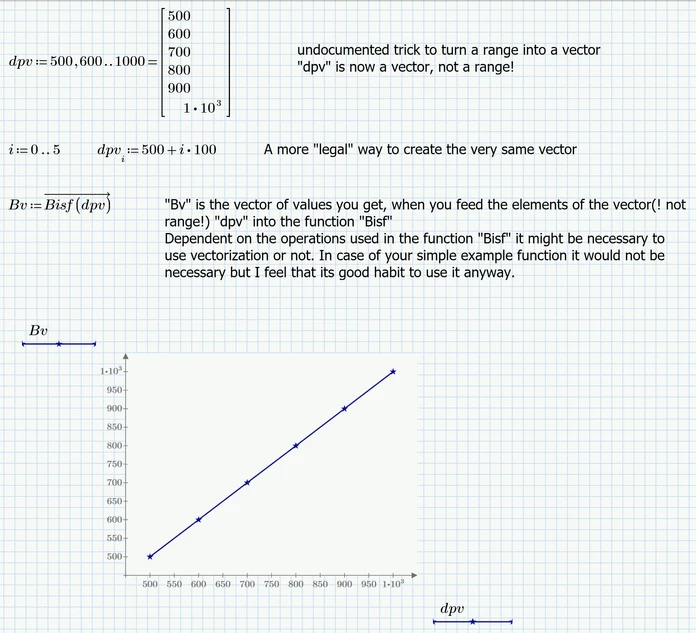
OR you can use vectors (not ranges) at both the abscissa and the ordinate:

Werner_E_5-1703197021919.png


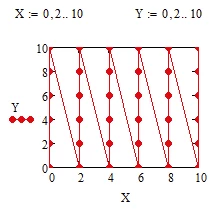
BTW, while Mathcad 15 would allow to plot one range over another, you don't get what you expect, either. What you get it kind of a waterfall plot:

Werner_E_4-1703196812571.png


3 replies

23-Emerald IV
December 21, 2023

Just add this:

LucMeekes_0-1703195436721.png

before the first graph to get this:

LucMeekes_1-1703195487926.png

Or did you mean something else...?


Success!
Luc

Liv7-BedrockAuthor
7-Bedrock
December 21, 2023

So it's not possible just to have as input merely a function expression, like in Mcd15 ?


Thank you,

Liv

Werner_E25-Diamond IAnswer
25-Diamond I
December 21, 2023

The Chart Component does not offer a "quickplot" feature (plotting a function without defining the abscissa values). Thats why your first Chart attempts failed. As Luc showed you have to define the abscissa values first.


As for the native plots, Prime does not allow to plot one range over another range

Werner_E_0-1703196219297.png

Interestingly it allows to plot a range over itself

Werner_E_1-1703196270211.png


Prime allows a range at the abscissa and a function dependent on that range at the ordinate:

Werner_E_2-1703196389702.png


OR you can use vectors (not ranges) at both the abscissa and the ordinate:

Werner_E_5-1703197021919.png


BTW, while Mathcad 15 would allow to plot one range over another, you don't get what you expect, either. What you get it kind of a waterfall plot:

Werner_E_4-1703196812571.png


Liv7-BedrockAuthor
7-Bedrock
December 21, 2023

Ok, I see.

It seems to be more clumsy than expected to quickly have some curves plots.

Particularly when the function to plot will have some denominator roots, e.g. some polynomial at denominator.


Agree with you, it's healthier to use vectorize.


Yes,  in MCd15 I used for vectors representation Xi and Yi on axes, where index i was indeed previously defined.


Argument "dpv" will be that defined array for the rest of the worksheet.

For a subsequent symbolic calculation one needs to use another variable as argument. Am I right ?


Thank you very much, 

Liv.

25-Diamond I
December 21, 2023

You can still use the quickplot feature for the native Prime plots the same way as in Mathcad 15. You simply have to use an undefined variable name at the abscissa. On contrary to Mathcad 15 we have a way in Prime to make a variable completely undefined again, the "clear" command.

Werner_E_0-1703201830481.png

Similar to Mathcad 15 the range you see in the plot is controlled by the values you set in the plot. In Prime you can edit the first, second and last value at each axis, so you can set start and and end value and step width that way.


As for subsequent symbolic evaluations you may either use the quickplot feature as just shown or, if you have already defined the abscissa values as a vector or range, you can either use a new undefined variable or make the already defined variable undefined again using the "clear" command.

You can also use the clear.sym(variablename) command to make the variable unknown/undefined for symbolic evaluations only. This is similar to using an assignment like variablename:=variablename in Mathcad 15.


ttokoro
21-Topaz I
21-Topaz I
December 21, 2023

image.pngimage.pngimage.png

t.t.
Liv7-BedrockAuthor
7-Bedrock
December 21, 2023

I see.


After such assignments for each graph, one have to take care to variables names in a worksheet of several dozens of pages...


Thank you a lot, ttokoro,

Best, Liv. 

25-Diamond I
December 21, 2023

@Liv wrote:

I see.


After such assignments for each graph, one have to take care to variables names in a worksheet of several dozens of pages...


Thank you a lot, ttokoro,

Best, Liv. 


In Mathcad 15 I usually used a variable name like x. or t. for plotting (note the dot!) because they would look the same like x or t which I still had free for something like symbolic evaluations.

In Prime the dot still would be seen in display and plot, but you could use the new clear() or clear.sym() commands like explained in my answer above to make the variables either completely unknown/undefined or just undefined for symbolic use.