3-Newcomer
July 14, 2023
Solved

Plotting Multivariable Multifunction Summation Function

  • July 14, 2023
  • 2 replies
  • 2858 views

Hello,


I'm new to mathcad (express prime 9.0.0.0 and have full functionality for another month), so extra points for being extra articulate 🙂


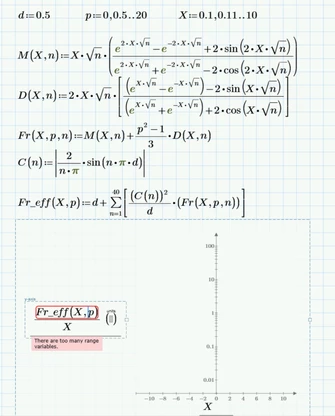
The image below on the left is what I am trying to accomplish and what I've typed out within Mathcad.


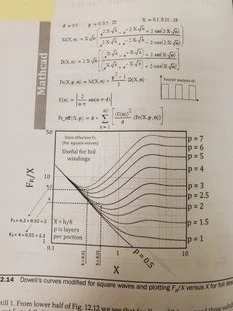
The image below on the right is the book example I am trying to replicate.


I am trying to plot Fr_eff/X vs X with different "p" values, which makes sense when looking at the text.


Some Questions:

  1. Why is the error "trying to plot to many range variables showing up?"
  2. In the example textbook they are showing the function they are Plotting "Fr/X". How are they plotting the function without writing the inputs to the function, ie. Fr(X,p)?
  3. They are only plotting p=0.5 up to 7 (in increments of approximately 1 in certain cases), which is not how they define p at the top. How are they only plotting certain p values, and not all of them?
  4. Last and obvious question, what am I doing wrong?
 

Modified_Dowells.mc.png textbook_dowells.jpg


Thanks


EDIT: I've attached the worksheet as well



Best answer by Werner_E

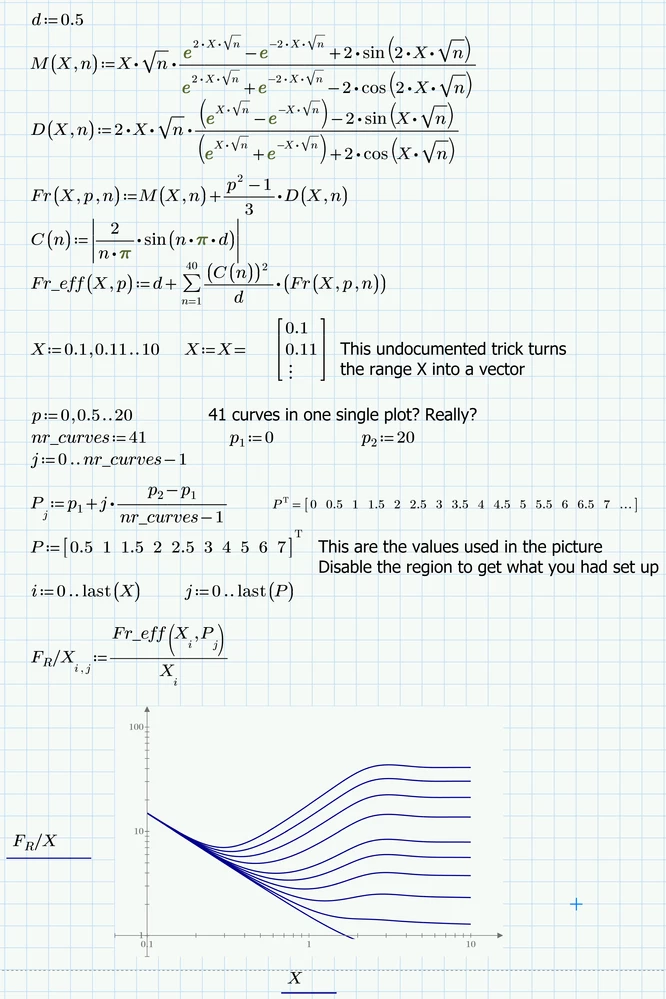
Here's the "magic" 😉

You type square brackets in defining some of the functions. Never do this unless you intend to create a vector/matrix. Only use parentheses . Mathcad 15 and below sometimes used square brackets on expressions with nested parentheses when displaying them, but you never type them in.

The picture shows that the horizontal x-xis also should be logarithmically scaled. You can move the axis with the mouse so they cross at (1; 0.1).
The upper limit 50 on the vertical axis is ignored by Prime - it always choses powers of ten.

Unlike real Mathcad Prime does not offer an option for adding grid lines. Luc an me both had posted workarounds for this. PTC bought a third party tool and integrated it (quite badly and with severe limitations) in Prime. They call it the Chart Component. You may create your plot using it. Its slow and cumbersome to use and does not support units, but it provides many of the very basic things which Primes native plots are missing, like grids, seocondary y-axis, labels, etc. Give it a try and see if it fits your needs.

Werner_E_0-1689355215680.png

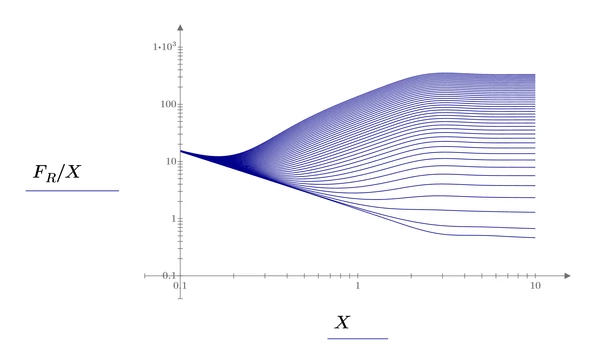
BTW, here is the plot using the 41 p-values you had set up. I also let Prime chose upper and lower limit of the y-axis automatically, so it now runs from 0.1 to 1000

Werner_E_1-1689355384766.png

The variable name FR/X is quite tricky to create. Of course you can use any name you like.


Sheet in format Prime 9 attached


2 replies

25-Diamond I
July 14, 2023

Attach your sheet as well, not just the pictures.

Plotting a family of functions in one go using two range variables is something which worked (with limitations) in real Mathcad,

Werner_E_1-1689352732886.png

but it doesn't work anymore in Prime.


There may be workarounds (apart from plotting ten separate curves), maybe using the waterfall trace, but I won't retype from the pic what you already typed 😉

3-Newcomer
July 14, 2023

Thanks for the reply, are you able to take a look at the sheet I attached (per your request) and see if you can make some magic out of it?

Werner_E25-Diamond IAnswer
25-Diamond I
July 14, 2023

Here's the "magic" 😉

You type square brackets in defining some of the functions. Never do this unless you intend to create a vector/matrix. Only use parentheses . Mathcad 15 and below sometimes used square brackets on expressions with nested parentheses when displaying them, but you never type them in.

The picture shows that the horizontal x-xis also should be logarithmically scaled. You can move the axis with the mouse so they cross at (1; 0.1).
The upper limit 50 on the vertical axis is ignored by Prime - it always choses powers of ten.

Unlike real Mathcad Prime does not offer an option for adding grid lines. Luc an me both had posted workarounds for this. PTC bought a third party tool and integrated it (quite badly and with severe limitations) in Prime. They call it the Chart Component. You may create your plot using it. Its slow and cumbersome to use and does not support units, but it provides many of the very basic things which Primes native plots are missing, like grids, seocondary y-axis, labels, etc. Give it a try and see if it fits your needs.

Werner_E_0-1689355215680.png

BTW, here is the plot using the 41 p-values you had set up. I also let Prime chose upper and lower limit of the y-axis automatically, so it now runs from 0.1 to 1000

Werner_E_1-1689355384766.png

The variable name FR/X is quite tricky to create. Of course you can use any name you like.


Sheet in format Prime 9 attached


19-Tanzanite
July 15, 2023

Hi WM_10738028,
Can you share the name of the book, and where this book can be found?

3-Newcomer
July 17, 2023

Hello Cornel, "Switching Power Supply Design & Optimization"


Probably Amazon, I got it from Springer, most likely a few other sources as well.