1-Visitor
July 27, 2020
Solved

Plotting Three Variables for WCSA on component selection

  • July 27, 2020
  • 2 replies
  • 5827 views

Hi


I have three variables in Inductance (L) value calculation for buck boost converter - Input Voltage, Output Voltage, Output Current. All three can vary. I would like to plot L value as a function of these three to determine the Worst case inductance requirement. In the attachment I have attempted 2D graph but how can look at sensitivity of L value this with 3 variables? 


Regards

Prasanna

Best answer by Werner_E

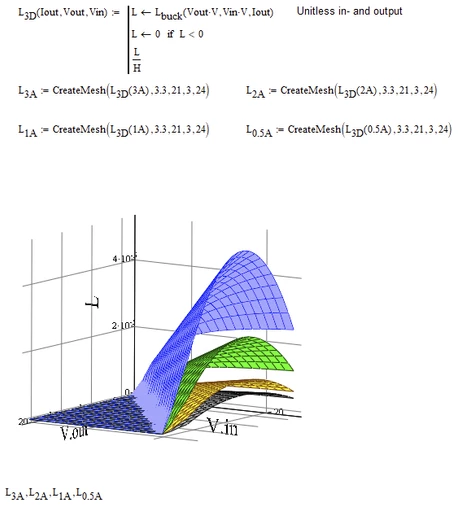
Here is an approach using CreateMesh (which does not like units) and a plot showing the 3D graphs for four different values of I.out (3A, 2A, 1A and 0.5A). Your minimum value of 0.1 A yield quite large values for L which would  let the other graphs look like zero planes.

Werner_E_0-1595967803563.png

I defined a auxiliary function L.3D which accepts three arguments and the fist one is I.out. This means that L.3D(2A) is treated as a two argument function (will not work in Prime).

Furthermore L.3D is written in a way that the last two arguments have to be unitless (Vin Vout). The unit volt is added before calling L.buck.
And at last the unit (H) is stripped of, so L.3D returns a simple unit-less scalar (which CreateMesh likes).

You may consider to multiply the result by 10^3 or 10^6 to show the result in mH or µH.

The function also sets any negative values to zero so its not necessary to limit the z-axis manually - you can leave autoscale on.


MC15 worksheet attached


2 replies

23-Emerald IV
July 27, 2020

Would this help?

LucMeekes_0-1595885972237.png

Success!
Luc


1-Visitor
July 28, 2020

Thanks Luc. I'm unable to see the graph though?


Regards

Prasanna

1-Visitor
July 28, 2020

Ok Now I got the 2D working with your example. But 3D plot shows Div by Zero error. Any pointers?


Thanks

Prasanna


prasavijay_0-1595918985490.png


25-Diamond I
July 27, 2020

Having three input and one result variable (L) would mean that you need a 4D-plot to visualize the whole situation in one single plot. Unfortunately we live in a 3D world and our screens are 2D. That means that you have to compromise. A 2D plot will show you just the change of L when you change one of the three inputs. You may show multiple 2D-graphs in one plot where a second input variable is changed in discrete steps.

You may also use a 3D plot showing the influence of two inputs in one single plot. having multiple 3D graphs in one plot would be possible, too, but I guess it would be more confusing than helpful.

Anyway, visualizing the influence of any of the three inputs in one single plot seems to much demanded.

Whats the main goal?

1-Visitor
July 28, 2020

The goal is to vary the three inputs or atleast two and look at the Inductance variation (min-max) to determine the inductance value. This seems to be the straightforward thing to do with XLS, but I'm having hard time with Mathcad doing similar. I have attached an example with XLS. 


25-Diamond I
July 28, 2020

So you are not looking for a continuous graph but just want to see the results for a few selected input values?

Here is what your Excel sheet shows done in Mathcad. I replaced the bars by line plots as Mathcads "bar" and "solidbar" styles seems not appropriate. You might consider a "stem plot" as a line plot doen't make much sense given the rather arbitrary input values.

I also added a variant using units and a differently scaled secondary y-axis.

Werner_E_0-1595939533077.png

Mathcad 15 file attached