1-Visitor
May 5, 2021
Solved

plotting topography data

  • May 5, 2021
  • 1 reply
  • 3984 views

Hello Everyone,
The data for cornea topography is loaded in the worksheet attached. The contour plot is generated using the 2-D interpolation algorithm. However, when compared to the topography system's original performance, the plot has a very low resolution. How can I get a plot that looks like the system output? 

I was also curious about how the data could be transferred and plotted in polar coordinates because I was having trouble mapping f(x,y) to f(r, theta) coordinates.


Any advice will be greatly appreciated.

All the best,

Payman.

Best answer by Werner_E

Addendum


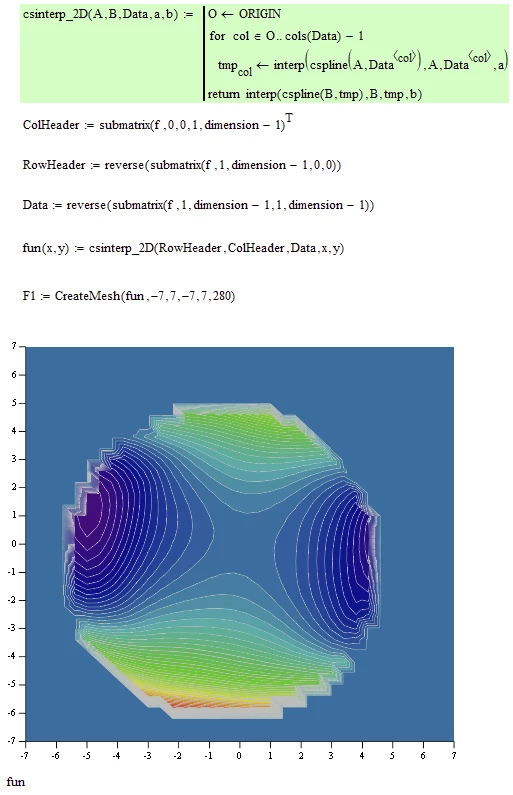
I used a routine I wrote a while ago to accomplish the interpolation and got a result similar to yours (not sure why it looks so ugly at the circular border). My routine is much slower than the built-in one but has the advantage of not being limited to square data matrices. Its not necessary to use it in your case and I just gave it a try to compare to your approach.

Werner_E_0-1623969385374.png


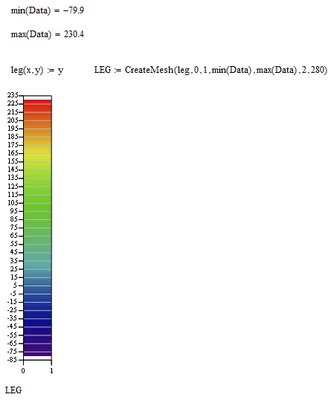
BTW, here is a way to add a rudimentary color legend:

Werner_E_1-1623969421442.png

MC15 sheet attached


1 reply

25-Diamond I
May 5, 2021

You may try to uncheck "Auto Contour" and set a higher number of contourlines manually.

I also draw the contour lines in a single solid color, not Colormap.
To duplicate the colors in the picture you provided, I guess you will have to create a custom color map.

Werner_E_0-1620246381447.png

BTW, the data you embedded in the MC sheet seems not to be the very same which was used in the picture you provided.

The data seems to be cartesian anyway, so what kind of polar plot (cylinder coordinates?) do you have in mind?

payman1-VisitorAuthor
1-Visitor
May 7, 2021

Thank you so much, Werner_E.
I have now loaded the whole data in the worksheet containing the front and back surface data. The interpolation argument has been changed to (y,x) instead of (x,y) and I think the orientation is now right. The issue is that the unit plot is within an 8-mm circle, while the worksheet plot is within a 6-mm radius circle. Is there any detail that has been lost?


I should point out that I intend to use the topography data for optical raytracing through the eye (i.e., finding the normal vector and ray intersection), so graph quality isn't a priority.

Thank you once again for your assistance.

Payman.

25-Diamond I
May 8, 2021

The issue is that the unit plot is within an 8-mm circle, while the worksheet plot is within a 6-mm radius circle. Is there any detail that has been lost?

I am not sure if I understand the issue. As written above it looks to me that the plots in the pictures you try to duplicate are based on different data values than the ones in your Mathcad sheet.

After all the row and column headers in the data in your sheet are running from -7 to 7 only (with mostly zero values at the ends) while the pictures show values up to about 8.5 (I see no negative values in the pics?)

Furthermore the plots in the Mathcad sheet are not symmetric on contrary to the plots seen in the pictures. You may turn on gridlines to better see that:

Werner_E_0-1620440605459.png

I am not sure about the effect interpolation may have. Spline interpolation sometimes can have undesired side effects. You may try lspline or pspline instead of cspline (affects basically the treatment of the end values only) or even linear interpolation.

But primarily I would check the data if its really the data which should yield the plots seen in the pictures.