1-Visitor
October 9, 2020
Solved

Polar plot

  • October 9, 2020
  • 2 replies
  • 5795 views

This is a very elementary question, but I cannot find a solution. I have two columns of numbers, the first (angles) goes from 0 to 90 in steps of 10, but I plot them in radians. The second  column is the measurement result at each angle, i.e. 10 values, the first being zero and the others are negative values down to -21. When I try to make a polar plot, I get the measurement values plotted in the 240 to 270 degree sector, and the radial axis goes from 0 in the centre to +21 at the perimeter.

If I try plotting in degrees, I get a bizarre scatter plot over the whole circle, but only 7 points are plotted.

How can I plot these data correctly?

Best answer by Werner_E

@JohnWoodgate wrote:
Thank you, but that still produces a completely wrong plot. One error is
that  the radial axis goes from 0 to 21, but the data values go from 0
to -21. Also, not all the points are plotted. See the attached.

There is nothing attached to your post.


But take a second look at my picture!

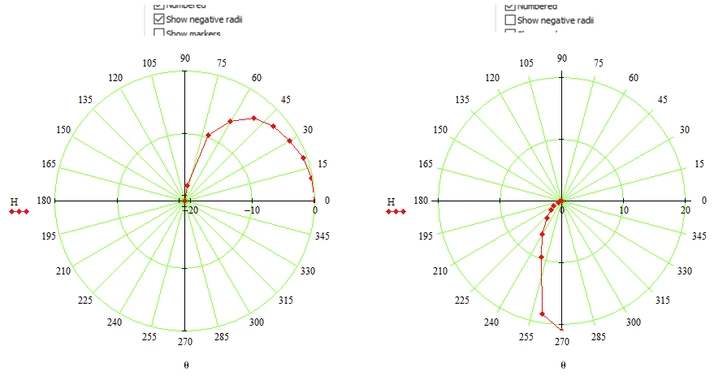
1) ALL 10 points are plotted and I even marked them with dots

2) Look closely at the radial scale! Because I checked "Show negative radii" the scale runs from -21 at the center to 0 at the outside. You can change those values at the appropriate placeholders at the right of the plot.


If you turn off "Show negative radii" (which is the default setting), the radial scale runs from 0 in the center to +21 at the outside. And of course the value of -6.2 for 60° is seen in the plot as +6.2 at 240° (the extension in negatives of 60 degrees).

This is shown below in the plot on the right side.

Werner_E_0-1602270454274.png


If none of these is what you expected, can you show which kind of plot you'd like to see with the data provides.

2 replies

Derbigdog
15-Moonstone
October 9, 2020

It looks like you are inputting the data in radians not degrees. you need to multiply f by degrees then convert to radians.


1-Visitor
October 9, 2020
Thank you, but that doesn't resolve the issue, as you can see from the
attached.
25-Diamond I
October 9, 2020

Would this help

Werner_E_0-1602268550786.png

Instead of adding deg in the definition of theta you might write theta*deg in the placeholder of the plot.

Even though the polar plot shows angles in degree, angles in Mathcad always are in radian unless you explicitly state that the value are degrees.


1-Visitor
October 9, 2020
Thank you, but that still produces a completely wrong plot. One error is
that  the radial axis goes from 0 to 21, but the data values go from 0
to -21. Also, not all the points are plotted. See the attached.
Werner_E25-Diamond IAnswer
25-Diamond I
October 9, 2020

@JohnWoodgate wrote:
Thank you, but that still produces a completely wrong plot. One error is
that  the radial axis goes from 0 to 21, but the data values go from 0
to -21. Also, not all the points are plotted. See the attached.

There is nothing attached to your post.


But take a second look at my picture!

1) ALL 10 points are plotted and I even marked them with dots

2) Look closely at the radial scale! Because I checked "Show negative radii" the scale runs from -21 at the center to 0 at the outside. You can change those values at the appropriate placeholders at the right of the plot.


If you turn off "Show negative radii" (which is the default setting), the radial scale runs from 0 in the center to +21 at the outside. And of course the value of -6.2 for 60° is seen in the plot as +6.2 at 240° (the extension in negatives of 60 degrees).

This is shown below in the plot on the right side.

Werner_E_0-1602270454274.png


If none of these is what you expected, can you show which kind of plot you'd like to see with the data provides.