
1-Visitor
July 25, 2017
Solved

Prime 4.0 Plotting Strangeness

  • July 25, 2017
  • 1 reply
  • 4080 views

Below is an example of an equation and its respective plot.  Everything seems correct and as expected.
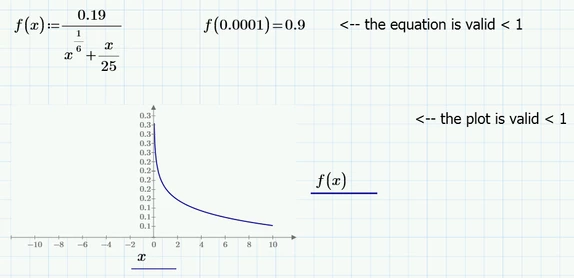
 

Plot 1.PNG


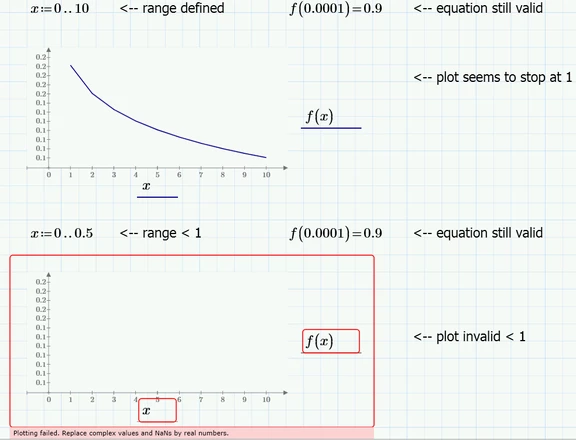
Then I define a range... and the plot stops being valid below 1.
 

Plot 2.PNG


Does anyone have any ideas as to what may be causing such behaviour?

Best answer by DJF

I don't have MC fired up at the moment to check, but I'm fairly certain your ranges are the problem.  Your first range is 0,1,2,3,4,5,6,7,8,10.  There is no answer for 0, so it starts at 1.  So, graph looks correct.  

The next range - I'm not even sure what MC is going to interpret that as.  You haven't defined the spacing.  


Try this:

x:=0.001,0.002,10  


Then you get 0,001, 0.002, 0.003 ..... up to 10.  Althought that's a lot of points.

1 reply

DJF16-PearlAnswer
16-Pearl
July 25, 2017

I don't have MC fired up at the moment to check, but I'm fairly certain your ranges are the problem.  Your first range is 0,1,2,3,4,5,6,7,8,10.  There is no answer for 0, so it starts at 1.  So, graph looks correct.  

The next range - I'm not even sure what MC is going to interpret that as.  You haven't defined the spacing.  


Try this:

x:=0.001,0.002,10  


Then you get 0,001, 0.002, 0.003 ..... up to 10.  Althought that's a lot of points.

1-Visitor
July 25, 2017

Thanks.  This solved the problem.

I'm assuming omitting the step size in the range definition fails when the range is below the step size.  Is there a way to change the default step size, so that it would be possible to omit it for smaller ranges? (It works fine for large ranges).

25-Diamond I
July 25, 2017

@Friengineer wrote:

Thanks.  This solved the problem.

I'm assuming omitting the step size in the range definition fails when the range is below the step size.  Is there a way to change the default step size, so that it would be possible to omit it for smaller ranges? (It works fine for large ranges).


No there is no way to set a default step size - its always 1.

In your first range example you defined the range 0,1,2,3... and because your equation fails a 0, the first point evaluated is at 1 and then at 2 and the two points are connected by a straight line - thats the reason your second plot  looks not that smooth and somewhat angular compared to the first one, where you used Mathcads Quickplot feature (letting Mathcad chose a suitable stepwidth).

In your second range you defined 0 .. 0.5. Because of default stepwidth 1 this "range" consists of the number 0 only (the next value 1 being larger than the endvalue 0.5 you provided) and because the plot fails at 0 you get an error.


You are free to chose a range like 0, 0.01 .. 10 even though the plot will fail at 0. it will start at 0.01.

 Or, depending on the section you are interested, you may use something like Pic.png