
4-Participant
November 16, 2023
Solved

Problem in defining unknowns and functions!!
  • November 16, 2023
  • 1 reply
  • 3830 views

Screenshot 2023-11-16 170741.png

Hey guys,


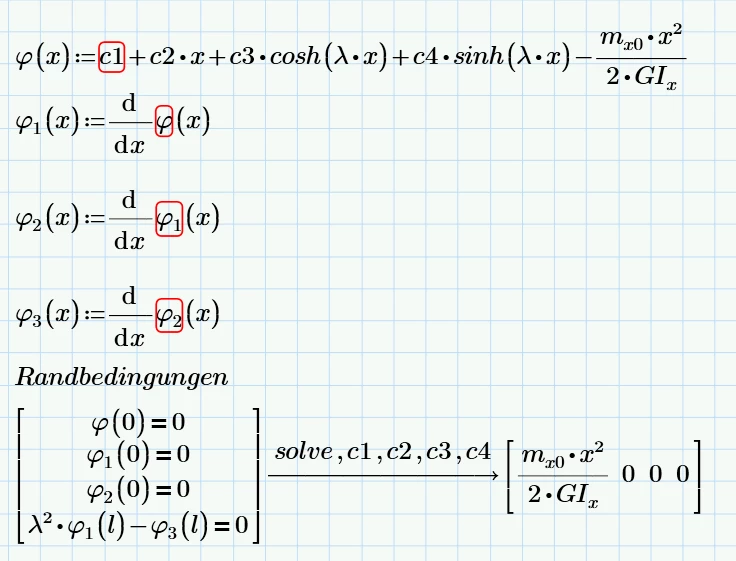
Im new to mathcad and after searching for a while, I still didnt find the solution. I just want to solve after 4 unkowns (c1, c2, c3, c4). I have 4 equations and 4 boundary conditions, but there is a problem of the definition of my unknown variables and my functions. Can anyone help me? If yes, please correct the data I am uploading or explain to me like step by step. I am really new and just saying "you need to define correctly" wont help me. Thank you very much in advance!

Best answer by Werner_E

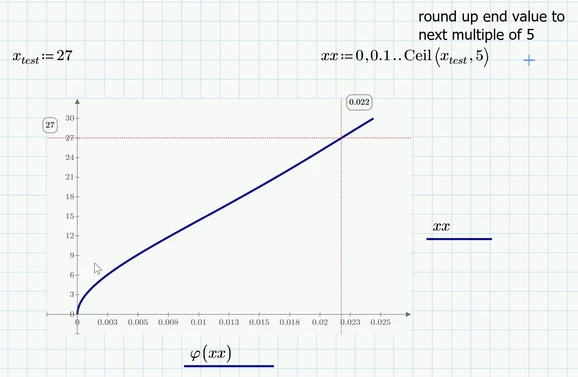
I agree that editing the plots is very user-unfriendly and you can run into troubles if the free variable is not on the x-axis but rather on the y-axis as is the case in your plot.

One way out can be to define a range for the free variable and let the values at the axis ticks unchanged (you may delete d´them if you already have typed in a value) to let Prime chose the values automatically. Prime will do so, but the auto-scaling is all but ideal and so you will have to change at least the second and maybe also the first value to get the scaling steps you'd like to see (Prime would simply divide the full range by 10). So in the plot below we have a automatically chosen step on the x-axis of 0.0025 and on the y-axis (ranging from 0 to 30) its 3.

Werner_E_1-1700256406639.png

I usually chose a name for the range which is only used for plotting which is different to the name used for the calculations. This isn't a must - you could as well use the name x instead of xx.


Next step is to apply the correct units to all variables. See attached file

1 reply

25-Diamond I
November 16, 2023

I see no problem in your sheet!

The redd errors are from the numeric engine which complains because of the undefined variables c1, etc.

This does not affect the symbolic engine, though.

You could avoid these errors if you make phi and its derivatives functions of x AND of all the unknowns.

Werner_E_0-1700168215568.png


But I agree that the solution given by Prime must be wrong as we should not expect to see any "x" anymore.

The problem was rather hard to spot - it was the the exponent in x². You used the superscript "2" (on your keyboard AltGr-2) but you should have typed x^2 instead!!!

Once you correct this, you will see

Werner_E_1-1700168900240.png


BTW, there is no need to define the functions f1,2,3 - you could as well use the prime symbol ("Ableitungsstrich") for the derivations. The keyboard shortcut for a German keyboard is Ctrl-ä.

Werner_E_2-1700169236246.png


EDIT:

Arghhh!!!
Just noticed that Prime did not simplyfed lambda*lambda^2 to lambda^3.
Had overlooked that you made the same error when you typed lamda² instead of lambda^2

So the solution looks actually that way - much friendlier 😉

Werner_E_4-1700170018807.png


Corrected worksheet in version Prime 9 attached

Nexiz4-ParticipantAuthor
4-Participant
November 17, 2023

Hey Werner,


thank you very much for your response!! I really learned a lot now. But it seems, that there is still something wrong, because the solution for c3 and c1 should be somethin with a sinh function. C2 and C4 are correct!


Here are the correct solutions, what we should get from mathcad:

IMG_0772.jpg

I think maybe we still have a definition problems? for the constants especially. There is still an error for c1, c2, c3 etc. It is very weird because as I said the solution for c2 and c4 are correct, but not cor c1 and c3. I now tried to write the derivations on my own, but still the solutions doesnt change. I would be very grateful if you could have another quick look. Thank you again for your help until now!

25-Diamond I
November 17, 2023

IMHO the solution given by Prime is correct.

Expression in sinh and cosh of l*lambda can only stem from the fourth equation and we simplify it, these terms cancel which means that the solution can't contain them.

Werner_E_0-1700235099179.png


I see three possible explanations:
1) The definition of the function phi(x) in your Prime sheet does not match the one in your manual calculation

2) The fourth equation used in the Prime sheet is not the same you used in your manual calculation

3) You made a mistake in your manual calculation