5-Regular Member
November 11, 2025
Solved

RKfixed mathcad prime 10 - compressible nozzle

  • November 11, 2025
  • 2 replies
  • 954 views

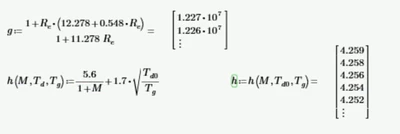
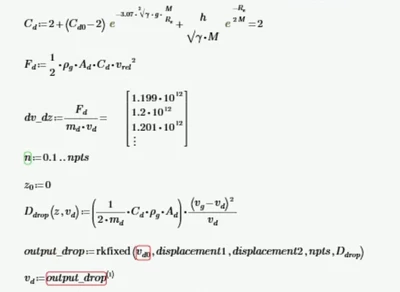
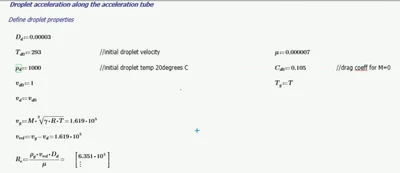
hi wondering if anyone can give me any tips or help? I'm very new to mathcad and using it to create a compressible nozzle with multiphase gas-particle flow. I'm having trouble calculating the velocity of the droplets with an initial velocity of 1. when implementing with rkfixed the vd0 says 'unknown error-ODEtoofewinit'

Any help would be appreciated if theres a better way to solve? thanks 

(g=gas, d=droplet)
MC_14395780_0-1762859008658.png

MC_14395780_1-1762859156766.pngMC_14395780_2-1762859178099.png


Best answer by Werner_E

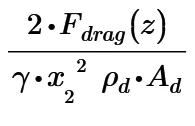
I had a second look and now am pretty sure that the magnitude of the summand 

Werner_E_0-1762988405281.png

is causing the error.

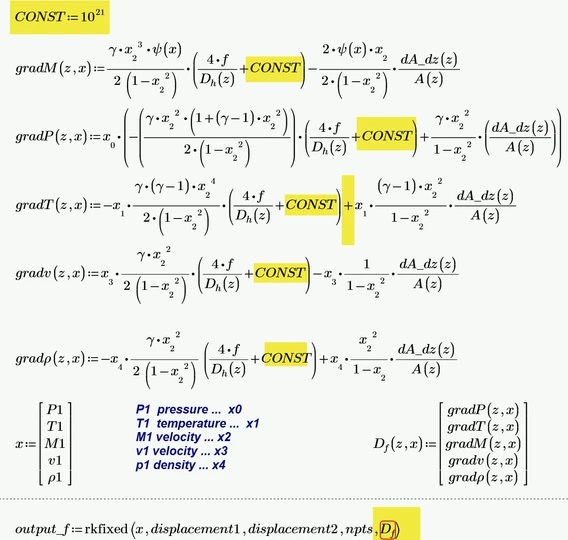
Apart from the implicit multiplication mentioned above which I guess should be a "+" these summands are the only difference from the first system which worked.

This summand is a value in the range from 10^2 to 10^23.

I replaced this expression by a simple constant of similar magnitude and rkfixed still would fail:

Werner_E_1-1762988621268.png

But as soon as I set CONST to 504 or something lower, the error goes away and we get a solution.

So I guess that the failure lies within the definition of F.drag(z). Are you sure that the magnitude this function evaluates to should be that large?


2 replies

25-Diamond I
November 11, 2025

I have no experience in your field of work but the Problem with your second 'rkfixed' failing is that rho.g is not a scalar but rather a vector with 301 elements - result of the first system of ODEs solved with 'rkfixed'.

Not sure if it makes sense but one way to make the second ODE based on the result of the first ODE system is to create a function for rho.g and use it in the definition of D.dump. Resulting values are rather large as you can see...

Werner_E_0-1762871554165.png

Numbers in the magnitude of 10^15 are in the range of the precision limit of the used IEEE number format.
Higher precision can be achieved by increasing the number of intervals. The function value for z=0.3 is now decreased by the factor 100, but the main behaviour is the very same:

Werner_E_0-1762872638138.png


5-Regular Member
November 11, 2025

Thank you so much for the help, I'm still very much a beginner using this so I appreciate it!

I also have the 2 equations above for vg and v_rel which actually change with length but only seem to output as a scalar, although if i put vg(subscript 20) it will give me a value of a vector. Do you know how I would implement this without an error outputting for the equations after it. 


MC_14395780_0-1762893903742.png


25-Diamond I
November 11, 2025

@MC_14395780 wrote:

Thank you so much for the help, I'm still very much a beginner using this so I appreciate it!

I also have the 2 equations above for vg and v_rel which actually change with length but only seem to output as a scalar, although if i put vg(subscript 20) it will give me a value of a vector. Do you know how I would implement this without an error outputting for the equations after it. 


MC_14395780_0-1762893903742.png


If you apply a vector index to v.g you should get an error, not a value  or a vector !!??

v.g is a scalar value because T is vector and also it square root is a vector. This vector is multiplied by vector M and Prime has to apply vector scalar multiplication. That's sure not what you intended. If you would like to see the correct vector, you would have to apply the 'vectorize" operator (the arrow over the expression).

Werner_E_0-1762899331228.png

But as you need the value(s) calculated via rkfixed in your second ODE, I would rather suggest that you turn all the results of the first rkfixed into functions of displacement z.

I showed how to do this with rho.g but the result of the second rkfixed was awfully wrong because this second ODE is based also on other result of the first system of ODEs.

Once you turned the rkfixed results into functions you can still use them for plotting:

Werner_E_1-1762899555623.png

But if you use any of these results in defining another quantity, you must be aware that you not defining a variable but rather a function depending on displacement z:

Werner_E_2-1762899700445.png

Doing this with all quantities solving the second ODE works OK and I think we get more meaningful results now.

Werner_E_3-1762900006999.png

You have to fix the rest of the worksheet yourself and when you got it to work I would suggest that you use one of Prime's strenghts and apply units right from the start.


Prime 10 worksheet attached

23-Emerald IV
November 11, 2025

I like your definition of the Cd parameter.

It is as though a number of symbols are dancing on the paper.


Success!
Luc

5-Regular Member
November 11, 2025

Thank you! My fractions don't always show up so my values appear to float about lol