I sure second what Vladiir had written - you always should attach your Prime sheet and also state, which version of Prime you are using.
Its not quite clear to me what you would like to ask for.
To add units you simply multiply the column with the desired unit and I would suggest assigning the result to single variables.

In the plot you will see a unit placeholder next to the expression for each axis. If you plot "Failures" over "Stress" you will already see "Pa" at the x-axis and can overwrite it with "MPa".
Scaling of the axis is implemented quite tricky and very uncomfortable. You can edit the tiny numbers you see at the axis. You can add the very first number, the last number and the second number (so you can control the step width) at each axis. In the following plot I set the first number on the x-axis to 0, the second to 20 and let the last one at its default (the hightest value in vector "Stress").
At the y-axis I changed the number format from "General" to "Decimal" to match the display in vector Cr2.
You can add horizontal and vertical markers and I add each of them by manually typing in the values 200 and 500000. Format them as needed.
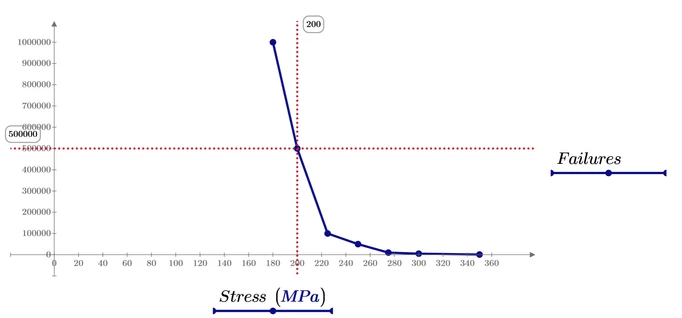
You may consider creating an interpolating function so you can calculate the number of failures depending on stress values not in the table using linear interpolation.
You can also use this function to create the plot. This time I used the expression "Stress/MPa" and "fails(stress)" in the placeholders for the vertical and horizontal markers. Prime shows the numbers nonetheless but you can see it if you click these placeholders.
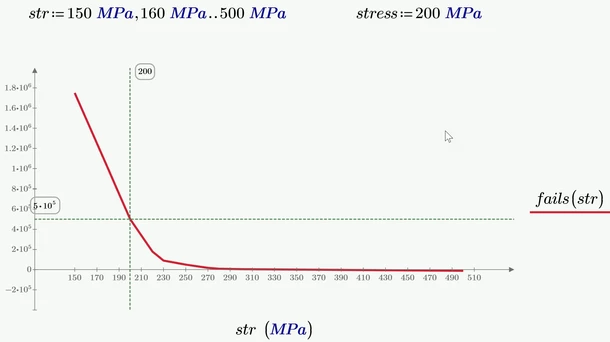
You may also use cubic spline interpolation instead of linear interpolation, but I don't see any benefit doing so
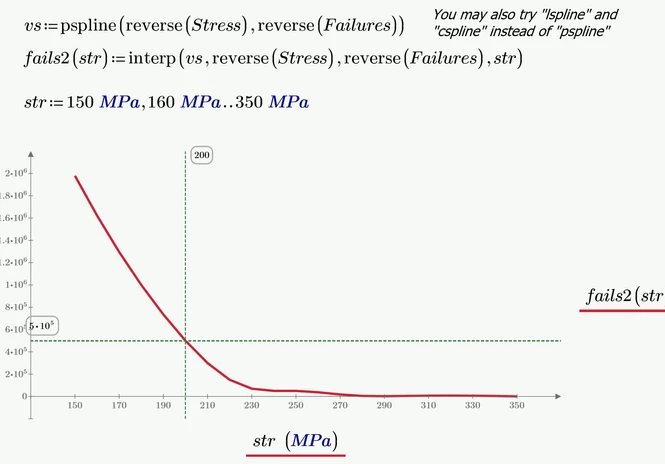
Prime 9 sheet attached


