5-Regular Member
December 2, 2013
Solved

Solve Block - Now a function of solving variable, too many arguments

  • December 2, 2013
  • 2 replies
  • 11683 views

I am wondering then how to fix this new problem. I have fixed the error for the basic file, but now I want to express the heat transfer not knowing the wall temperature but rather knowing the ambient temperature. The equations are not too bad to solve, but I'm having issues with the solve block having too many arguments after I made the functions of the variable I wish to solve for. I would like to put my conditions in as a function and get the feedback for the correct outlet temperature (assuming the thermal gradient isn't too large that the wall temperature varies greatly in the z direction along the pipe axis).

The issue is I would like to express the properties of any given substance as a function of temperature (or average temperature in most cases).

The excel spreadsheet (minus updating the properties) gives a correct answer by iterating through. The user needs to press the buttons several times until all errors are zero.

I know I can do this problem in excel or a programing language, but the outputs look messy. For my project homework I'd like to use Mathcad to express the given solution, that way it is more readily checked.

Any insight would be much appreciated.

Best answer by Werner_E

It is my impression that in Mathcad the while loop should repeat while the condition is true, and stop when it is false.

Thats the behaviour in any other programming language I know of, too.

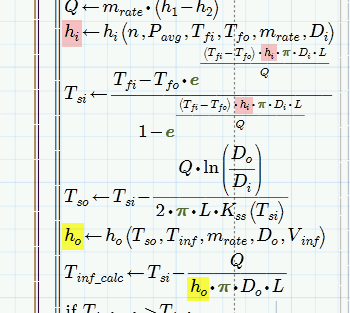
The problem is again that you use the same name for different things as you did in your other sheet.

Chose different names for the higlighted variables.

The second time your loop is executed h_i is no function anymore because you redefined it as variable in the first run and therefore the error message. Its a shame that Prime is not more helpful in finding errors in programs.

temp.png

2 replies

25-Diamond I
December 2, 2013

The problem are function definitions like the following one you are using.

02.12.png

You use a similar construction for other functions as well.

Use the error tracing in the calculation ribbon to see where the error stems from,

jroth5-Regular MemberAuthor
5-Regular Member
December 3, 2013

How do I use the error tracing? It is 'grayed out' for me, i.e. I'm not able to press any buttons.

25-Diamond I
December 3, 2013

Open your sheet, chose ribbon Calculate, click in the expression which throws the error and type F9 for recalculate. Now you should be able to use the error tracing. When you press "First" the tracing buttons are greyed out again (which should not happen) and the cursor jumps to the region I showed in my previous post.

1-Visitor
December 2, 2013

A picture of the physical configuration might be useful.

TTFN

jroth5-Regular MemberAuthor
5-Regular Member
December 3, 2013

I don't have access to a scanner currently (I'll try to upload on later).

I have a flow inside of a pipe. I want to know the outlet temperature at the end of some run. However, the heat transfer depends on the average properties (more specifically local properties), so I am calculating the heat transfer from the fluid to the pipe, the transfer of energy across the pipe, and the transfer of energy from the pipe to the ambient outside air/fluid.

Essentially, the energy lost by the fluid is equal to the energy given off to the environment for a hot flow in a pipe.

But, as i mentioned, we don't know the inside wall temperature of the pipe, nor the outside wall temperature of the pipe. If we guess the Temperature final out, we should be able to solve for the inner wall temperature of the pipe, then the outter wall temperature of the pipe, and then the ambient air. But as we know the ambient air temperature, we continue to guess the outlet fluid temperature until we have a solution, and there can only be one solution.

This is why I figured the solve block would work well for it.

1-Visitor
December 4, 2013

Yes, it should. You probably have too many variables defined. Given set convection and conduction, there is only one unknown, which is the surface temperature. The continuity relationship ensures that energy is conserved, so the delta temperatures across each interface are strictly determined by the amount of heat transferred.

TTFN

To clarify, given the thermal conductivity between the fluid and the ambient, there can only be one value of heat that simultaneously satisfies all of the individual heat flows so that the sum of the delta Ts equals the delta between the fluid and the ambient. This would be the way I would solve the problem.