1-Visitor
December 2, 2018
Solved

Solving for series of equations that include functions, derivatives, and boundary conditions

  • December 2, 2018
  • 1 reply
  • 7533 views

Hi,

I am trying to solve a beam bending problem. My end goal is to solve a problem with more complexity, but for now I have simplified it so that I can make sure I understand how to use MathCAD.

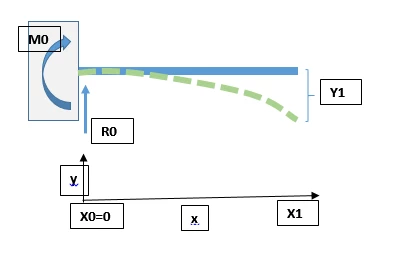
See the sketch below. I have a cantilever beam, supported on the left (at x0=0) it extends to x1. The Support reaction loads can be described as M0 and R0 which I am trying to solve for. The end of the beam is being deflected by Y1.


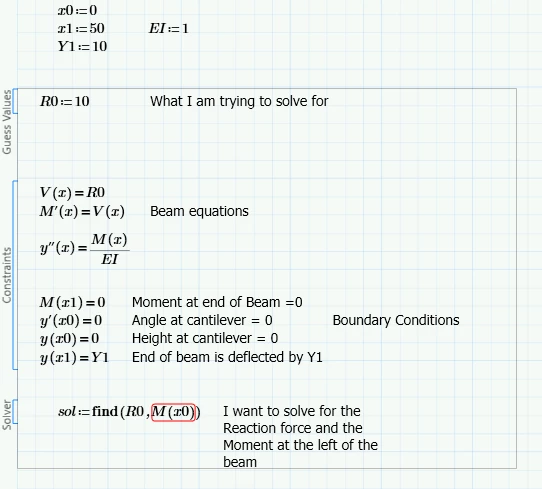
I have set up a solve block in MathCAD (Prime 2.0) as such:
 mathcad jpeg.PNGproblem snip.PNG

But I get all sorts of errors. I've been reading about different solving methods including odesolve (I guess this could be seen as a really simple ODE, as well as symbolic calculation, but I haven't gotten any to work! Can anyone help me solve this? See the Sheet attached for the example.

Cheers,

Raz


Best answer by LucMeekes

This, in the way it is shown, will definitely NOT work with any version of Prime to date, nor with any version of Mathcad other than 11.

If you need to do a lot of this kind of stuff, symbolically, you can use the symbolics of Mathcad or Prime to help you solve Differential Equations via the Laplace domain (essentially that's what my sheet in Mathcad 11 does). But it involves work by you. If you want ready symbolic solutions to DE's out of the box, then you need to resort to other applications: Maple & Mathematica are two of the most powerful I know of, you may want to check out Maxima (it's free). (Why do all names of these applications start with "Ma"?)

It so happens that the symbolic machine in Mathcad 11 is Maple. As of Mathcad 14 they replaced that with MuPad. (Ah, that one's not part of the pack!)

But... If you can live with numeric solutions, Mathcad will be your friend, and if you then need to include units as well, then Prime may be your better friend.


Success!
Luc

1 reply

24-Ruby IV
December 2, 2018

beem.pngBut I think the Odesolve function is not for a boundary problem! We must use shooting method!  

23-Emerald I
December 2, 2018

@ValeryOchkov wrote:

beem.pngBut I think the Odesolve function is not for a boundary problem! We must use shooting method!  


This is not really a boundary value problem.  If you write the second order ODE for y, you have two initial conditions y(0)=0, and y'(0)=0.  (A cantilever, fixed, end.)

Capture.PNG

He needs to think/learn about how to formulate the problem.

RazBaz1-VisitorAuthor
1-Visitor
December 3, 2018

Fred, Thank you for your help - I recreated the solution in my sheet, however I am running into some roadblocks. By the way, I really appreciate that your method includes units.


With the Euler method, I have defined the input forces (R0:=10N) and then solved for the displacement, but I am trying to do the opposite. I am trying to input the displacement at the end of the beam and then solve for the reaction force.

In other words, the boundary condition y(x1)=Y1 was not maintained.

In this case, I can decrease my initial guess for R0 to 10N*(10mm/41.66mm) and I will get the a satisfactory solution, however this recursive method may fall apart once I try to expand this solution to a more complicated beam with multiple supports.

Do you have any suggestions for how to rewire the solution to solve for the resultant force?


Thanks again for the help - by the way, how do you mean "think/learn about how to formulate the problem"? I can solve this problem by hand, symbolically, is there a way to formulate the problem in mathCAD so it can do the same?