14-Alexandrite
March 5, 2024
Solved

Starting the solution from the origin

  • March 5, 2024
  • 5 replies
  • 1554 views

I wrote a program and it works properly. The only problem is that it starts from the second value in the matrix not from the first value. How can I solve this problem?, The problem is in layer 1

2024-03-05 (1).png

Best answer by Werner_E

Similar to JTK I can' see any problem here as the routine seems to work OK. I also don't understand what exactly you mean with " it starts from the second value in the matrix not from the first value".


What I notice is:

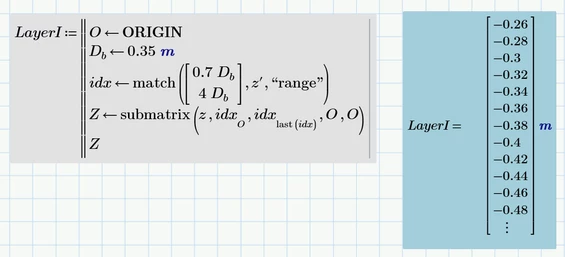
1) You formulate the calculation as a function but actually it isn't a function. The argument Z you provide has no effect! You could as well define LayerI as a normal variable!
Werner_E_0-1709653049027.png

Luc suspected hat you meant "z" as argument instead if "Z", but I thinks thats not the case as you define other variables in a very similar way as functions later in your sheet. You probably thinks that you have to provide the return variable "Z" in some way, but thats not the case. As soon as you use it in your program, its created.


2) The program looks for a specific range in a vector " z' " and returns the corresponding values from the vector " z ". But z an z' are the very same vectors just with different signs as you have defined z := z' somewhere above. Why?

You could achieve the very same effect easier using just vector z' and the "vlookup" function (Note the minus sign in front of "vlookup", which ensures the desired sign change)

Werner_E_1-1709653207076.png

If z and z' would be significantly different vectors, you could use the "lookup" function as shown here

Werner_E_2-1709653348584.png


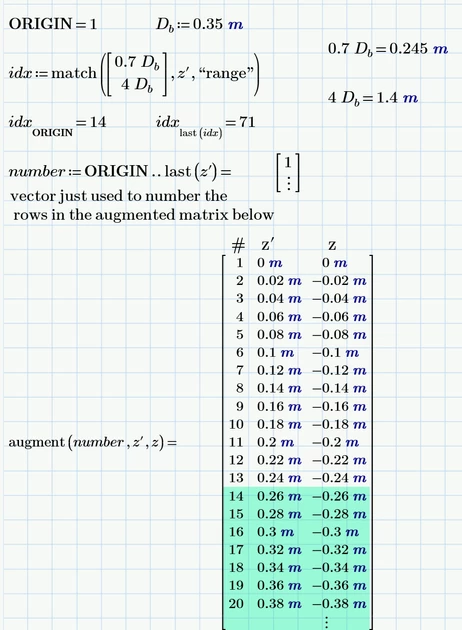
To make clear what happens and why the function works OK (at least thats what I think), you can make the calculations on worksheet level and check intermediate results:
Werner_E_3-1709653649373.png

As you can see, the 0.26m in row #14 is the first value which is in the range from 0.245 m to 1.4 m.

So why do you think that the program "starts from the second value in the matrix not from the first value" ??



5 replies

13-Aquamarine
March 5, 2024

Unfortunately, the display resolution of this board makes your screen capture unreadable.

24-Ruby III
March 5, 2024

It is better to attach your Matcad Prime worksheet to the message.

14-Alexandrite
March 5, 2024

I attached it 

13-Aquamarine
March 5, 2024

I don't see the problem ... I think. The values from the calculation shown in the first post seem to be correct. The starting value is not exactly 0.7 D as that value is between the data points. The end value is co-incident with the 4 D, so that value is included in the result.


If you need to start and end exactly at 0.7 D and 4 D, you have to test the first and last point value and add data points if necessary and likely also modify the added Z-value to the range end value.

23-Emerald IV
March 5, 2024

Your function is defined with one parameter: Z.

Inside you also use z and z' . Those are different variables 

Prime is case sensitive.


Success! 

Luc

Werner_E25-Diamond IAnswer
25-Diamond I
March 5, 2024

Similar to JTK I can' see any problem here as the routine seems to work OK. I also don't understand what exactly you mean with " it starts from the second value in the matrix not from the first value".


What I notice is:

1) You formulate the calculation as a function but actually it isn't a function. The argument Z you provide has no effect! You could as well define LayerI as a normal variable!

Werner_E_0-1709653049027.png

Luc suspected hat you meant "z" as argument instead if "Z", but I thinks thats not the case as you define other variables in a very similar way as functions later in your sheet. You probably thinks that you have to provide the return variable "Z" in some way, but thats not the case. As soon as you use it in your program, its created.


2) The program looks for a specific range in a vector " z' " and returns the corresponding values from the vector " z ". But z an z' are the very same vectors just with different signs as you have defined z := z' somewhere above. Why?

You could achieve the very same effect easier using just vector z' and the "vlookup" function (Note the minus sign in front of "vlookup", which ensures the desired sign change)

Werner_E_1-1709653207076.png

If z and z' would be significantly different vectors, you could use the "lookup" function as shown here

Werner_E_2-1709653348584.png


To make clear what happens and why the function works OK (at least thats what I think), you can make the calculations on worksheet level and check intermediate results:

Werner_E_3-1709653649373.png

As you can see, the 0.26m in row #14 is the first value which is in the range from 0.245 m to 1.4 m.

So why do you think that the program "starts from the second value in the matrix not from the first value" ??

