10-Marble
November 20, 2024
Solved

Unit_Error while solving equations using solve_block.

  • November 20, 2024
  • 3 replies
  • 2776 views

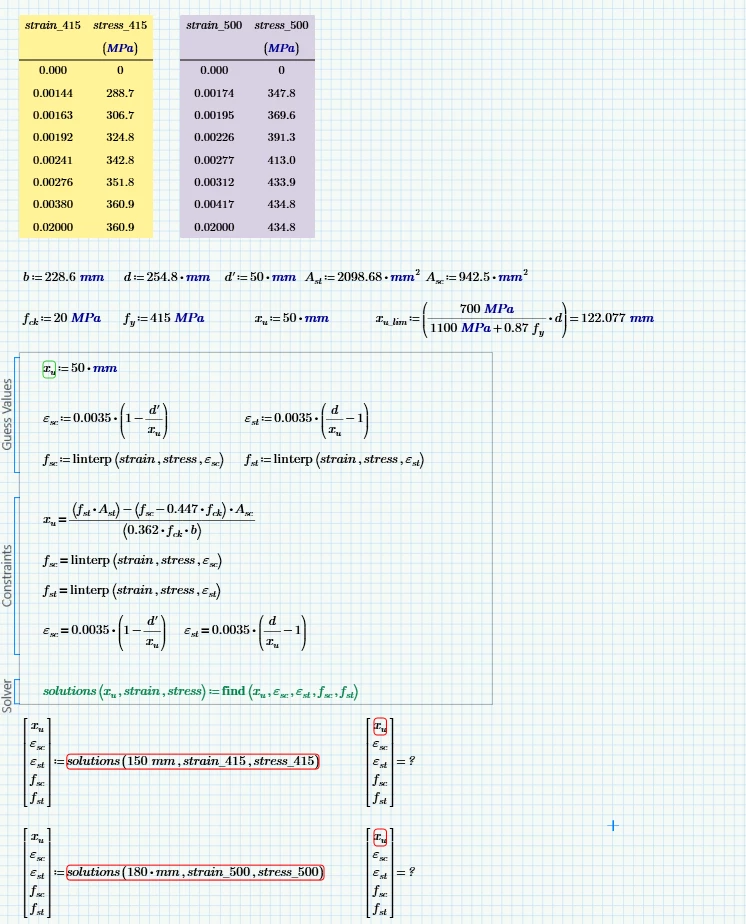
I am getting error for unit compatibility while solving equations using solve_block.

Please guide me to make correction.

thanks.Solve_Block_Unit_Error.png

Best answer by Werner_E

You are NOT working with the same values when you omit the units!!

Without units you use values like 288.7, but with units you use 288,7 MPa which is internally represented by Prime  in its base unit Pa.

So the numeric algorithm used by the solve block now uses the number 288700000.
On the other hand you use for example the number 50 for d but in the other sheet you use 50 mm, which is represented by the number 0.05 internally (base unit meter). Even worse when it comes to the areas. Unit-less value 942.5 versus 0.0009425 (m^2).

So the numbers in use when you use units cover a rather large range from very small to very large which may make a big difference concerning convergence behaviour within a limited tolerance.

So I think that's the reason why your solve block is so sensible concerning the guess values.


In the attached (unit-less) file I changed all values to the same numeric values which are used in the sheets with units.

As you can see, the calculations fail now!

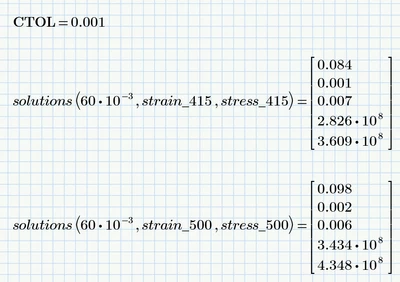
You would have to set the system variable CTOL (convergence tolerance) to a rather large value like 10^-1 (default is 10^-3) to make the solve block work again and this at the cost of precision.

OR you let CTOL at its default value and provide other/better guess values.

I found that a guess value of 60*10^-3 makes for both sets the calculation work OK
Werner_E_0-1732120156560.png

Using other guesses was already the 'solution' in the sheet with the units.

In the new sheet here I found that 60*10^-3 and also 80*10^-3 are good guesses, but the second calculation (strain_500) fails with a guess of 70*10^-3. So there is a high sensibility concerning the guesses...


BTW, the "root" function, as shown by Luc, is usually much less sensible concerning the guess value and could also be use in a second way without having to provide a guess.



3 replies

25-Diamond I
November 20, 2024

@MSRAZA wrote:

I am getting error for unit compatibility while solving equations using solve_block.


The error message I get is not about a unit mismatch! Its about Prime not being able to find a solution! ???


For some reason you are providing the guess value for x.u via the first function argument. If you want to do so, you must delete the hard coded assignment of the guess value (x.u := 50 mm).

Now the call with strain_500 returns a result, the first one with strain_415 still doesn't. Reason seems to be that your solve block calculation is very sensible with respect to the guess value. Changing the guess to 180 mm makes the first call work as well.

Werner_E_0-1732106819192.png


MSRAZA10-MarbleAuthor
10-Marble
November 20, 2024

I appreciate all that you have done for me.

But when working without units, it is working perfectly without any error.

we can verify by root function, which was shared by you.

Kindly find the attached file.

Thank you.

without_unit.png


23-Emerald IV
November 20, 2024

Did you just strip off the MPa and mm units from the definitions of your variables, or did you change the values to express them in Pa and m?

Compare your results to those of Werner and myself, and ask yourself: What would be the unit of the value(s) of xu, that you found, as the values are different?


Success!
Luc

23-Emerald IV
November 20, 2024

I see no immediate units problem. Your case seems overdetermined.

When xu is known, then both eps values are known, and also the two f values fsc and fst.

This means that basically your problem is one-dimensional for each of the two scenarios, and can be solved with the root function:

First define:

LucMeekes_0-1732105439660.png

Then setup the root function:

LucMeekes_5-1732106066918.png

Then solve for the first scenario:

LucMeekes_1-1732107389945.png

Check results:

LucMeekes_2-1732107405485.png

Now  for the other scenario:

LucMeekes_0-1732107334040.png


Success!
Luc


MSRAZA10-MarbleAuthor
10-Marble
November 20, 2024

Thank you for your support.

25-Diamond I
November 20, 2024

Thinking of a different setup as Luc has shown sure is preferable, but in cases where this is not possible and you experience similar problems, you still can use units in your worksheet but strip the units for the solve block and add them again afterwards.


Its quite cumbersome and ugly looking and not recommended, but can be done if really necessary 😉


Here is one way to do it using the example of your solve block.

Werner_E_0-1732128023781.png

Prime 10 sheet attached

