

ThingWorx Applications & External connectors
Introduction
ThingWorx Applications (RTPPM, AMU, CWC) standard data ingestion require an industrial connection between Kepware and ThingWorx. However, data aren't always available through Kepware tags. This documentation will outline the process on how to leverage data flowing by using external connectors such as an ERP system.
Requirements
- ThingWorx
- CWC, RTPPM or AMU
- SQL
- External Connector
- ThingWorx Applications properly configured
Each ThingWorx application has different data requirements, make sure to respect them:
- RTPPM: RTPPM data requirements
- AMU: AMU data requirements
- CWC: CWC data requirements
Entities Creation
When creating an external connector, some entities might need to be created. To facilitate the development and the export process it is recommended to create a custom project. This project could include all new entities created:
- Thing/ThingShape that contains the logic
- Application Keys
- User
- Other
External Connector
An external connector can either be:
- ERP
- MES
- Custom views
- External databases
- Other data sources
Communication Protocol
The recommended communication protocol used to establish the connection between ThingWorx and the external connector is a REST API.
Data Automation
For data automation retrieval, there are 2 ways that can be used:
- External Source -> ThingWorx
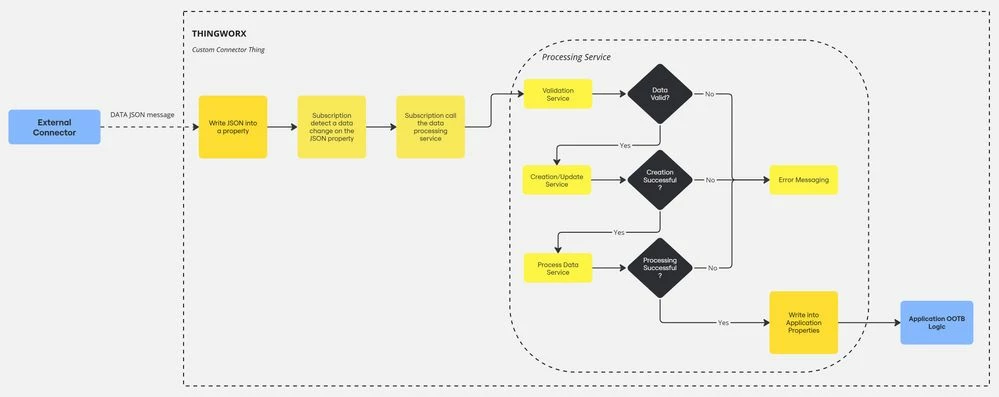
The best practice is to send messages from external sources to ThingWorx. Then subscription can be used to trigger the data processing logic.
- ThingWorx <-> External Source
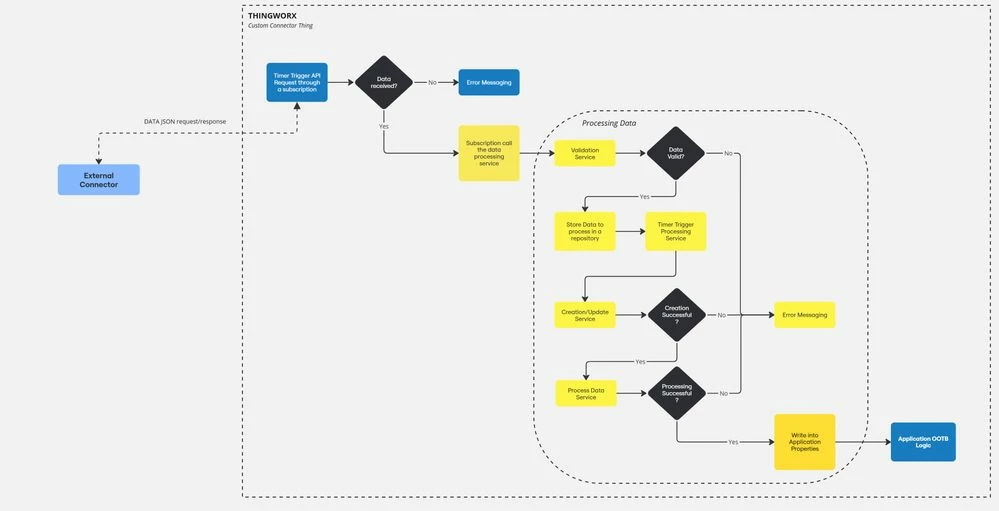
Another way is to trigger the external sources using ThingWorx timers to get the data. However, this is not recommended for performance and timing purpose.
Interface Data Retrieval
On another end, it is possible to customize out-of-the-box ThingWorx interfaces and use buttons as triggers for data retrieval. In those cases, ThingWorx will ask for data to the external sources via GET request through the REST API.
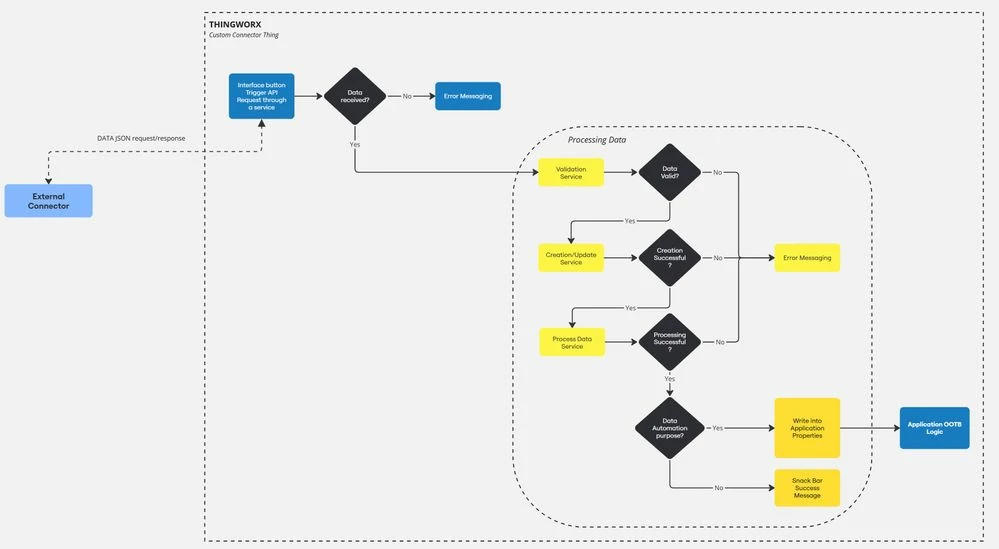
API Call
As mentioned before, REST API protocol is preferred to allow data flow between external connectors and ThingWorx. Depending on which way data retrieval is used here’s how to proceed for API call:
External Source -> ThingWorx
- Create an External Connector Thing with the ODataConnector Thing Template
- Configure the thing properly according to the external source
- Create a JSON property within the external source can write
- Create a subscription that is triggered on JSON property data change
- Create processing data services that will be called within the previous subscription
- Write data in application properties so the OOTB logic can go on
ThingWorx <-> External Source
- Create an External Connector Thing with the ODataConnector Thing Template
- Configure the thing properly according to the external source
- Create services or routes to request desired data from external sources
- Create processing data services that will call previous request data services/routes and then process the data
- Write data in application properties so the OOTB logic can go on (data automation)
- Create/Update actions (Data non application dependent)
- API Call directly in a ThingWorx service
- Use ThingWorx Snippet for GET/POST request
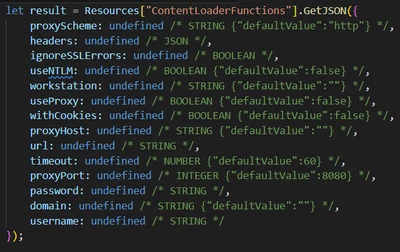
For more documentation :
Data Format
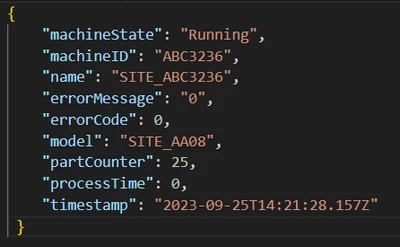
JSON universal data format is recommended to communicate between the external connector and ThingWorx. The JSON structure must be consistent and must contain key data that will allow to associate external data with the proper equipment, tool, site, etc.
Example of JSON structure
Processing Data
- Data Validation
- Make sure that the information received from the connector are properly formatted, valid and that they can be linked to existing data in the database (equipment, product, etc.).
- Data Creation/Update
- If needed create/update record in the database
- Write into ThingWorx properties
- Data received from the connector need to be written in the proper application property so the out-of-the-box subscriptions can detect a data change as they would have if the property would have been connected to a Kepware tag.
- Out-Of-The-Box Logic should do the rest.
Note that it is highly recommended to log error message to facilitate troubleshooting. Those messages should include the error section and the JSON message received.