
1-Visitor
February 7, 2013
Question

Creating a curve between two planes

  • February 7, 2013
  • 2 replies
  • 8171 views

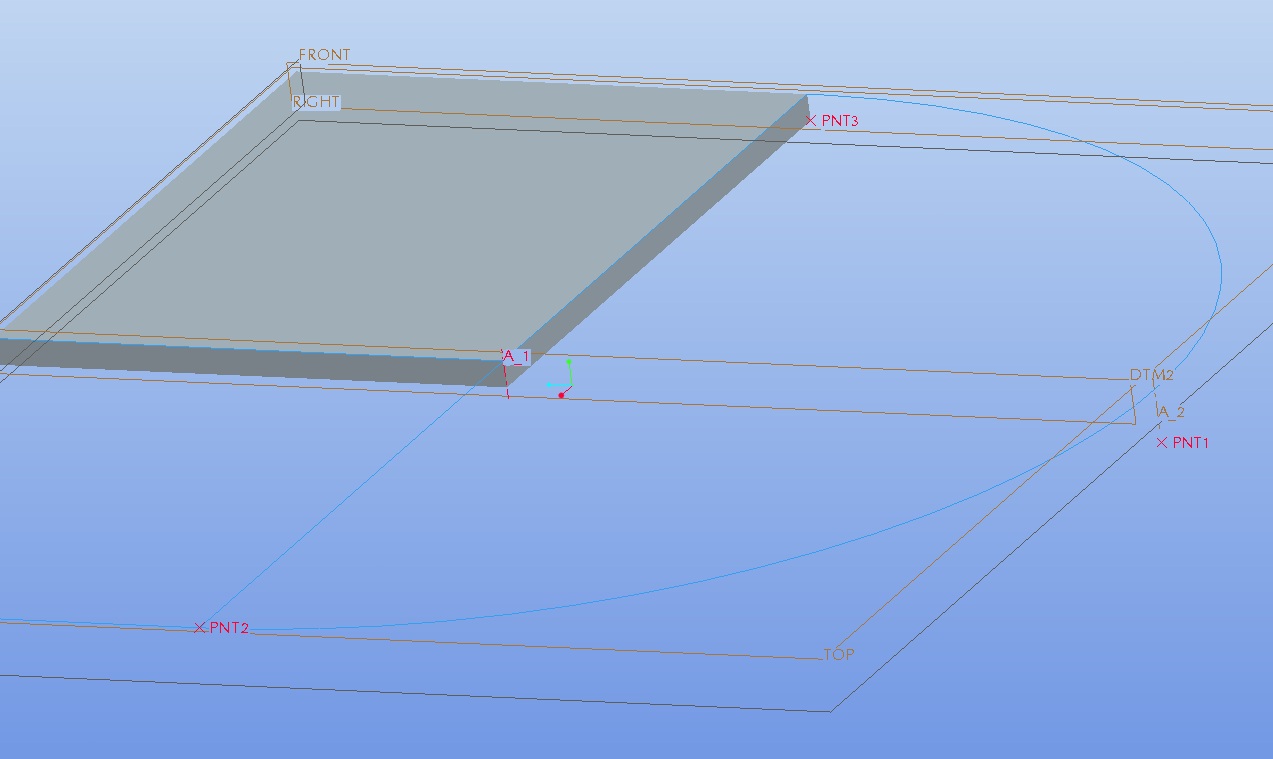
I want to create a revolved surface rotated 90 degrees, the starting point is on one plane and the end point is on another plane. How can I create a revolved surface with the top going between these two points. I've added a picture to try to illustrate what I'm trying to do. This is probably very simple, I just haven't used ProE in a while.
revolve.jpg

So the axis of rotation is the highlighted axis A1. The points are the two closest points point 1 and 2 I believe. So the revolve will go from the point 2 to point one which is a 12 inch drop while the axis will stay the same.

2 replies

1-Visitor
February 7, 2013

I don't know exactly what you are trying to achieve, but hopefully this response will help.

Generally speaking, to create a revolve feature you need two things: A sketch (either internal or external) and an axis. You already have the axis, so you just need the sketch. You mention that you want the revolve to go from point 2, to point 1. Practically speaking, there is no difference in making the revolve go from point 2 to point 1, or to go from point 1 to point 2 (unless design intent dictates otherwise).

Just by looking at the photo, I'm guessing that you will want to make the sketch defining the shape of the feature on the plane DTM2 and select axis A_1 as the revolve axis. Once that is done you can specify that you want the revolve to to travel 90 degrees, or you can click the option to have the revolve stop at a specific point, and select point PNT2.

Is this what you were looking for?

1-Visitor
February 7, 2013

No. Let me try to explain better. In this image I've attached I've drawin the cross section I want to revolve. Notice that point 1 is on a lower plane than point 2. A revolve will simple rotate this around the axis. I want to rotate this about that same axis but I want it to also slide up to the top plane. So in addition to revolving I want it to slide upwards...does that help at all?

revised.jpg

Think of the rotation as a 90 degree section of a helical coil. I want this profile to follow a helical profile.

Patriot_1776
22-Sapphire II
February 7, 2013

Like I said, helical. So, you want the location on the axis to stay the same, but make the cross section change from a rectangle to a parallellogram?

Like I said, it depends on what end conditions are desired. Should the arc you show be tangent to the plane at both the start and end?

Patriot_1776
22-Sapphire II
February 7, 2013

I THINK he wants a helical feature. Depends on the geometry you really want. What should the ends look like? It's an ambiguous question.