
1-Visitor
July 20, 2015
Solved

Creo 3.0 Toolkit Fatal Error encountered

  • July 20, 2015
  • 2 replies
  • 4015 views

Hi everyone, I've been having a big problem trying to display a model in creo with TOOLKIT on my computer.Following is my programm:


#include "stdafx.h"

#include "ProToolkit.h"

#include "ProCore.h"

#include "ProMdl.h"

#include "ProUtil.h"

#include "ProWindows.h"

#include <ProTKRunTime.h>

int main()

{

  char *a_char_ptr;

  a_char_ptr= "C:\\Program Files\\PTC\\Creo 3.0\\M010\\Parametric\\bin\\parametric.bat";

  ProError i= ProEngineerStart(a_char_ptr,"");

  ProError status;

  ProPath Mdlpath;

  ProType MdlType;

  ProMdl *Mdl;

  ProMdlName MdlName;

  int *w_id;

  ProStringToWstring(Mdlpath,"C:\\Users\\fsd_proe\\Documents\\bauteil1.prt");

  status =ProMdlFiletypeLoad(Mdlpath,PRO_MDLFILE_UNUSED,PRO_B_FALSE, Mdl);

  status=ProMdlTypeGet(Mdl,(ProMdlType*)&MdlType);

  status=ProMdlMdlnameGet(Mdl,MdlName);

  status= ProObjectwindowMdlnameCreate(MdlName,MdlType,w_id);

  status=ProMdlDisplay(Mdl);

  ProTKPrintf("Well done!");

  return 0;

}

The function "ProEngineerStart" works well, I can open creo without problem. However when I try to display a model, a window pops up that says:
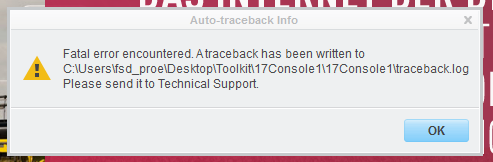
traceback.PNG

According to this link Re: Creo 2.0 Parametric Fatal Error encountered, I have insert a config.pro file in the directory containing traceback.log, i.e. C:\Users\fsd_proe\Desktop\Toolkit\17Console1\17Console1. But it doesn't work. In the directory C:\Users\Public\Documents, it doesn't work either.  My computer is belonging to my university and Creo is installed under username as shown above and I work also in under this username.

My OS is win7 64bit and my image card is

Grafikkarte.PNG

Any help would be much appreciated! Thanks a lot!


Christian


This thread is inactive and closed by the PTC Community Management Team. If you would like to provide a reply and re-open this thread, please notify the moderator and reference the thread. You may also use "Start a topic" button to ask a new question. Please be sure to include what version of the PTC product you are using so another community member knowledgeable about your version may be able to assist.
Best answer by sully7

The error is with your toolkit code.

Try this:

int main() {

  char *a_char_ptr;

  a_char_ptr= "C:\\Program Files\\PTC\\Creo 3.0\\M010\\Parametric\\bin\\parametric.bat";

  ProError i= ProEngineerStart(a_char_ptr,"");

  ProError status;

  ProPath Mdlpath;

  ProType MdlType;

  ProMdl Mdl; // not a pointer

  ProMdlName MdlName;

  int w_id; // not a pointer

  ProStringToWstring(Mdlpath,"C:\\Users\\fsd_proe\\Documents\\bauteil1.prt");

  status =ProMdlFiletypeLoad(Mdlpath,PRO_MDLFILE_UNUSED,PRO_B_FALSE, &Mdl); // fills the address of the ProMdl

  status=ProMdlTypeGet(Mdl, (ProMdlType*)&MdlType);

  status=ProMdlMdlnameGet(Mdl, MdlName);

  status= ProObjectwindowMdlnameCreate(MdlName, MdlType, &w_id); // fill the address

  status=ProMdlDisplay(Mdl);

  ProTKPrintf("Well done!");

  return 0;

}

As a side note, if it generates a traceback.log file, and your code has a .PDB file, it should show you the line at which your code causes the failure.

2 replies

1-Visitor
August 5, 2015

It is good practice to always check the return value of the functions before continuing with the application (at least until you can be sure everything works under any condition)

e.g. what happens, if ProMdlFiletypeLoad() doesn't return a handle to the model for whatever reason?

Regards,

Gunter

sully714-AlexandriteAnswer
14-Alexandrite
April 1, 2016

The error is with your toolkit code.

Try this:

int main() {

  char *a_char_ptr;

  a_char_ptr= "C:\\Program Files\\PTC\\Creo 3.0\\M010\\Parametric\\bin\\parametric.bat";

  ProError i= ProEngineerStart(a_char_ptr,"");

  ProError status;

  ProPath Mdlpath;

  ProType MdlType;

  ProMdl Mdl; // not a pointer

  ProMdlName MdlName;

  int w_id; // not a pointer

  ProStringToWstring(Mdlpath,"C:\\Users\\fsd_proe\\Documents\\bauteil1.prt");

  status =ProMdlFiletypeLoad(Mdlpath,PRO_MDLFILE_UNUSED,PRO_B_FALSE, &Mdl); // fills the address of the ProMdl

  status=ProMdlTypeGet(Mdl, (ProMdlType*)&MdlType);

  status=ProMdlMdlnameGet(Mdl, MdlName);

  status= ProObjectwindowMdlnameCreate(MdlName, MdlType, &w_id); // fill the address

  status=ProMdlDisplay(Mdl);

  ProTKPrintf("Well done!");

  return 0;

}

As a side note, if it generates a traceback.log file, and your code has a .PDB file, it should show you the line at which your code causes the failure.

1-Visitor
April 14, 2016

James is right about the wrong levels of indirection!

I am marking his answer as Correct on behalf of Christian (it's a while back he filed the question, so probably found the error anyway)