14-Alexandrite
January 10, 2019
Solved

Does Creo 4 require server admin permissions (for network installation)?

  • January 10, 2019
  • 1 reply
  • 41152 views

It seems that I cannot get around the requirement to "have the Microsoft Universal C Runtime in Windows installed on the ... network computer where [I] want to install Creo software."  As quoted from page 13 of the "Preparing to Install Your PTC Software" document.  Unfortunately that is a significant change for me from Creo 2 & Creo 3.


With Creo 2 & 3, I was able to take a local installation, copy it to a (server) shared network location, and simply modify the PSF file(s) to make Creo 2 & 3 available to a large number of people.


With the introduction of the CREO_AGENT_LDP_LIST and the genlwsc.exe process with Creo 4, I can't get Creo 4 creoagent.exe to properly initialize (since genlwsc.exe won't start).  I believe this must be due to the prerequisite to have Universal C Runtime installed on the "network computer where [I] want to install Creo software."  Now I need either server admin privileges to install the C Runtime on the server, or I need desktop admin privileges to install creosvcs_64.exe on 40 workstations (which defeats the purpose of network installs).


USERS:

Is anyone else's experience different? 

Am I wrong about needing the Universal C Runtime installed on the server? 

Is there a simple way to "sell" this to a server admin?


Just thought I'd float the question while I start the task of educating IT of the benefits of installing Creo on the network and waiting for someone to be assigned to help me.


PTC:

Again, am I wrong about needing the Universal C Runtime installed on the server? 

It has been extremely favorable to have Creo (ProE) unencumbered by the operating system (Windows, Unix, etc.) all these years (decades, really). Any chance you can reverse this requirement?


Best answer by TomU

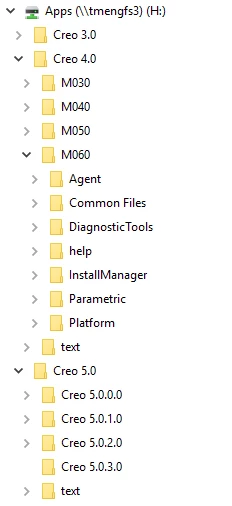
I install it locally on my workstation and then copy it to the server.  I used to install with the default path (C:\Program Files\PTC\...) but then I was forever using Notepad++ to change paths in all the different .bat files to match the mapped drive letter and the server's folder structure.  Now I just disconnect my mapped drive and recreate a new temporary mapped drive to a folder on my local computer that has the same folder structure and drive letter as the server.   I install the program, configure everything, and then copy this folder to the server.  I then uninstall everything from my local computer, remove the locally mapped drive, and remap the drive to the server.


One of the benefits of setting these path variables is that I can adjust their positions in the folder structure to my liking.  I keep a separate copy of the Creo agent for each build code of Creo.


Quality Agent Path.PNG


Environment Variables.PNG


Folder Structure.PNG

1 reply

23-Emerald IV
January 10, 2019

You don't need anything special installed on the file server.  I have all versions of Creo running from read only mapped network drive to a file server.  Nothing Creo related runs on the server.  You may need the runtime installed on the local user's computers.  Make sure you are copying the Creo Agent to the file server as well...

14-Alexandrite
January 14, 2019

Thank you @TomU for the reply.

I have the runtime installed locally on my machine.  Do you install Creo on your server or do you install it on a workstation, then copy to the server?  I can only copy from my workstation to the server.


If I use a local path for CREO_AGENT_LDP_LIST and keep a server path for CREO_AGENT_EXE_PATH, it works fine.  The genlwsc.exe process shows in task manager as a local image path, while creoagent.exe shows as a network image path. Any other combination, including the preferred method of installing nothing on the local workstation, does not work. It's a shame because that method has worked for a very long time.


I may have to resort to a silent install of the Creo Platform Services (creosvcs_64.exe) on all the workstsations.

TomU23-Emerald IVAnswer
23-Emerald IV
January 14, 2019

I install it locally on my workstation and then copy it to the server.  I used to install with the default path (C:\Program Files\PTC\...) but then I was forever using Notepad++ to change paths in all the different .bat files to match the mapped drive letter and the server's folder structure.  Now I just disconnect my mapped drive and recreate a new temporary mapped drive to a folder on my local computer that has the same folder structure and drive letter as the server.   I install the program, configure everything, and then copy this folder to the server.  I then uninstall everything from my local computer, remove the locally mapped drive, and remap the drive to the server.


One of the benefits of setting these path variables is that I can adjust their positions in the folder structure to my liking.  I keep a separate copy of the Creo agent for each build code of Creo.


Quality Agent Path.PNG


Environment Variables.PNG


Folder Structure.PNG