
Solved
About "extension-snap"
■Q7:Under sketch mode, How to turn on the "extension-snap" of LINE_F to make the POINT_K pass through or make it align the extension?
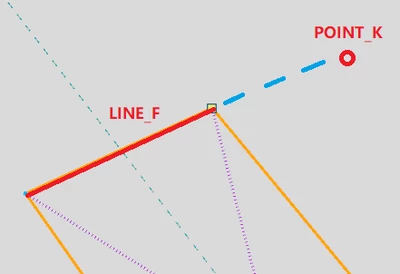

■Q7:Under sketch mode, How to turn on the "extension-snap" of LINE_F to make the POINT_K pass through or make it align the extension?
Thank you for providing this interesting observation regarding difference in cases AD vs. BC. I never noticed this but then I prefer to apply the constraints after "freehand sketching" - as often the system assumes something I don't intend.
Anyway, note that constraints that the system will "assume" while you are creating entities in sketch mode are configurable (via the options menu, Sketcher section).
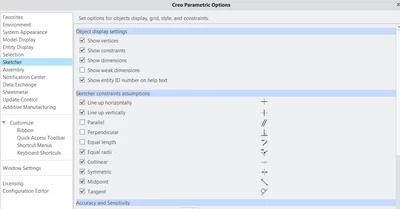
Also, you can disable / enable constraints "on the fly" - read the status line as you are using sketch tools as there is often "hidden" functionality to be discovered.

If the "coincident" / "colinear" constraint is one of the assumed constraints, then the following technique will work regardless of whether you are trying to align to an open-ended line or a side of a closed loop:
1) start sketching your entity and hover above the line to which you are trying to "snap":
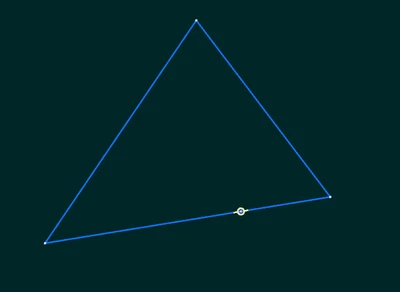
2) right-click to "lock" the constraint
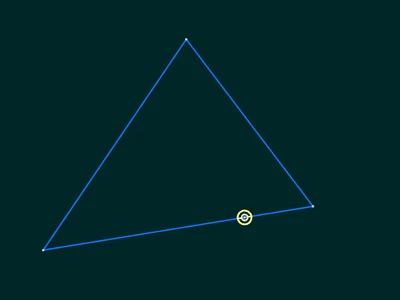
3) position your point in the intended position. you should see the "locked" constraint continues to be assumed:
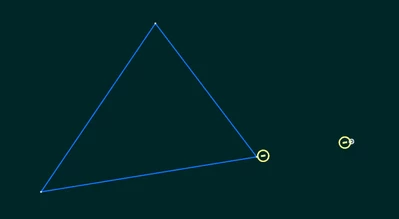
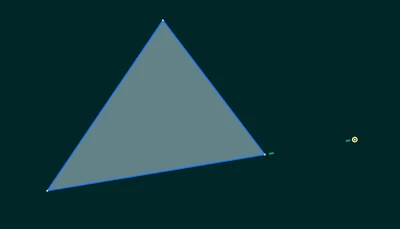
4) finish placing your point and the coincident constraint has been imposed:
Enter your E-mail address. We'll send you an e-mail with instructions to reset your password.