
10-Marble
October 17, 2023
Question

Activated parts transparency hides holes/outlines

  • October 17, 2023
  • 3 replies
  • 2355 views

When I activate parts in Creo 10.0.1.0 the transparency hides holes/oulines of other parts. Here is an example. None of the holes are shown, once I active the lower plate. Is there any way to change that?
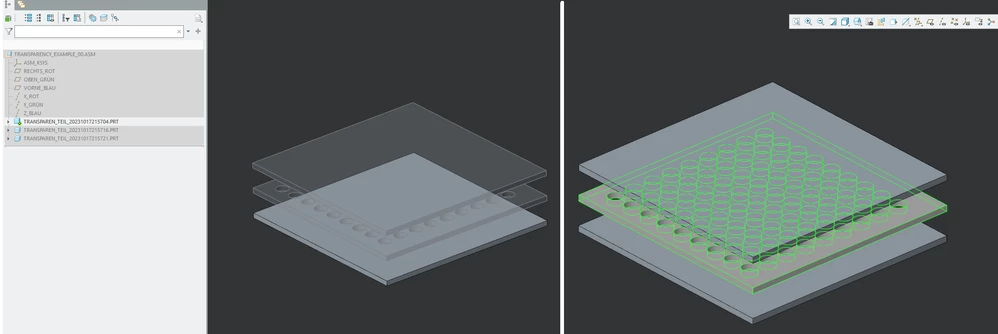
creo10activatedPartTransparency.png

3 replies

24-Ruby III
October 18, 2023

Hi,

in Creo 10.0.0.0 I can't reproduce the problem.

MartinHanak_0-1697616552911.pngMartinHanak_1-1697616593163.png


10-Marble
October 18, 2023

The problem appears when there are other inactive parts in front of that. Example:

Creo 10

creo10activatedPartTransparency_10.png


Here the difference to Creo 2:

creo10activatedPartTransparency_2.png


24-Ruby III
October 18, 2023

Hi,

I am able to reproduce your "problem" even in Creo 7.0. I think Creo works the way "as designed". Please contact PTC Support and discuss the problem with them.


Note: Your cylinder is hidden behind grey plate and therefore it is invisible. If you if you reduce the size of grey plate then you will see the end of cylider

23-Emerald III
October 18, 2023

You can turn off the "dimming" of the inactive components using

dim_inactive_components never

I don't think this is what you want to do but just thought I would suggest it.

17-Peridot
November 15, 2023

Pls subscribe to this article : https://www.ptc.com/en/support/article/CS405148