
13-Aquamarine
March 4, 2025
Question

Align freestyle shape to facet model

  • March 4, 2025
  • 5 replies
  • 895 views

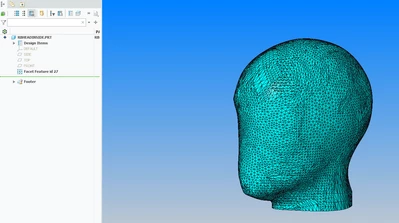
I am using Creo 9 and trying to align freestyle shape(s) to facet feature; not finding any way to do this.

my goal is to make smooth shape from stl feature then be able to "shell" the model
 

rburk_0-1741119726823.png

any help is greatly appreciated

thanks

Rich

5 replies

tbraxton
22-Sapphire II
22-Sapphire II
March 4, 2025

Check out the functionality of the restyle module for Creo. It has some functions that will help meet the objective.


About Restyle (Reverse Engineering)


Two that you will likely find very useful (.stl= faceted data):


Fit freeform surfaces to faceted data.
Automatically create spline surfaces on faceted data.
12-Amethyst
March 30, 2025

I don´t know how to make smooth shape, but you can change your display style to shading with reflexion or shading.

It can hide those black edges.

ZX_10618597_0-1743344822239.png


16-Pearl
March 31, 2025

Hi @rburk 

Try using the Attach option.

ProFeature_0-1743409034086.png


13-Aquamarine
March 31, 2025

Hi @rburk 


Your mesh is not a manifold

Y_Yoely_0-1743424952649.png


Community Manager
April 20, 2025

Hi @rburk,


I wanted to see if you got the help you needed.

If so, please mark the appropriate reply as the Accepted Solution. It will help other members who may have the same question.
Please note that industry experts also review the replies and may eventually accept one of them as solution on your behalf.
Of course, if you have more to share on your issue, please pursue the conversation. 


Thanks,
Anurag