12-Amethyst
April 22, 2024
Solved

Angular circle ?!

  • April 22, 2024
  • 3 replies
  • 4700 views

Hello,


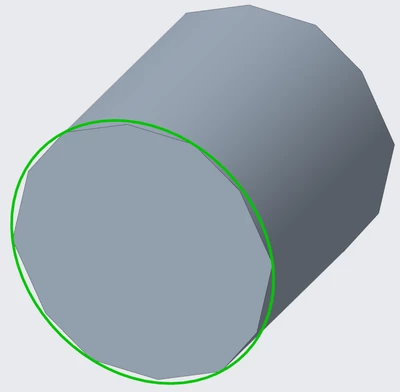
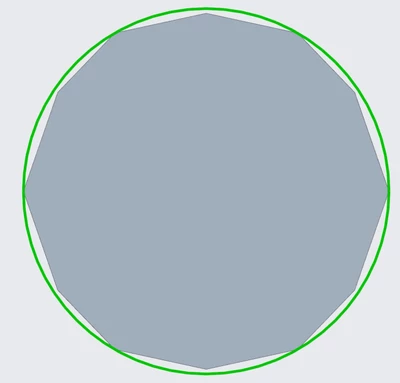
how can I setup the amount of flanks for a circle?
2024-04-22_120053.png

2024-04-22_120113.png

Since I am using creo 9 that behaviour is "new". When I used 6 it wasn´t doing this - most probably the setup was correct. 
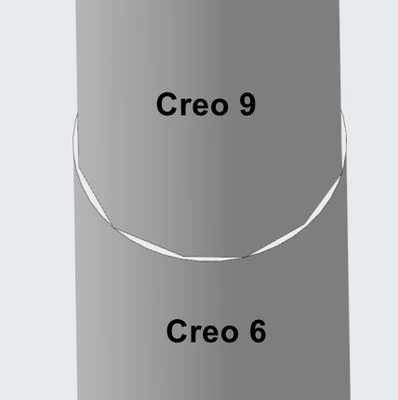
2024-04-22_120257.png

I am sure its an easy fix. thanks in advance.


P.S. Yes, I searched for a similiar topic but didnt found it either in www nor in this forum.

Best answer by kdirth

Model accuracy is a setting in the model: File > Prepare > Model Properties > Accuracy

3 replies

21-Topaz II
April 22, 2024

It's a graphics setting within Creo. The geometry is a precise circle, you're just seeing how it is rendered when the visualization settings are somewhat low.

https://community.ptc.com/t5/3D-Part-Assembly-Design/How-to-change-the-circular-line-and-arc-resolution-in-creo/td-p/308855 

12-Amethyst
April 22, 2024

thanks for the hint - I tried the settings in the post but I have the feeling that I gets worse. I tried some values (15, 30, 50, 1) especially for shade_quality but no very noticable change. I am using the HP ZBook Studio G9 - I cant imagine that the problem is the hardware...


The strange thing is the third pic in my post - a creo 6 model is rendered nicely but in the same time and same dimensions a creo 9 model is rendered not so nice. Surely its just for me strange and there is a explanation to it.


Thanks for trying to help.

23-Emerald III
April 22, 2024

Be careful with shade quality setting. I changed it to a larger number and it made working with my large assemblies impossible.

I went back to a setting of 3, which is the default (at least in Creo 6 and previous)

tbraxton
22-Sapphire II
22-Sapphire II
April 22, 2024

Try reducing the model accuracy to a tighter value and report back if this changes the display. If you have a high aspect ratio part (length of cylinder is very long compared to the radius of cylinder) then this can influence the nature of the rendering of the geometry.


You can also set the length of the cylinder equal to the diameter and see what happens.

12-Amethyst
April 22, 2024

I searched for the variable "accuracy" in the config editor and found some but I think only "accuracy_lower_bound" is what I am searching for?! this was already on 0,000001. I think I am in the wrong settings. ðŸ˜•


tbraxton
22-Sapphire II
22-Sapphire II
April 22, 2024

One key point in the context of what you are asking: Are your parts using absolute accuracy or relative accuracy? If you are not familiar with the difference, then you will need to understand this concept. Creo 7+ has implemented absolute accuracy out of the box but if you are using start parts that use relative accuracy then this can cause problems for you.


What is being suggested here is that you lower the absolute accuracy of your part. If the part is using relative accuracy and you are working in Creo 9 then you should immediately update your start parts to use absolute accuracy and not relative.

kdirth
21-Topaz I
21-Topaz I
April 22, 2024

Part accuracy can also cause the same visual effects.  Below, the left cylinder (Ø10 x 10) has an absolute accuracy of 0.1 and the right is 0.001.  Relative accuracy will also make a smoother circle on small parts.  Starting Creo 7.0, absolute accuracy became default.

kdirth_0-1713787157743.png


There is always more to learn.
12-Amethyst
April 22, 2024

Thank you too, I changed the value in the settings (File > Prepare > Model Properties > Accuracy) from 0.015 to 0.001 and thats what I searched for! ðŸ˜€

When I restarted creo to see if it saved the settings I saw that the default value was back. Because those are the model properties I assume that I have to set up the value each and every time when I start creo?


Sorry for my novice knowledge - I normally work with a different CAD environment. 


Thanks in advance.

tbraxton
22-Sapphire II
22-Sapphire II
April 22, 2024

The model accuracy is saved with the part model.