
16-Pearl
January 20, 2016
Question

Another workaround for 3-side surface

  • January 20, 2016
  • 6 replies
  • 11496 views

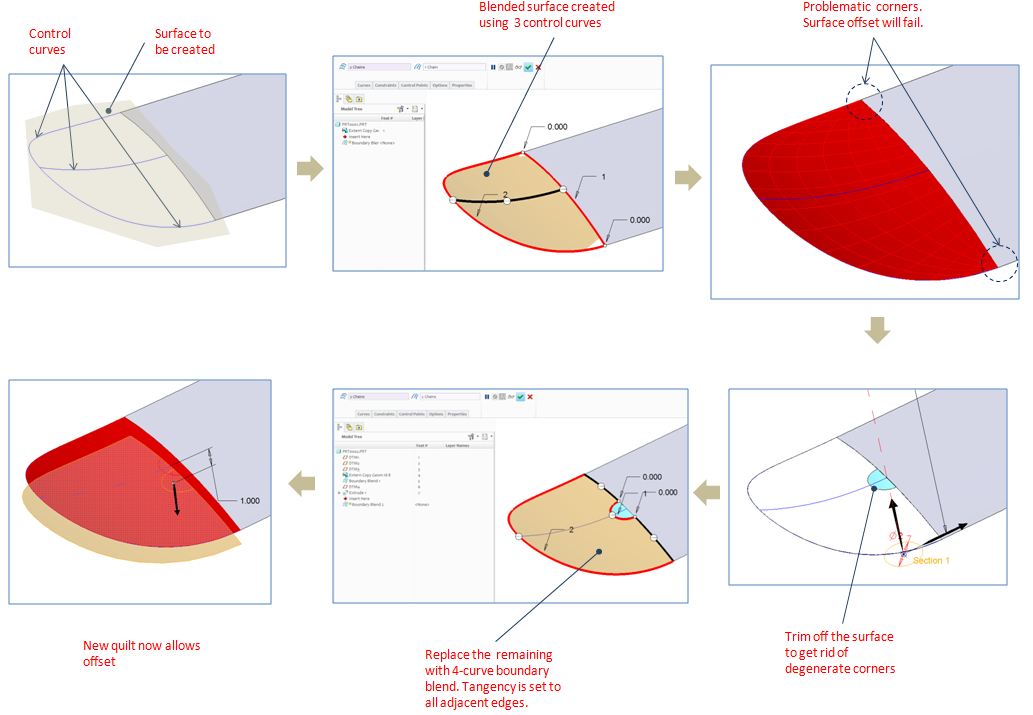
Hi, i just learned and would like to share with you another way to create an offsetable surface from 3 boundary curves. I welcome your comments, or better still, other better workarounds you might have. I attached here the creo 2 file for yr reference.
Capture.JPG

6 replies

17-Peridot
January 20, 2016

Interesting concept... create the Patch first

15-Moonstone
January 20, 2016

Don't want to sound pretentious, but that is an old hat.

BHOoi16-PearlAuthor
16-Pearl
January 20, 2016

Thanks, Constatin. I would like to learn new and better ways. Any new tricks to share?

15-Moonstone
January 20, 2016

Hi,
In this case you might want to try the 'influencing curve' under 'Options' in the boundary blend.
It 'magnets' the surface to the selected curve with the ability to control the influence.
The influencing curve can run in direction one or two or connect one and two!

influence.jpg

12-Amethyst
January 20, 2016

I believe that splitting the big control curve in two is enough to get it done.

Watch my video. I did it first splitting the curve and second without splitting.

Just another way to do it.

Jose

17-Peridot
January 21, 2016

And don't overlook the lowly boundary blend.  With careful reference management, it can close ends nicely.

BHOoi16-PearlAuthor
16-Pearl
January 21, 2016

Hi, Antonius. I have few questions regarding your approach:

1. what is the purpose of sweep 2 feature? (45 deg is the intent?)

2. Why do you need to set C2 continuity along the bottom edge.

3. In this model, i could have just created it using boundary blend alone(without sweep). what is the difference?

Thanks

1-Visitor
January 21, 2016

if you`re lucky to have ISDX, Style feature in Creo2 will solve this for you.

3 sided surf.JPG

Even 5 sided boundaries are handled surprisingly well. I checked, result are very welcome.

5sided surf.JPG

1-Visitor
January 21, 2016

please follow some of my tutorials which at the end should faciliate evryone solving such issues in the future

https://drive.google.com/folderview?id=0B60eG4B19bE4VWpjaFlBNlZuMzg&usp=sharing

I encourage you to to check the one below

https://drive.google.com/file/d/0B60eG4B19bE4RTFtcVF0UU1ta0U/view?usp=sharing

BHOoi16-PearlAuthor
16-Pearl
January 21, 2016

Question: Is it possible to use  style option "trimmed rectangle" to create all the triangle surfaces in yr tutorials ? In that case, we don't even have to worry about other methods.

1-Visitor
January 21, 2016

take into account that less people than more owns ISDX license(simple put: it costs a lot!). Even if you have one, there is high maintanance to be paid yearly while there no much new features developed from iteration to iteration.

plus, this option as far as I am aware is available since Creo 2, not before.

I think one should still consider making 5 sided boundaries manually if high surface quality is required. ISDX solves these issues well, but not best.

1-Visitor
January 21, 2016

With all these techniques, you could hardly see the differences. You should model to how the geometry would exist in real life. How would the geometry be so it looks smooth in real life?

You want a nice curve around the outside and define how it scoops up.

BHOoi16-PearlAuthor
16-Pearl
January 22, 2016

Agreed. Different techniques do allow me for more options when dealing with different geometrical needs. True, the final shape counts.