
14-Alexandrite
May 4, 2016
Solved

Assembly model scale

  • May 4, 2016
  • 2 replies
  • 10719 views

Hi,

I would like to change the model scale of a whole assembly (Creo2)

Model \ Operations \ scale Model

> entering a scale value (1.5)

> confirmation (Yes)

This don't have any effect. So we have to change scale part after part.

Then, if this operation is not possible on an assembly, strange to see this option is available in assembly mode.

Is there any manner to do this ?

Thanks,
Best answer by StephenW

Don't use that scale. It will only work part by part.

You may be able to use a UNITS change to accomplish this.

Go to file, prepare, model properties and adjust the units, if you can set the units change to accommodate your needed scale.

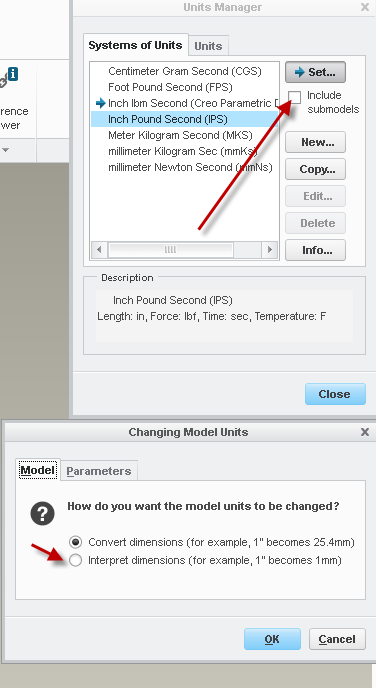
First unit change would be to "interpret" the dimensions (1" becomes 1.5 units).

Second unit change would be back to the "convert" back to the desired units (1.5 units becomes 1.5")

I just don't know if you can make it work for any scale factor or if it has to be only a real units change, which wouldn't work for you.

I know it's not a good explanation but you might want to experiment with it to see if you can get something to work.

2 replies

kdirth
21-Topaz I
21-Topaz I
May 4, 2016

The option in the assembly would control dimensions created at the assembly level such as offset datums, assembly constraints, and assembly cuts.

There is always more to learn.
StephenW23-Emerald IIIAnswer
23-Emerald III
May 4, 2016

Don't use that scale. It will only work part by part.

You may be able to use a UNITS change to accomplish this.

Go to file, prepare, model properties and adjust the units, if you can set the units change to accommodate your needed scale.

First unit change would be to "interpret" the dimensions (1" becomes 1.5 units).

Second unit change would be back to the "convert" back to the desired units (1.5 units becomes 1.5")

I just don't know if you can make it work for any scale factor or if it has to be only a real units change, which wouldn't work for you.

I know it's not a good explanation but you might want to experiment with it to see if you can get something to work.

1-Visitor
January 30, 2018

Using Creo 3, I'm not getting the option to go 1:1 with submodels checked. Since I'm working with an assembly of several hundred parts I'd rather not scale them individually! Any new information to share with the masses?

1-Visitor
January 30, 2018

Poor memory on what the screen said from me... See attachment.


Also, I imported it as a part, instead of an assembly.