

BOM Qty w/ Nested Repeat Region
Hopefully you guys can help, because I'm sure there is an easier way than we are doing this.
We have assemblies that ship along with bagged up extra hardware. In a lot of cases we also call out hardware that will be required but we are not providing. This has been an annoying task for us, but we have been successful in most regards. The main issue lies when the same hardware is used in the assembly and also is shipped loose.
Currently we create one BOM that lists the parts/hardware that is assembled in the shop. We then place a separate BOM for each ship loose pack on the next sheet, filter out all shop assembled items, and flatten this pack.

This works unless some of this hardware is also in the top level, because it then merges with it and will not appear in this BOM. The BOM above represents (16) assemblies of a nut, screw, lock, and (2) flat washers. These all get thrown in a bag with a label for shipping.
What I would like to do is created a Nested Repeat Region that filters the BOM for only items with "~~~" in the description (that's how we designate items that aren't assembled) and then be able to show the total quantity of items that are going in each bag.
I've accomplished all of this except the total quantity. What I have is the quantity of the assembly and then of each item in that assembly. Although it is technically right, it isn't what we need.
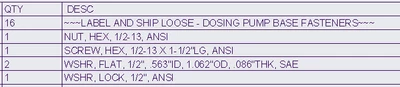
Is there a Repeat Region relation that I can use to tell it to multiple all part quantities by the assembly quantity and list that in a new parameter that I will assign to that column? (part.qty * asm.qty = total.qty)
We've done this for multiplying an entire BOM's quantity by a set number, but not for multiplying a part by its parent's quantity.
Thanks.