4-Participant
August 16, 2022
Solved

Cabling report table for 2-conductor spool

  • August 16, 2022
  • 1 reply
  • 1532 views

Hello,

I created a harness with some spools that contained 2 conductors.

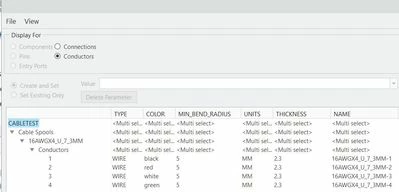
I defined the color coding for each and was able to route them separately. 

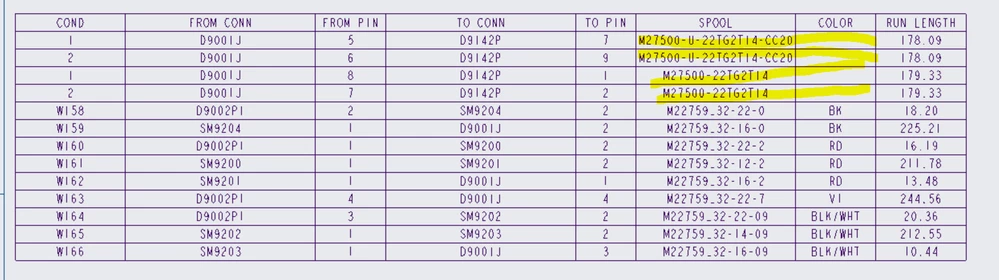
The report table looks correct except for the color code.

How do I get them to show up correctly like the other single wire spools?multi-conductor cable.PNGCapture.PNG
Any insight for this would be appreciated,

Thanks!


Kino
Best answer by Lars_F

Hi,


You don't tell us the table report parameter for the COLOR

For example I get the wire colors (for cable conductors and discrete wires) using the following report parameters...

"harn.run.cond.color"
"harn.run.cond.spool.COLOR"


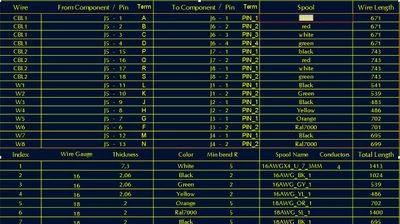
The above report parameter (either one) gives the following colors under the "Spool"-item.

Lars_F_0-1660655715683.jpeg


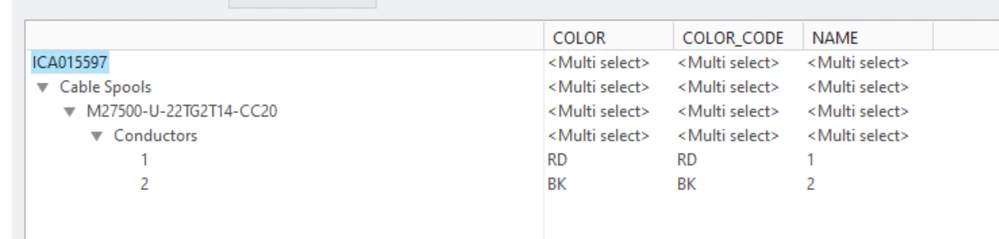
The spool parameters look as follows...

Lars_F_1-1660656003288.jpeg


Br, 

Lars


1 reply

Lars_F14-AlexandriteAnswer
14-Alexandrite
August 16, 2022

Hi,


You don't tell us the table report parameter for the COLOR

For example I get the wire colors (for cable conductors and discrete wires) using the following report parameters...

"harn.run.cond.color"
"harn.run.cond.spool.COLOR"


The above report parameter (either one) gives the following colors under the "Spool"-item.

Lars_F_0-1660655715683.jpeg


The spool parameters look as follows...

Lars_F_1-1660656003288.jpeg


Br, 

Lars


4-Participant
August 16, 2022

Thank you Lars,

I had the parameter set as "harn.run.spool.COLOR".

I changed it to "harn.run.cond.spool.COLOR", now it displays the correct color code.


I also ran into another issue that the repeat region report table seems correct in the working file, but when it gets published in Windchill the numbers goes missing. Any idea why? I have rerouted the cables in question, and there's no failed wires or anything.

Images below are working drawing file in Creo, published drawing in windchill, and drawinf file opened in Creo View.

missing cables-1.PNGmissing cables-2.PNGmissing cables-3.PNG


Thank you so much.


Kino

14-Alexandrite
August 17, 2022

Hi,

I remember something similar happening in the past (numbers, or items disappearing when checked in to Windchill). Unfortunately I didn't document the solution. 

It might be that the solution was either...

- Check that the from pin and to pin parameters are correct... maybe

  • Wire - &harn.run.name
  • From Component - &harn.run.cond.from.conn.name
  • Pin - &harn.run.cond.from.pin.name?
  • To Component - &harn.run.cond.to.conn.name
  • Pin - &harn.run.cond.to.pin.name?
  • Spool - &harn.run.spool.name

Or that you should add some drawing models into the drawing (Drawing Models->Add model)?

Perhaps the flat model or the parent assembly should be added?


Br,

Lars